DDNS Type: DDNS Types can be chosen via DDNS. ( currently the list
supports various DDNS, including ORAY DDNS, 3322 DDNS, TZO DDNS
and DYNDNS DDNS. These DDNS can be multiple operated according
to users need and setup. )
Enable: Enabling DDNS domain resolving function.
Refresh Time: Do not register frequently. The interval between two
registrations shall be more than 60 seconds. Too many registration
requests may result in server attack.
User name: The account registered in the DNS service provider.
Password: The password to the account registered in the DNS service
provider.
Domain: The domain name registered in the DNS service provider.
Default: Restore all parameters of DDNS setup to be defaulted ones.
Save: Saving the parameters in the DDNS setup interface.
Cancel: Going back to the former management interface.
When DDNS is successfully configured and enabled, you can type in
the registered domain name in the IE address bar directly to link the Web
page of the device.
3.5.2.3 Email
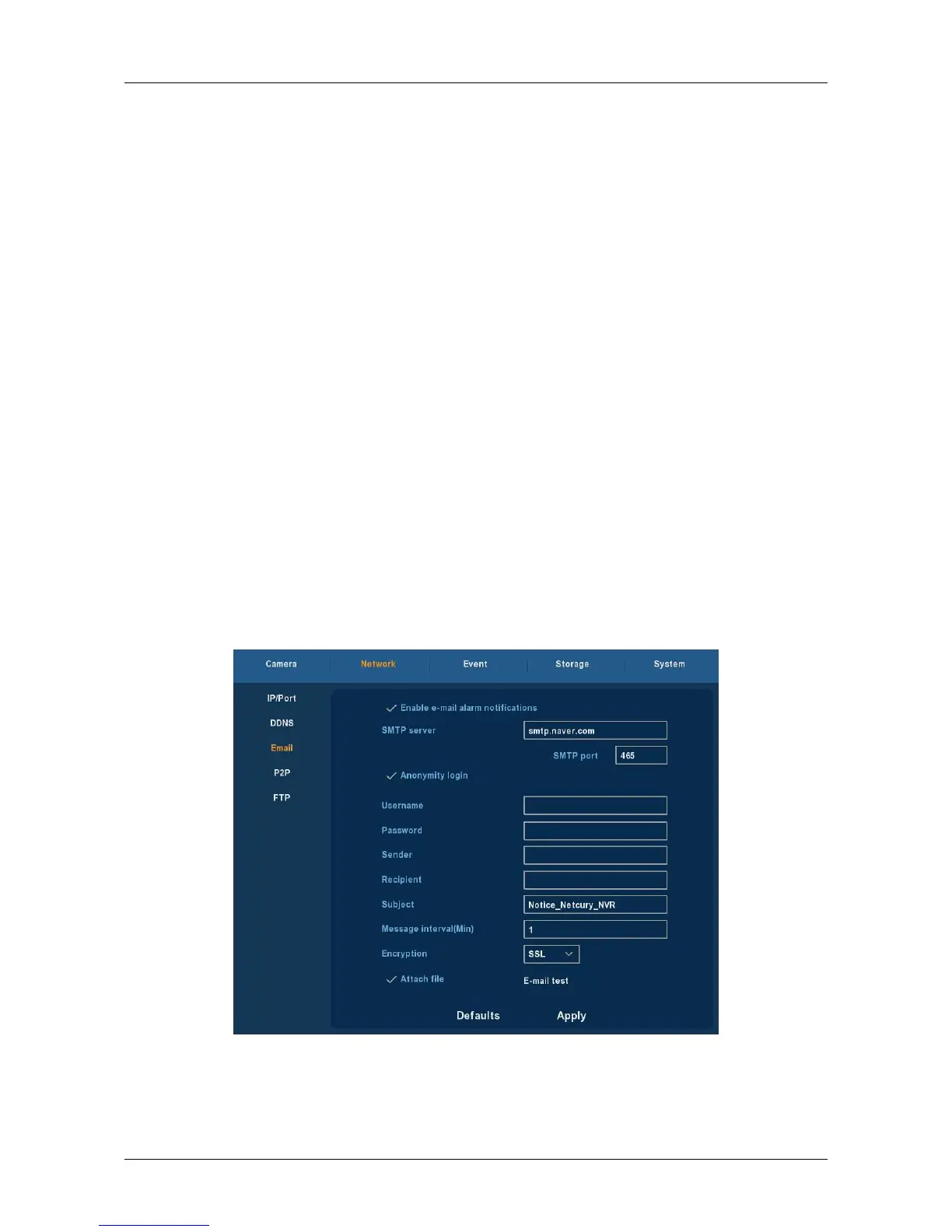
Choose ”Menu→Setup→Network→Email” in the Menu interface, the
Email interface is displayed, as Figure 3-19 shows. When warning information
appears in the interface, one can send mails to the designated mail
address.
Figure 3-19
Enable e-mail alarm notifications: Enabling the mail sending function.



 To Next Page