EasyManua.ls Logo

NHP TemBreak PRO - Pre-Defined Curve Selection

Default Icon
105 pages
Print Icon
To Next Page IconTo Next Page
To Previous Page IconTo Previous Page
Loading...
Commissioning
40
TemBreak PRO B_BE-UM-001-EN V1.1.0
Pre-Defined Curve Selection
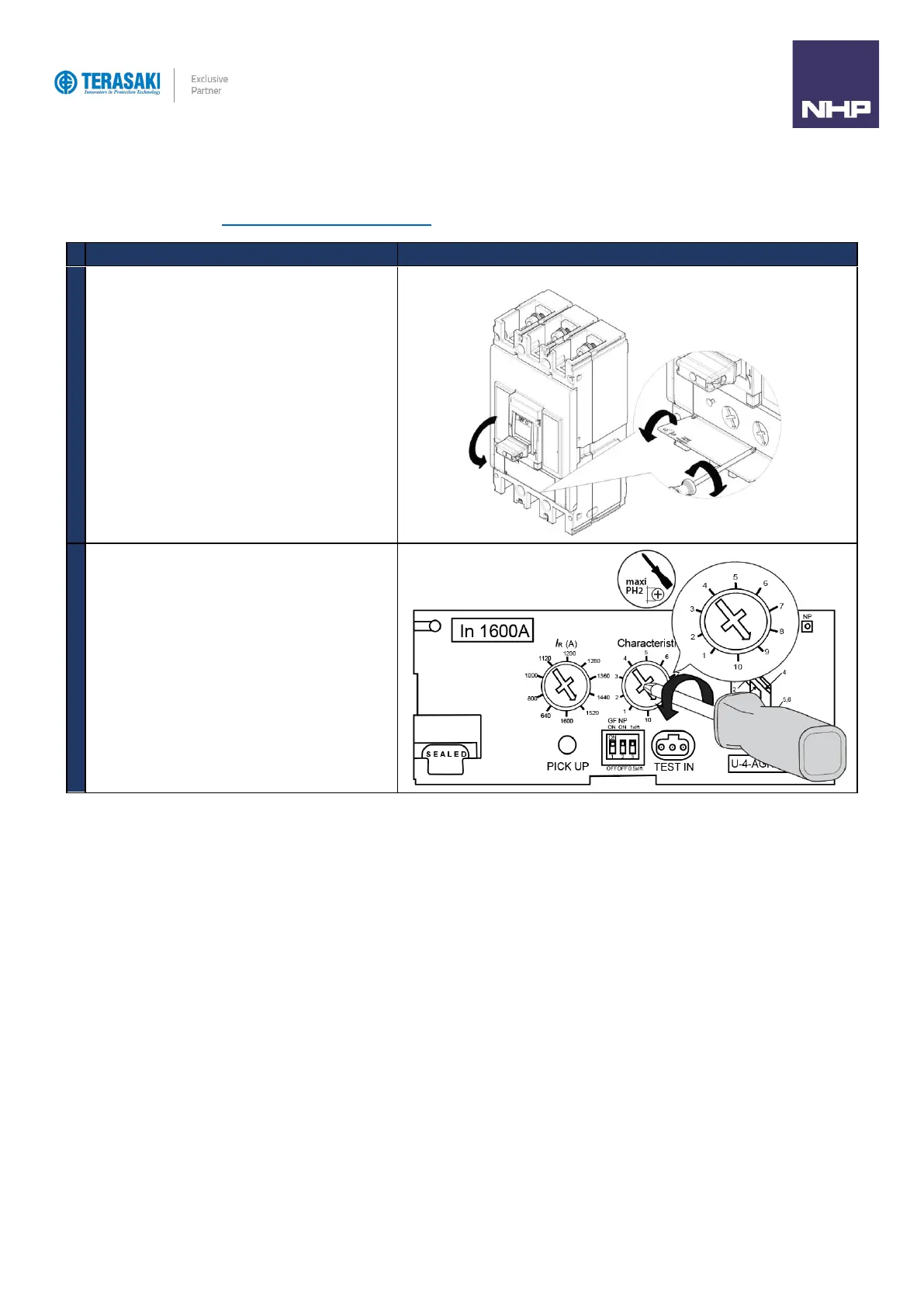
LTD, STD and INST protection is further defined by the selection of a pre-defined curve as selected via the Curve characteristic rotary dial, which is
performed as follows. Refer to Protection Settings Pre-Defined Curves section for further detail on selection of the pre-defined time-current curve.
Action
Note / Illustration
1
Turn the MCCB to the OFF Position
Open the transparent flap in order to access Curve
adjustment dial
2
Using a PH1, PH2 or PZ2 size screwdriver, position the
adjustment dial on the desired curve number.

Table of Contents

Related product manuals