Commissioning
43
TemBreak PRO B_BE-UM-001-EN V1.1.0
LSIG 4P – NP and GF Protection Adjustments (I
N
)
On the 4P variant B_BE MCCB, NP protection mode is configured by the NP DIP switches, which is performed as follows. Refer to Neutral Protection (NP)
section for further detail on NP protection.
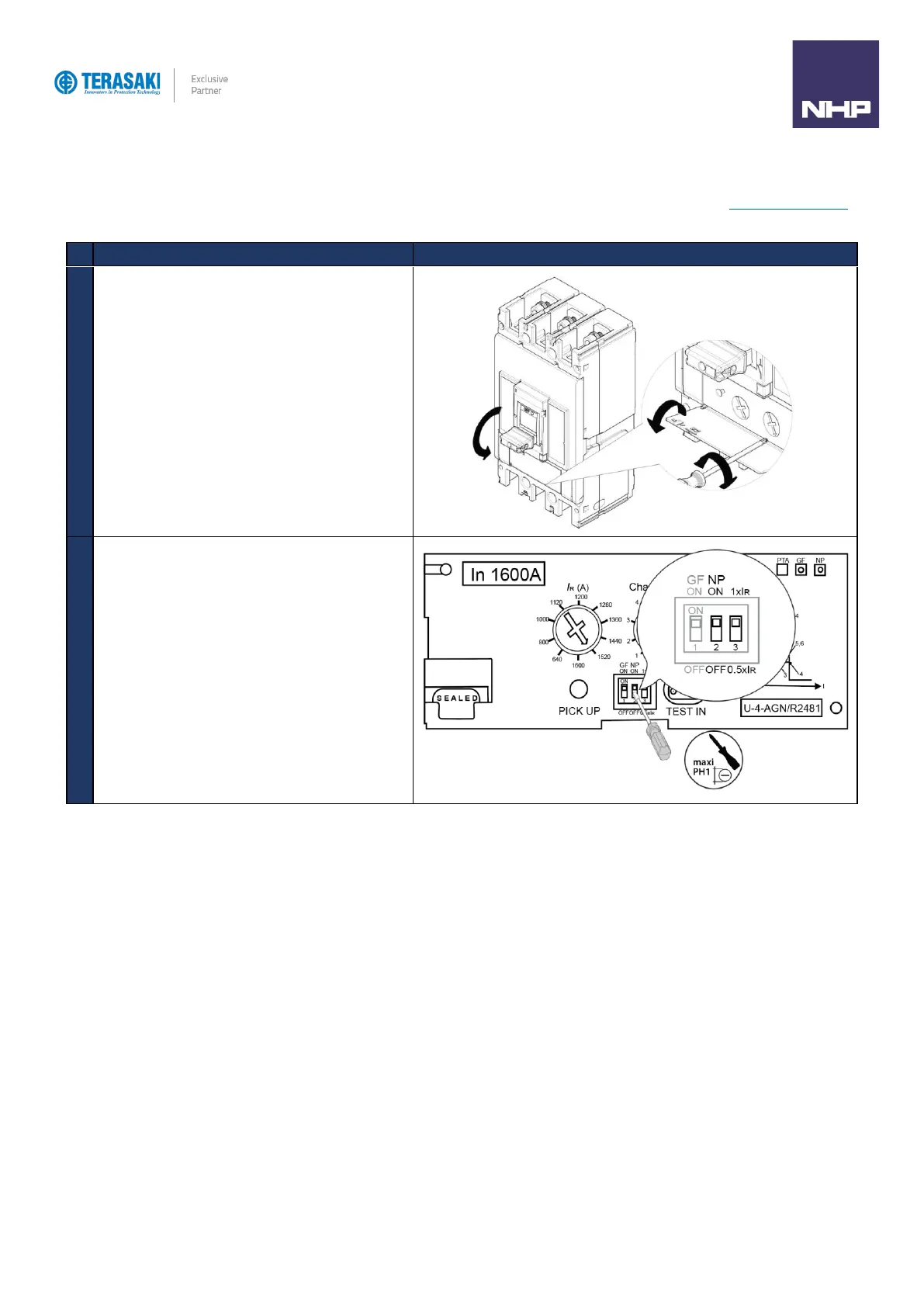
Turn the MCCB to the OFF Position
Open the transparent flap in order to access the NP DIP
switches
Move the NP DIP switches using a small flat head
screwdriver.
The Neutral Coefficient percentage can be adjusted using the
DIP switches on the MCCB by setting the two NP switches
(positions 2 and 3).
DIP switch 2: OFF: NP disabled
ON: NP enabled
DIP switch 3: OFF: N% = 50% x Ir
ON: N% = 100% x Ir



 To Next Page