Commissioning
41
TemBreak PRO B_BE-UM-001-EN V1.1.0
INST Protection Only Setting
The B_BE can be configured for INST protection only by selecting the INST only pre-defined time-current curve as follows: Refer to Protection Settings –
Instantaneous Protection (INST) section for further detail on setting I
i
.
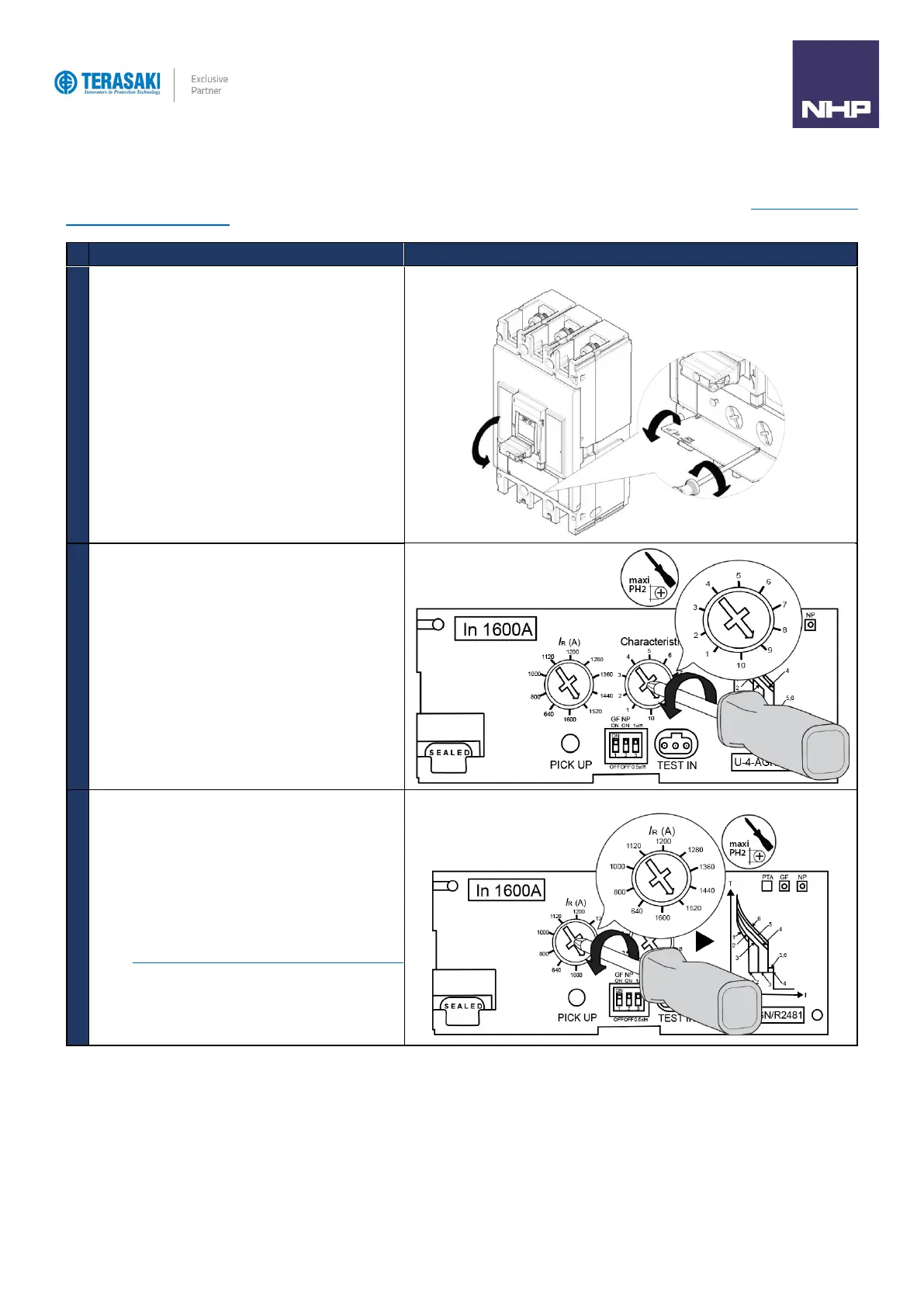
Turn the MCCB to the OFF Position
Open the transparent flap in order to access Curve
adjustment dial.
Move the Curve adjustment dial using a PH1, PH2 or PZ2
size screwdriver.
Position the adjustment dial on the curve below that matches
the MCCB model:
B250 – Curve 8
B400 / 800 / 1000 / 1250 / 1600 – Curve 10
B800 / 1000 / 1250 / 1600 ONLY
Using a PH1, PH2 or PZ2 size screwdriver, rotate the I
R
adjustment dial to further adjust I
i
.
Refer to Protection Settings – Instantaneous Protection (INST)
section for further detail on setting I
i
.



 To Next Page