17
9.3 - Communication buses
1. Have a functioning Nice FloR/A, Inti, One 2 button or 4 button remote
control with a battery installed prior to programming the remote control.
2. Press and hold the button on the side of the receiver until the led
illuminates green on the receiver, then release the button.
3. Within 10 seconds, press and hold any key on the FloR/A, Inti, One remote
control until the led in the receiver blinks green 3 times, indicating that the
FloR/A, Inti, One is programmed to control the receiver.
4. After the led on the receiver blinks green 3 times, another 10 second
interval is started to program another FloR/A, Inti, One remote control if
desired. Repeat step 3 to program the additional FloR/A, Inti, One remote
control. Step 3 may be repeated as many times as necessary to program
all available FloR/A, Inti, One remote controls.
5. Verify that the FloR/A, Inti, One remote control(s) can control the gate by
pressing one or more buttons individually on the remote control(s).
Wirelessly add new remote control to the Plug-In Receiver
A FloR/A, Inti, One remote control that has been programmed to control a
receiver may be used to create other FloR/A, Inti, One remote controls for
the same receiver. This procedure needs to be performed within 10 to 20m
(30 to 60 feet) of the receiver, but the receiver does not need to be physically
accessed.
1. Press and hold any button on the non programmed FloR/A, Inti, One
remote control for at least 5 seconds, then release the button, taking note
of the button that was pressed.
2. Press the same button on the programmed FloR/A, Inti, One remote
control three times.
3. Press the same button in step 1 on the non programmed FloR/A, Inti, One
remote control and release.
4. It is recommended to test the new copy of the FloR/A, Inti, One remote
control with the assigned gate controller.
NOTE: This procedure will affect all receivers within radio range.
Deleting a Single FloR/A, Inti, One Remote Control from the Plug In
Receiver Memory
A FloR/A, Inti, One remote control that has been programmed to control a
receiver may be removed from the receiver memory without affecting other
assigned remote controls. This procedure needs to be performed at the Plug
In Receiver with the affected FloR/A, Inti, One transmitter
COMMUNICATION BUSES
OVIEW
Programming and diagnostic unit which connects directly to the gate
controller and is part of the Nice “Opera” control system. The unit can be
used in “standalone” mode via its front panel keypad, or it may be accessed
via a Bluetooth or cellular enabled PDA, PC, or Smartphone when used with
the
OView Software Suite. This unit, when matched with the OVIEW Bluetooth or
GSM modules, enables remote control and management of the gate
controller. Remote control functions include most of the programming
functions that are available at the front panel LCD on the control board as
well as software updates.
OVBT: Bluetooth module for OVIEW and the “OView Software Suite”
application for PC, PDA, or Smartphone for localized wireless control of the
gate controller.
OVBTGSM: Combination GSM and Bluetooth module that plugs into the
OVIEW and provides cellular phone access through the “OView Software
Suite” application for PC, PDA, or Smartphone, for wireless local, national,
and international controller of the gate controller.
OVIEW Software Suite: Provides desktop or Smartphone level control of
the gate controller. Other benets include software updates that can be made
wirelessly as new versions of software are made available.
BLUEBUS ACCESSORIES
MOTB: Moon Touch programmable keypad with secure codes (up to 9 digits
per code if required) to control gate opening and closing. Connects to the
2wire BlueBUS connector with inexpensive unshielded twisted pair wire.
FT210B: Photocell transmitter and receiver pair that connects to the 2wire
BlueBUS connector with inexpensive unshielded twisted pair wire and is a
non contact sensor for entrapment protection as specied in UL325, Section
31.1 “General Entrapment Protection Provisions”.
MASTER/SLAVE Not applicable in this system
9.4 - Programming the plug-in receiver and remote controls
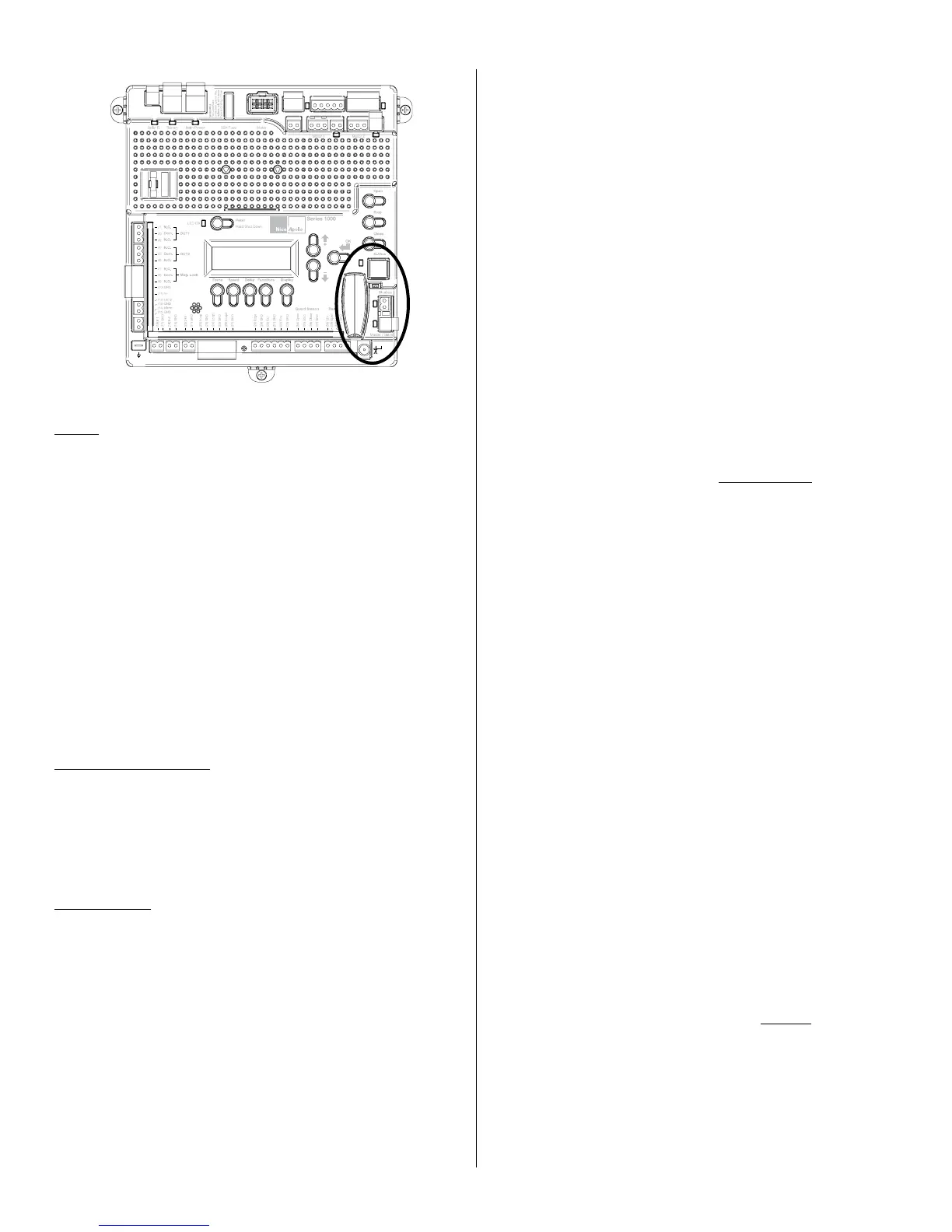
Plug in Receiver: The 433PlugIn Receiver provides up to 15 channels for
specic control of individual gate functions. The receiver includes built in
programming functions for adding or removing Nice FloR/A, Inti, One wireless
remote controls to/from a gate installation. The following procedures detail
the steps to assign a remote control, add a new remote control, delete
a single remote control, or remove all remote controls from the receiver
memory.
Programming the FloR/A, Inti, One 2Button or 4Button Remote Control
with the Plug In Receiver.
These procedures apply to the FloR/A, Inti, One wireless remote control.
These procedures assign factory default controls automatically to the remote
control
1. Press and hold the button on the side of the receiver until the led on the
receiver illuminates green and keep the button pressed. The led will illuminate
after approximately 4 seconds.
2. Press and hold any button on the FloR/A, Inti, One remote control until the
led on the receiver blinks 5 green ashes.
3. Release the button on the side of the receiver.
4. It is recommended to verify that the deprogrammed FloR/A, Inti, One remote
control no longer controls the gate
Deleting all FloR/A, Inti, One Remote Controls from the Plug In Receiver
Memory.
All programmed remote controls may be removed from the plug in receiver
memory . This procedures need to be performed at the gate controller.
1. Press and hold the button on the side of the receiver until the led on the
receiver illuminates green and keep the button pressed.
2. Watch the led and on the receiver and verify the following sequence in the
led.
3. Within 4 seconds after pressing the button (approx.) the green led illuminates.
4. Within 8 seconds after pressing the button (approx.) the green led turns off.
5. With 12 second after pressing the button (approx.) the green led starts
ashing.
6. Count the green led ashes on the receiver. On EXACTLY the 5
TH ash,
release
the button on the receiver.
7. It is recommended to test the FloR/A, Inti, One remote controls, if available,
with plug in receiver to verify that no longer affects the gate controller.



 To Next Page