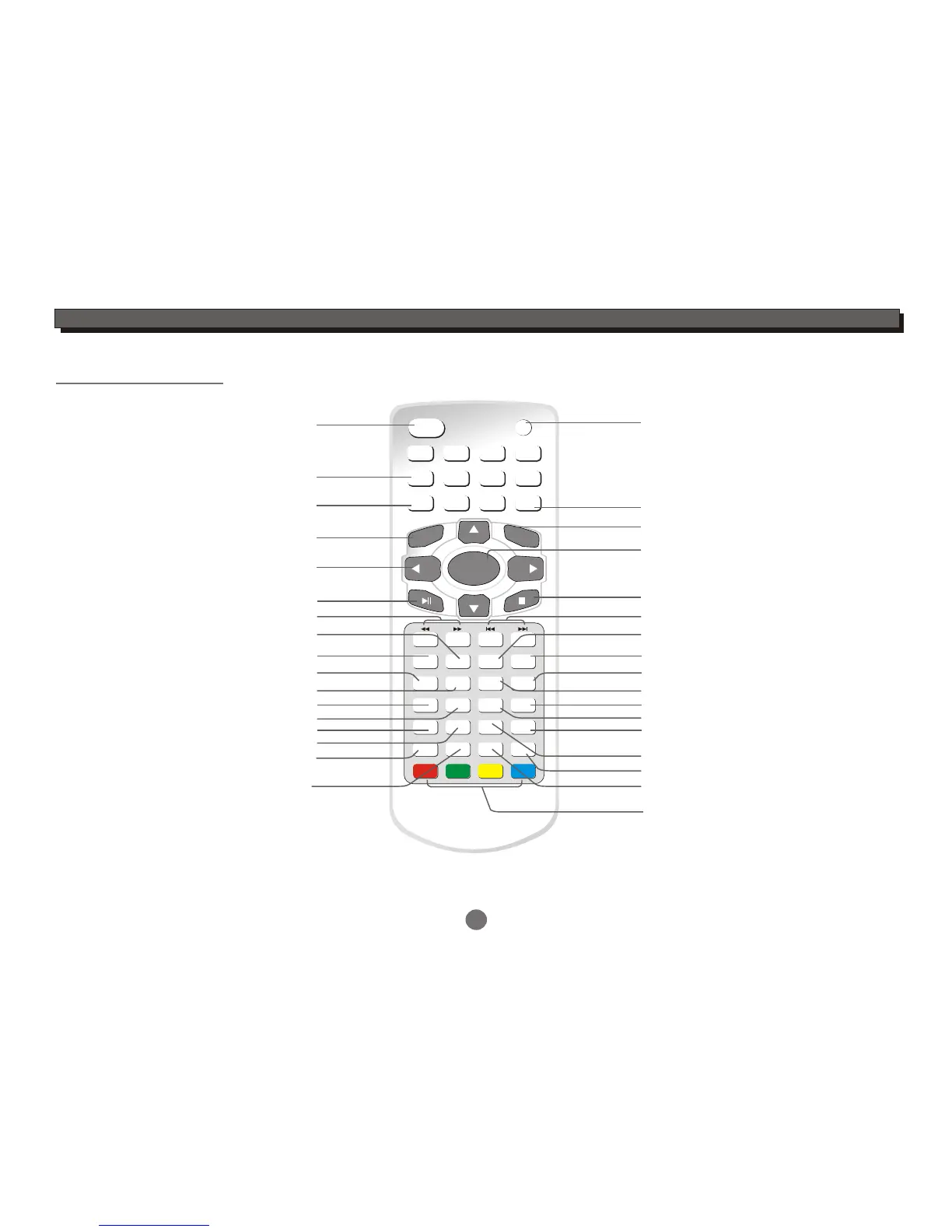
1 2
3
4
5
6
7
8
9
GOTO
0
ENTER
LCD ON/OFF
SETUP
LCD SETUP
SLOW
ANGLE
PROGRAM
TITLE
A-B
MUTE
MENU
RETURN
AUDIO
AV IN/OUT
CLEAR
MODE
SUBTITLE
VOL+
CH+
CH-
VOL-
INFO
EPG
TTX TV/RADIO
ROTATION
ZOOM
REP. / FAV
4
INTRODUCTION
Remote control
LCD display On/Off
Numeric entry
Programme setting
Repeat section A to B
LCD setup menu
Repeat playback(In DVD mode)
Open up the favourite channel list(in DVB mode)
Stop
Play/Pause
DVD/DVB/Card/USB mode select
Disc Skip backward/forward
The display screen up-down and left-right rotation
Turn up the volume
Clear the last entry
Return to DVD disc menu
Return to DVD disc title
DVD setup menu
Cursor:Up/Down/Left/Right
(Up/Down:Channel Up/Down in DVB mode)
Enter
Return to the upper menu
Angle select(disc feature)
Search backward/forward
Turn down the volume
AV in/AV out select
Goto
Slow
Turn off the audio output
For teletext function
Audio track select(disc feature)
DVD subtitle select(disc feature)
Electronic programme guide menu
Zoom
On Screen Display(in DVD mode)
Display channel information(in DVB mode)
Switch between TV and Radio
Open up the text function,but it is
not available on all channels.


 To Next Page