16
First Steps
Inserting Memory Cards
Pictures are stored in the camera’s internal memory (21 MB) or on removable
Secure Digital (SD) memory cards (available separately) (A 91).
If a memory card is inserted in the camera, pictures are automatically stored on the
memory card and pictures recorded to the memory card can be played back,
deleted or transferred. Remove the memory card to store pictures in the internal
memory, or play back, delete or transfer pictures from the internal memory.
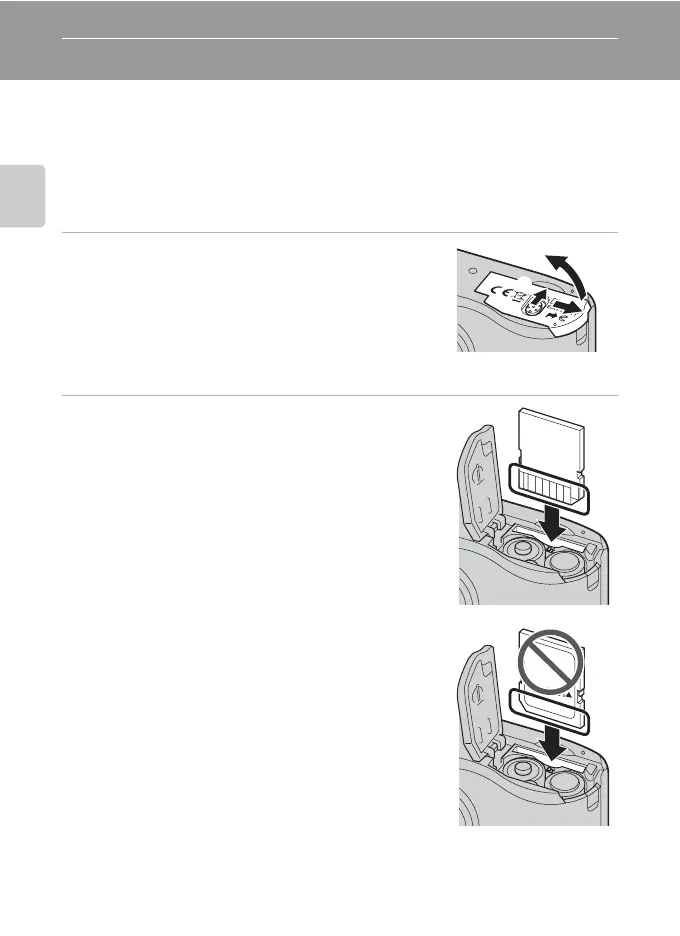
1 Turn the camera off and open the battery-
chamber/memory card slot cover.
Make sure that the camera is off (the power-on lamp and
the monitor are off) before opening the battery-
chamber/memory card slot cover.
Hold the camera upside down to prevent the batteries
from falling out.
2 Insert the memory card.
Slide the memory card in correctly until it clicks into
place.
Close the battery-chamber/memory card slot cover.
B Inserting Memory Cards
Inserting the memory card upside down or backwards
could damage the camera or the memory card. Make
sure that the memory card is correctly oriented.
1
2
3



 To Next Page