43
Editing Pictures
More on Playback
Enhancing Brightness and Contrast: D-Lighting
D-Lighting can be used to create copies with enhanced brightness and contrast,
brightening dark portions of a picture. Enhanced copies are stored as separate
files.
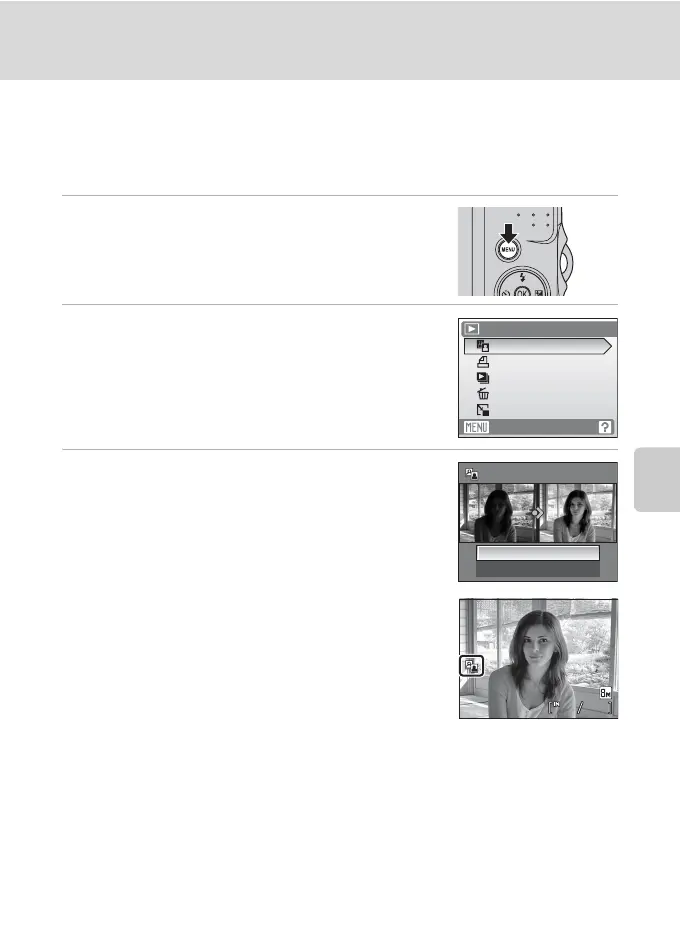
1 Select the desired picture from full-frame
(A 24) or thumbnail (A 40) playback mode
and press d.
The playback menu is displayed.
2 Use the multi selector to choose D-Lighting
and press k.
• The original picture is displayed at left and the picture
applied with D-lighting enhancement is displayed at
right.
3 Choose OK and press k.
A new copy with enhanced brightness and contrast is
created.
To cancel D-Lighting, choose Cancel and press k.
D-Lighting copies can be recognized by the c icon
displayed during playback.
D More Information
See, “Image File and Folder Names” (A 92) for more information.
Playback menu
Exit
Small pic.
Print set
D-Lighting
Slide show
Delete
OK
Cancel
D-Lighting
0004.JPG
4
4
0004.JPG
15/05/2008 15:30
15/05/2008 15:30



 To Next Page