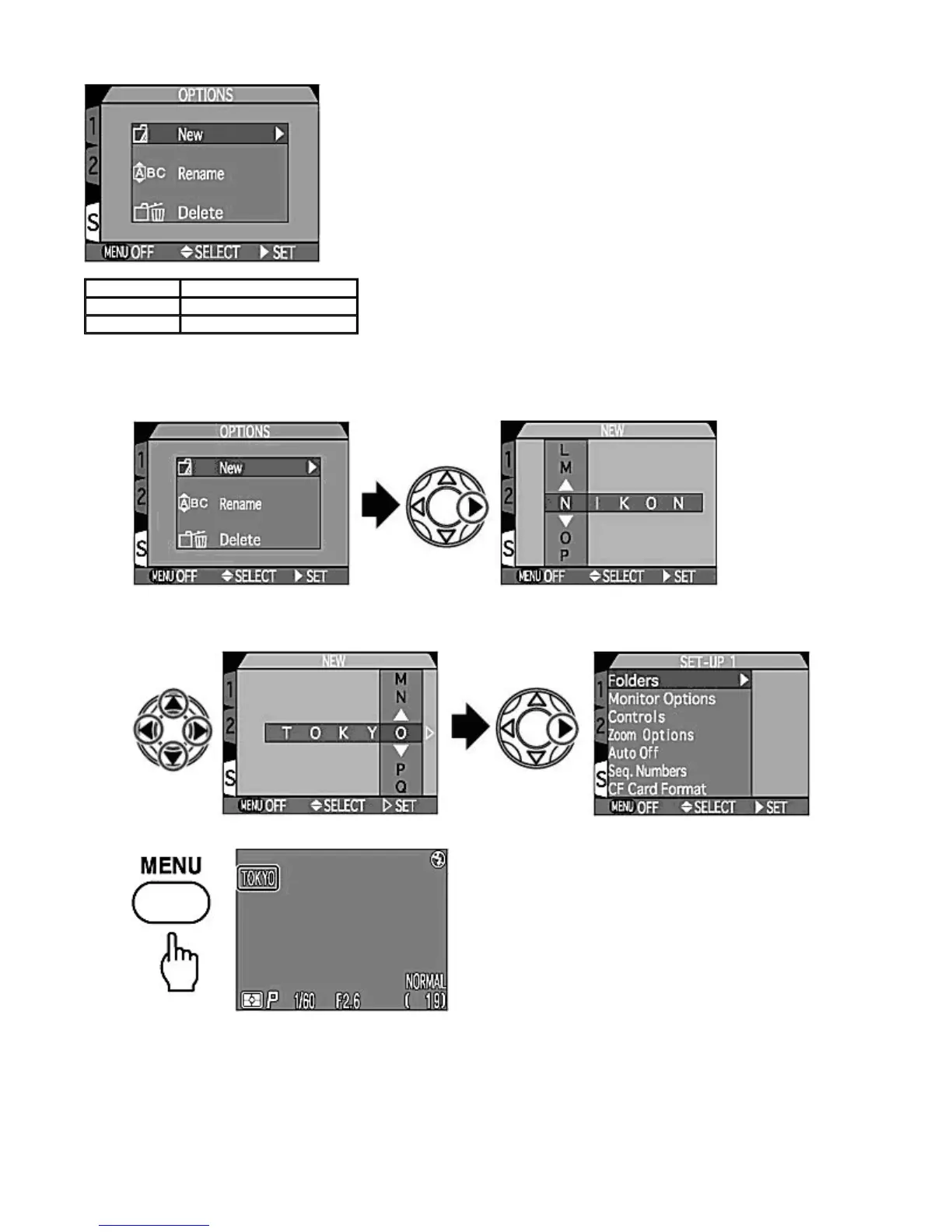
[New]
Creates a new folder on the CF memory card.
1.
Select "New" in the Options menu and press RIGHT
on the Multi selector. NIKON is displayed first.
2.
Press LEFT/RIGHT
to highlight letter to be changed and press UP/DOWN
to edit selected letter. Repeat the
procedure to create new five-letter folder name. Press RIGHT
to create new folder. The Monitor returns to the
SET-UP menu.
3.
Press the MENU
button to complete the setting.
{
Folder name is shown on the Monitor when a folder other than NIKON is selected.
[Rename]
Use this option to rename folder (other than the NIKON folder).
New
Creates a new folder.
Rename
Renames a folder.
Delete
Deletes a folder.
Pa
e 97 of 136
ikon COOLPIX995 Di
ital Camera
3/15/2002htt
://www.livemanuals.com/
acka
es/
roducts/NK002/2136/manual/fullmanual.html



 To Next Page