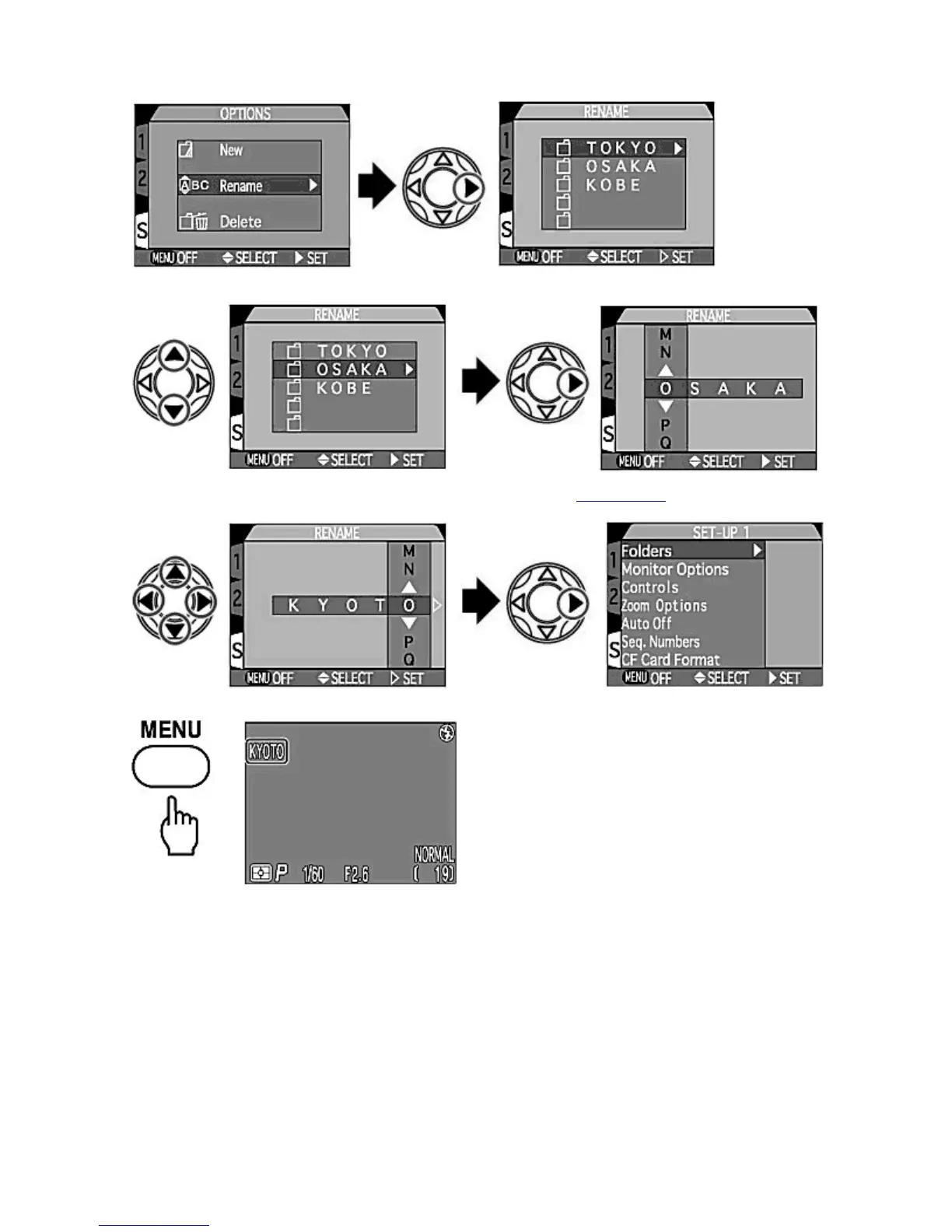
1.
Select the "Rename" option and press
RIGHT
on the Multi selector to display the folder list.
2.
Press UP/DOWN
to select the folder to be renamed and press RIGHT
to display the name.
3.
Press LEFT
/
RIGHT
/
UP
/
DOWN
to edit the name as described in the
step 2 of New
. Press RIGHT
to rename
existing folder. The Monitor returns to the SET-UP menu.
4.
Press the MENU
button to complete the setting.
[Delete]
This option enables you to delete folders (other than the
NIKON
folder).
1.
Select "Delete" in O
tions and
ress
RIGHT
on the Multi selector to dis
la
the folder list.
Pa
e 98 of 136
ikon COOLPIX995 Di
ital Camera
3/15/2002htt
://www.livemanuals.com/
acka
es/
roducts/NK002/2136/manual/fullmanual.html



 To Next Page