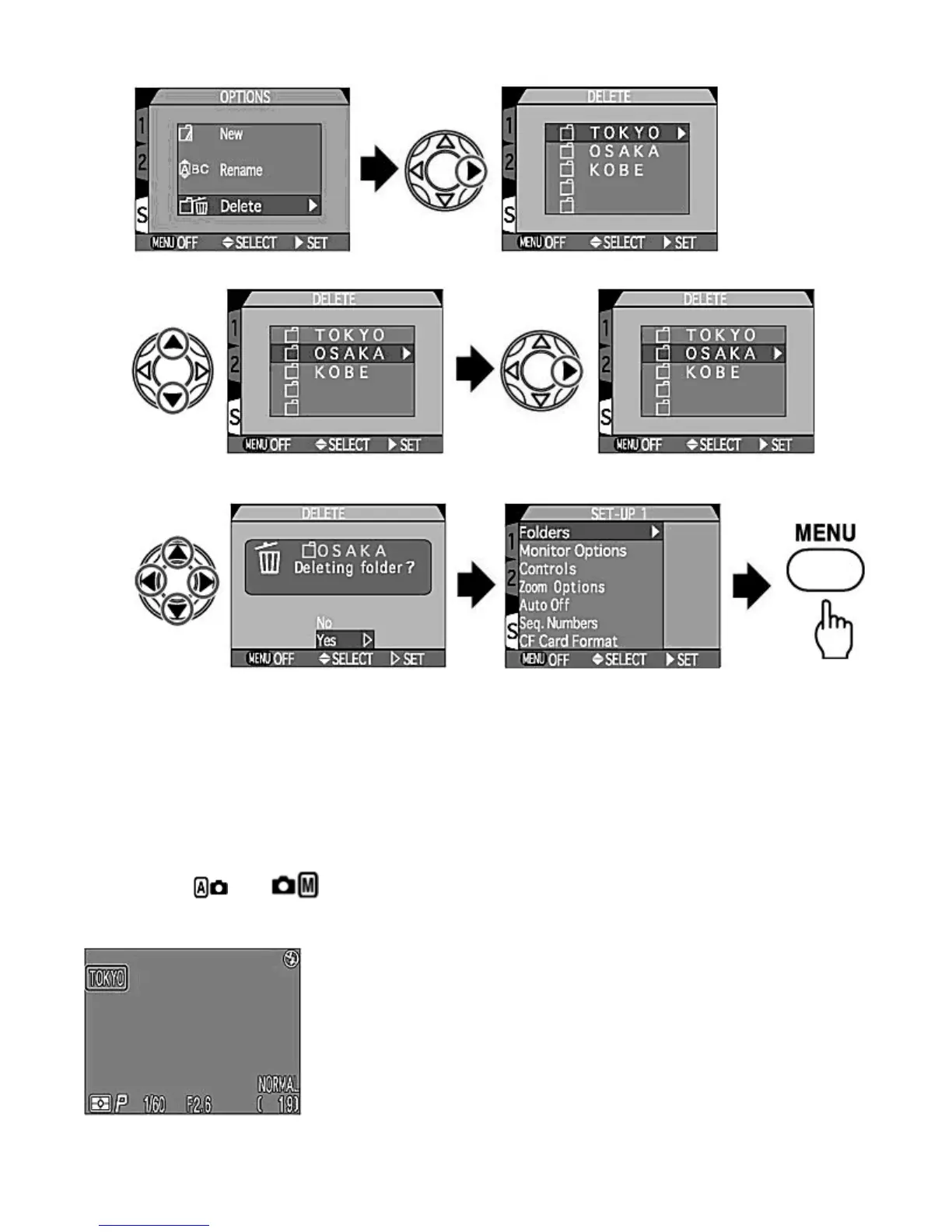
2.
Press UP
/
DOWN
to select the folder to be deleted and press RIGHT
to display the confirmation dialog box.
3.
Press UP
/
DOWN
to select Yes and then press RIGHT
to delete selected folder. The Monitor returns to the SET-
UP menu. Press the MENU
button to complete the setting.
NOTE :
Deleting folders
The
NIKON
folder cannot be deleted.
If the selected folder contains hidden or protected images, the folder will not be deleted. Any images it contains that are neither
hidden or protected will, however, be deleted.
-- Selecting a folder --
Once additional folders have been created, you can select the folder that will be used for playback or to store
photographs
in
and
mode. Until a new folder is selected, all subsequent images will be stored in this
folder, which will also be used for playback.
Pa
e 99 of 136
ikon COOLPIX995 Di
ital Camera
3/15/2002htt
://www.livemanuals.com/
acka
es/
roducts/NK002/2136/manual/fullmanual.html



 To Next Page