159
Choose On to use the exposure indicator to determine whether the camera is
correctly focused in manual focus mode (0 40; note that this function is not available
in shooting mode M, when the exposure indicator instead shows whether the subject
is correctly exposed).
Select the increments used when making adjustments to
shutter speed, aperture, exposure and flash compensation, and
bracketing.
If On is selected, exposure will lock when the shutter-release
button is pressed halfway.
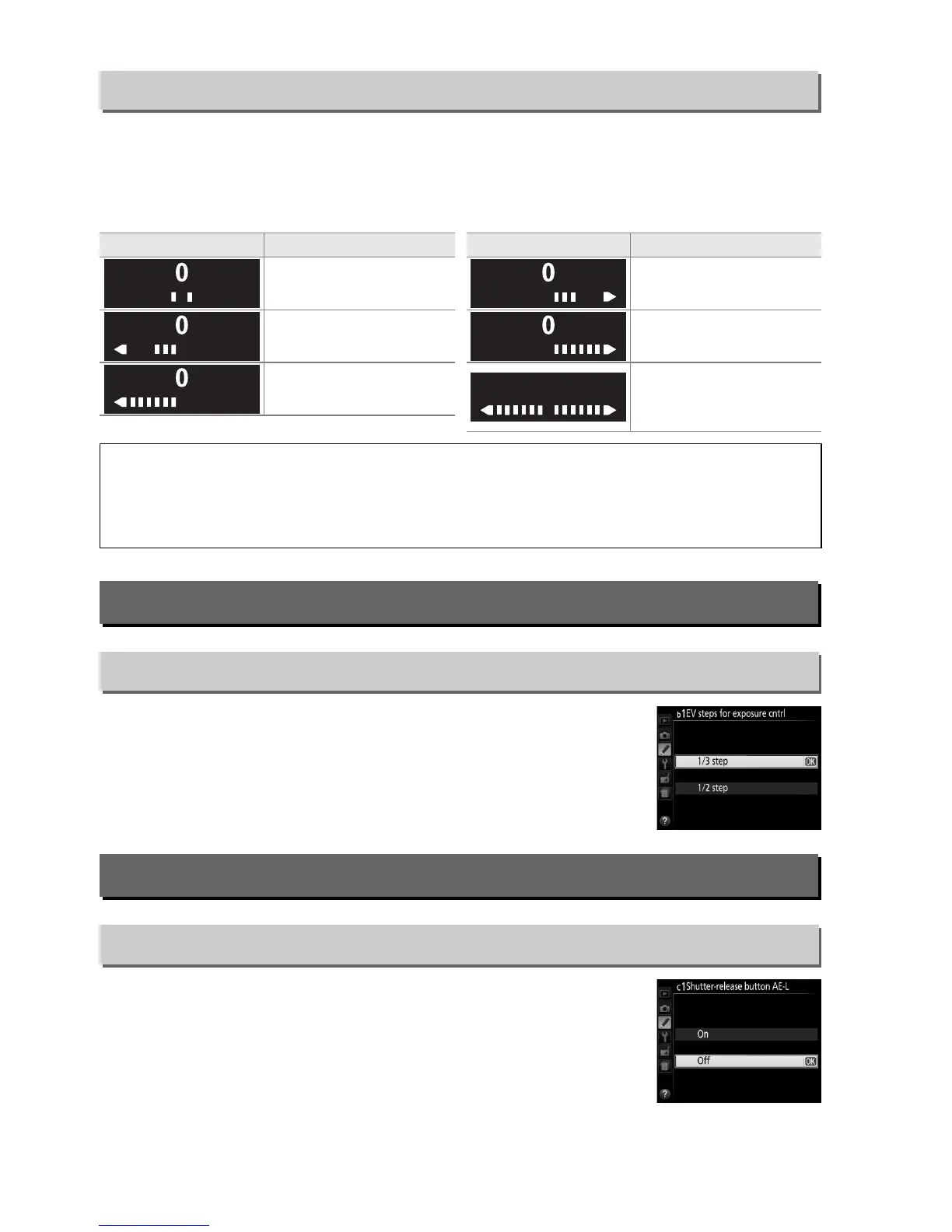
a4: Rangefinder
G button ➜ A Custom Settings menu
Indicator Description Indicator Description
Subject in focus.
Focus point is slightly
behind subject.
Focus point is slightly in
front of subject.
Focus point is well
behind subject.
Focus point is well in
front of subject.
Camera can not
determine correct
focus.
A Using the Electronic Rangefinder
The electronic rangefinder requires a lens with a maximum aperture of f/5.6 or faster.
The
desired results may not be achieved in situations in which the camera would be unable to
focus using autofocus (0 34).
The electronic rangefinder is not available during live view.
b: Exposure
b1: EV Steps for Exposure Cntrl
G button ➜ A Custom Settings menu
c: Timers/AE Lock
c1: Shutter-Release Button AE-L
G button ➜ A Custom Settings menu



 To Next Page