210
* The WR-R10 wireless remote controller can not be attached at the same time as a WU-1a
wireless mobile adapter or ME-1 stereo microphone.
Attempting to forcibly attach
accessories can damage the camera or accessory.
Remote
controls/
wireless
remote
controller
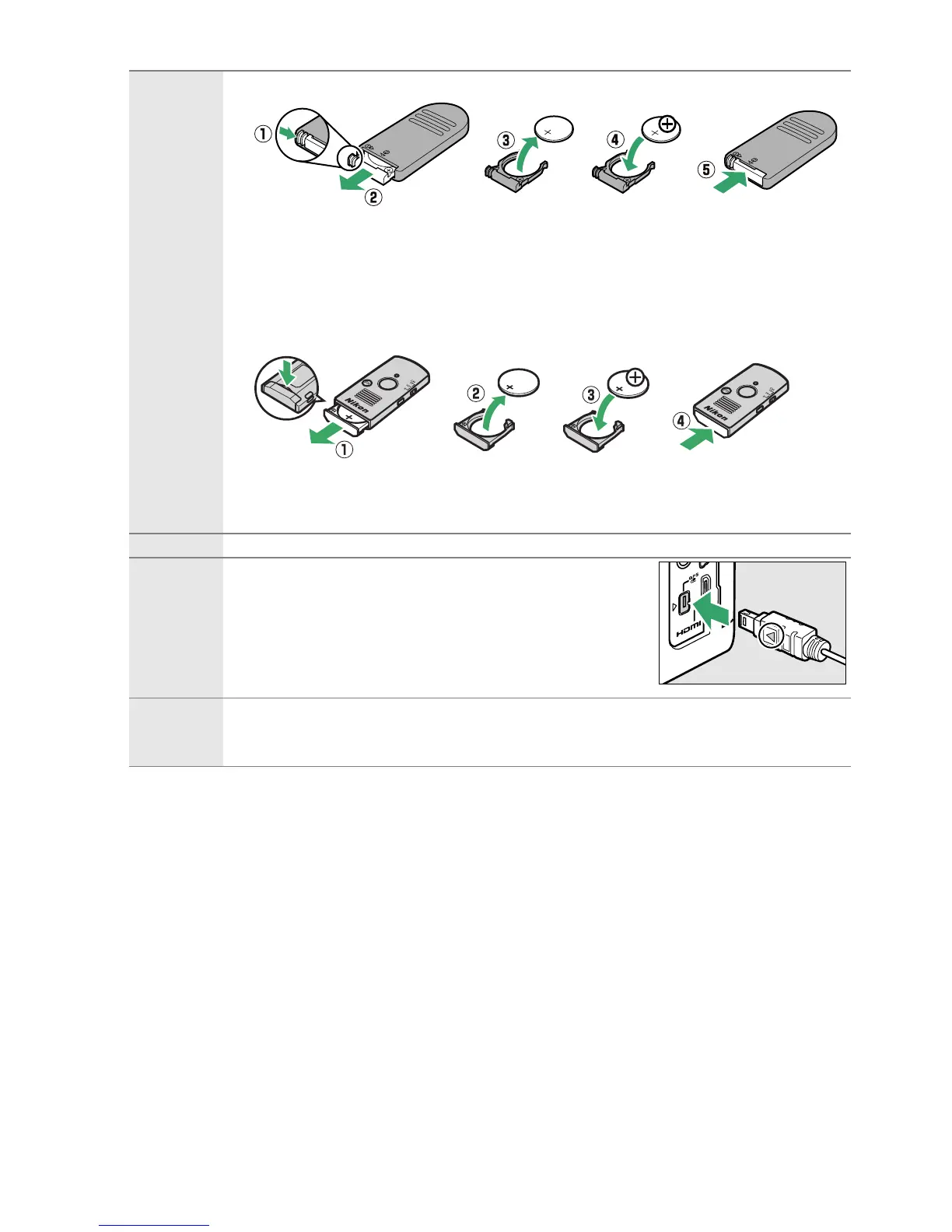
• Wireless Remote Control ML-L3 (0 31): The ML-L3 uses a 3 V CR2025 battery.
Pressing the battery-chamber latch to the right (q), insert a fingernail into the
gap and open the battery chamber (w).
Ensure that the battery is inserted in
the correct orientation (r).
• Wireless Remote Controller WR-R10
*
/WR-T10: When a WR-R10 wireless remote
controller is attached, the camera can be controlled wirelessly using a WR-T10
wireless remote controller (0 32, 175).
Insert a fingernail into the gap behind the battery-chamber latch and open the
battery chamber (q).
Ensure that the battery is inserted in the correct
orientation (e).
Microphones Stereo Microphone ME-1 (0 104)
*
Accessory
terminal
accessories
The D5200 is equipped with an accessory terminal for
WR-R10 wireless remote controllers (0 175), MC-DC2 remote
cords (0 60), and GP-1 GPS units (0 175), which connect
with the 4 mark on the connector aligned with the 2
next to the accessory terminal (close the connector
cover when the terminal is not in use).
USB and A/V
connector
accessories
• UC-E17 and UC-E6 USB cables (0 134)
• Wireless Mobile Adapter WU-1a
*
: Supports two-way communication between the
camera and smart devices running the Wireless Mobile Adapter Utility.



 To Next Page