EasyManua.ls Logo

Nikon D5200 - Page 85

Nikon D5200
370 pages
Print Icon
To Next Page IconTo Next Page

To Previous Page IconTo Previous Page
Loading...
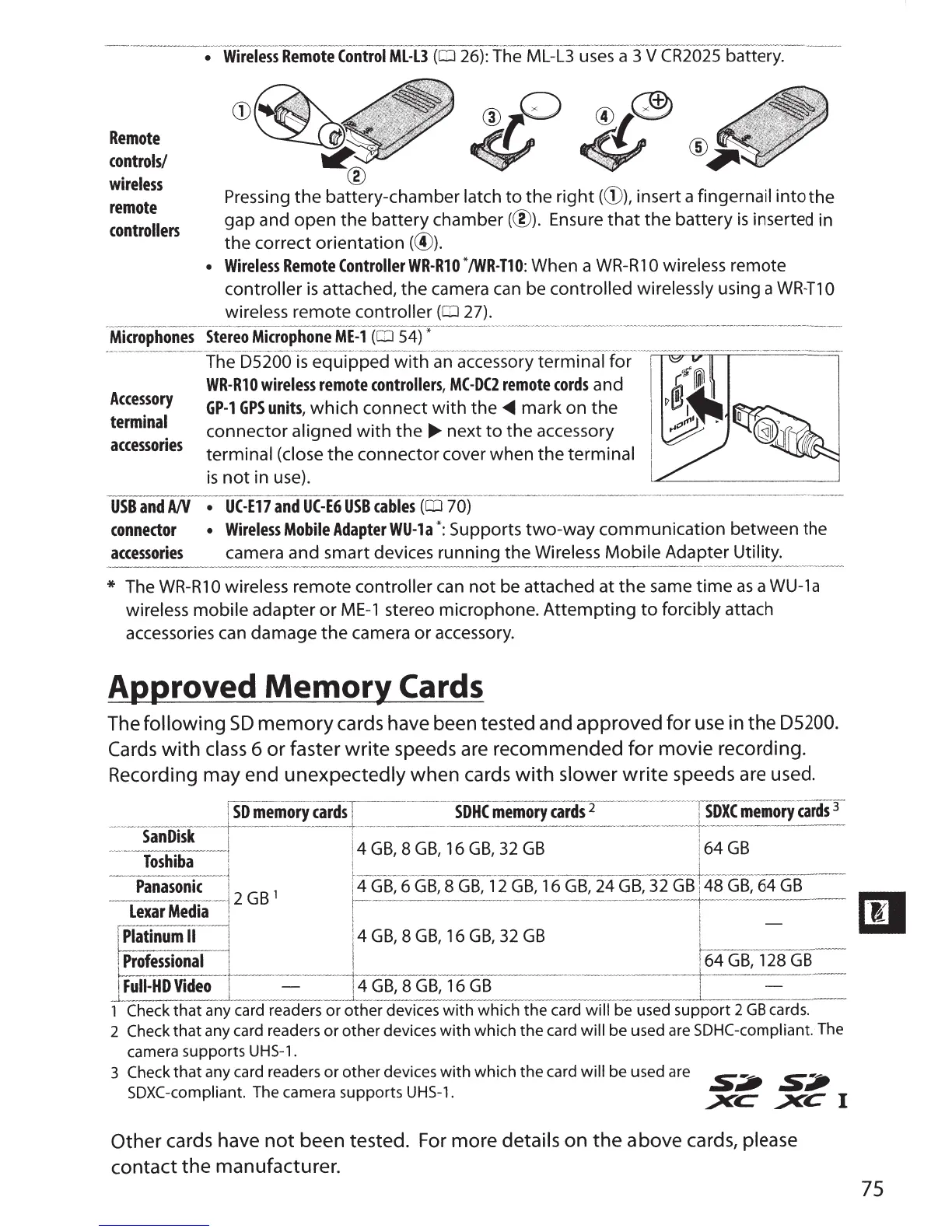
Remote
controls/
wireless
remote
controllers
@
Pressing
the
battery-chamber
latch
to
the
right
(G)),
insert
a
fingernail
into
the
gap
and
open
the
battery
chamber(@).
Ensure
that
the
battery
is
inserted in
the
correct
orientation
(@).
Wireless
Remote
ControllerWR-RlO
*/WR-T10:
When
a
WR-R1
0 wireless
remote
controller
is
attached,
the
camera can be
controlled
wirelessly
using a
WR~T1
0
wireless
remote
controller
(OJ
27).
-
Microphones
___
_
st
-
ereoMicrophone
ME
~
1(
rn
s4)
-
*-
----
-
-
--
-----
-
-
---
-
--
-
- - -
--
----
-
-
--
---
---
-
------~-
-----
--
-
--
-
------~-
--
-
---
-----------
--
--
-·-
rhe
--
5s
-
ioo
-
T5
___
equTppecrwi!h._
an
-·accesso-ry
--
termTnaff0
_r ___
____________
____
_
__
_
_____
_
__
________
_
__
__
_ _
Accessory
terminal
accessories
WR-R10
wireless
remote
controllers,
MC-DC2
remote
cords
and
GP-1
GPS
units,
which
connect
with
the~
mark
on
the
connector
aligned
with
the
~
next
to
the
accessory
terminal
(close
the
connector
cover
when
the
terminal
1
is
not
in use).
USB
and
A/V
UC-E17
and
UC-E6
USB
cables
(CD
70)
connector
Wireless
Mobile
Adapter
WU-la
*:Supports
two-way
communication
between
the
accessories
camera
and
smart
devices
running
the
Wireless
Mobile
Adapter
Utility.
*
The
WR-R1
0 wireless
remote
controller
can
not
be
attached
at
the
same
time
as
a WU-1a
wireless
mobile
adapter
or
ME-1
stereo
microphone.
Attempting
to
forcibly
attach
accessories can
damage
the
camera
or
accessory.
AJ)J)roved
Memor}'
Cards
The
following
SD
memory
cards have been tested and
approved
for
use in
the
05200.
Cards
with
class
6
or
faster
write
speeds are recommended
for
movie
recording.
Recording may end
unexpectedly
when
cards
with
slower
write
speeds are used.
[
so
-
ITeemory
-
cards
T·---
--
---
-------·
----
·-
soHc
niemory
cafci$
2
----
-
-
----
-
-
--
----
----
-~
soic
memorycards
3
------·-
san
-
Disk
-----
~-------
-
----
-
---
-
-
-
--
---t
·
·-
-
-
-------
----
-
---
-
--------
------------
--
--
-
----------------
--:------
---·-------
-
--------
·-
--
-
-1
!
4
GB
8
GB
16
GB
32
GB
i
64
GB
Toshiba
l
l
'
' '
l
i
r-
---~-------~
--------
-----
~-
---~~----------
-
..
._........,_.._
.......
~---
~~-------~--
-
-+----
~
~
...........
_____
____
~-
----
Panasonk
-l
1
!4GB, 6GB, 8GB, 12
GB,
16GB, 24GB, 32
GB
!48GB,
64GB
~
~~:~~
1
2
GB
~
~~~
-
8
~
G~,
16G~;G~
--
--
~-
-
~~
--
1
1
!Professional
~
I
-----------
--
·
--
---
-----
--~--fGB
:12s
G
~
B
--
l
Fuii-HD
Video
14GB,
8GB,
16GB
!
_L
.
_______....L---~--
-----
_ _
____
....._
_
___
----
1
Check
that
any card readers or
other
devices
with
which the card
will
be used support 2GB cards.
2
Check
that
any card readers
or
other devices
with
which
the
card
will
be used are SDHC-compliant.
The
camera supports
UHS-1.
3
Check
that
any card readers or other devices
with
which
the
card
will
be used are
s----
S:li'
SDXC-compliant. The camera supports
UHS-1.
~
~C
1
Other cards have
not
been tested. For more details
on
the
above cards,
please
contact
the
manufacturer.
75

Table of Contents

Other manuals for Nikon D5200

Related product manuals