Chapter 6 Installing the Device Driver
2 Installing the DS-U1 Driver
- 28 -
2.5
Uninstalling the DS-U1 Driver
To delete the DS-U1 driver from the hard disk, use [Add or Remove Programs] in [Control
Panel].
Operating procedures
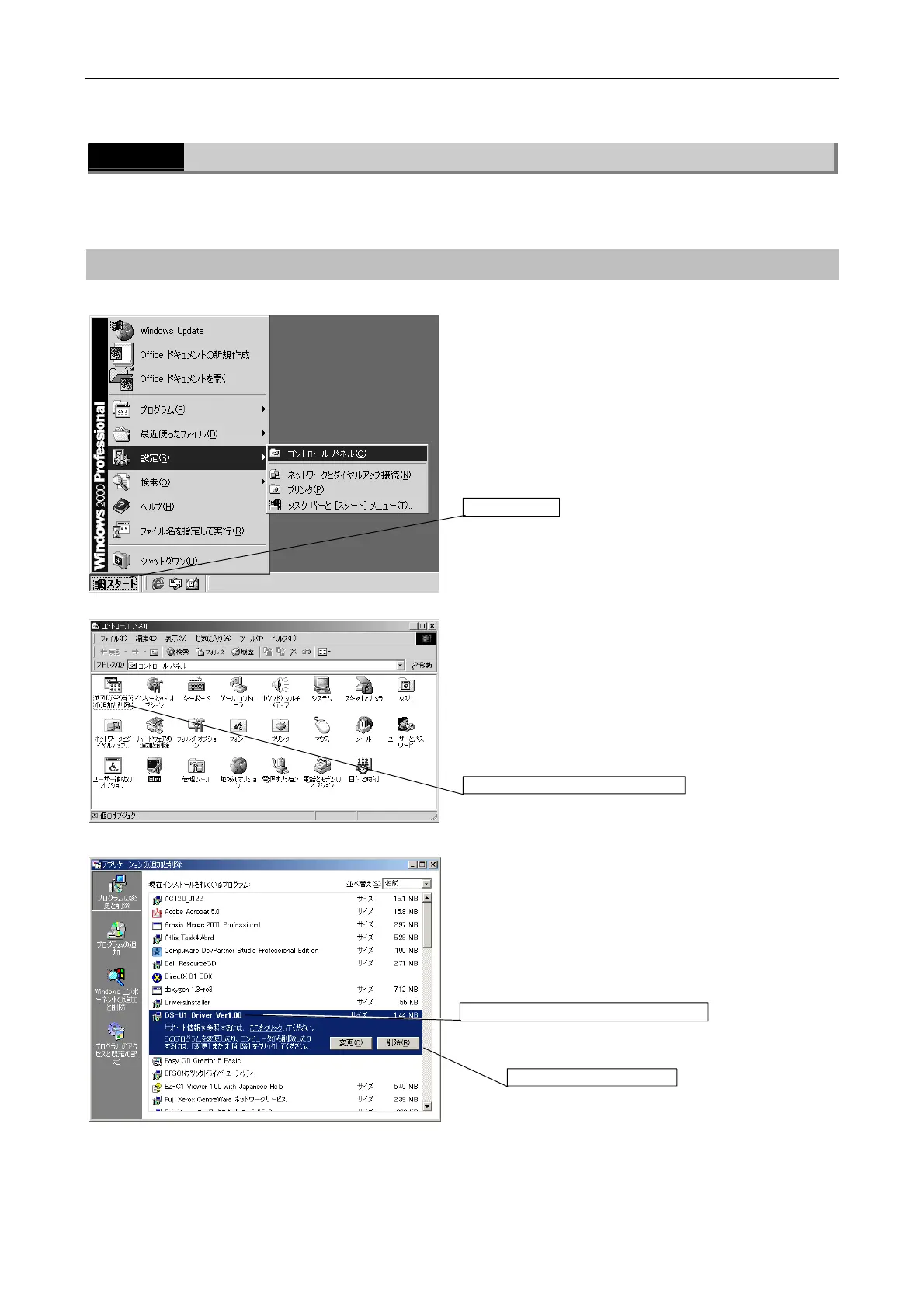
u [Start] menu
Click the [Start] button, then select [Settings].
Click [Control Panel] to open the [Control Panel]
window.
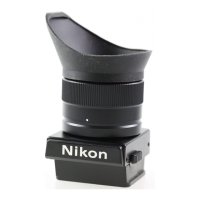
u [Control Panel] window
Double-click the [Add or Remove Programs] icon to
open the [Add or Remove Programs] dialog box.
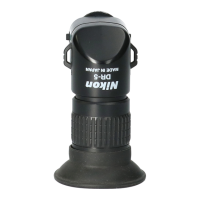
u [Add or Remove Programs] dialog box
Select [DS-U1 Driver Ver 1.00].
Click the [Delete] button.
[Start] button
[Add or Remove Programs] icon
1. Select [DS-U1 Driver Ver 1.00].
2. Click the [Delete] button.



 To Next Page