Chapter 4 Microscopy Procedure (Detailed)
15
4
Microscopy
Operations for actual microscopy
10
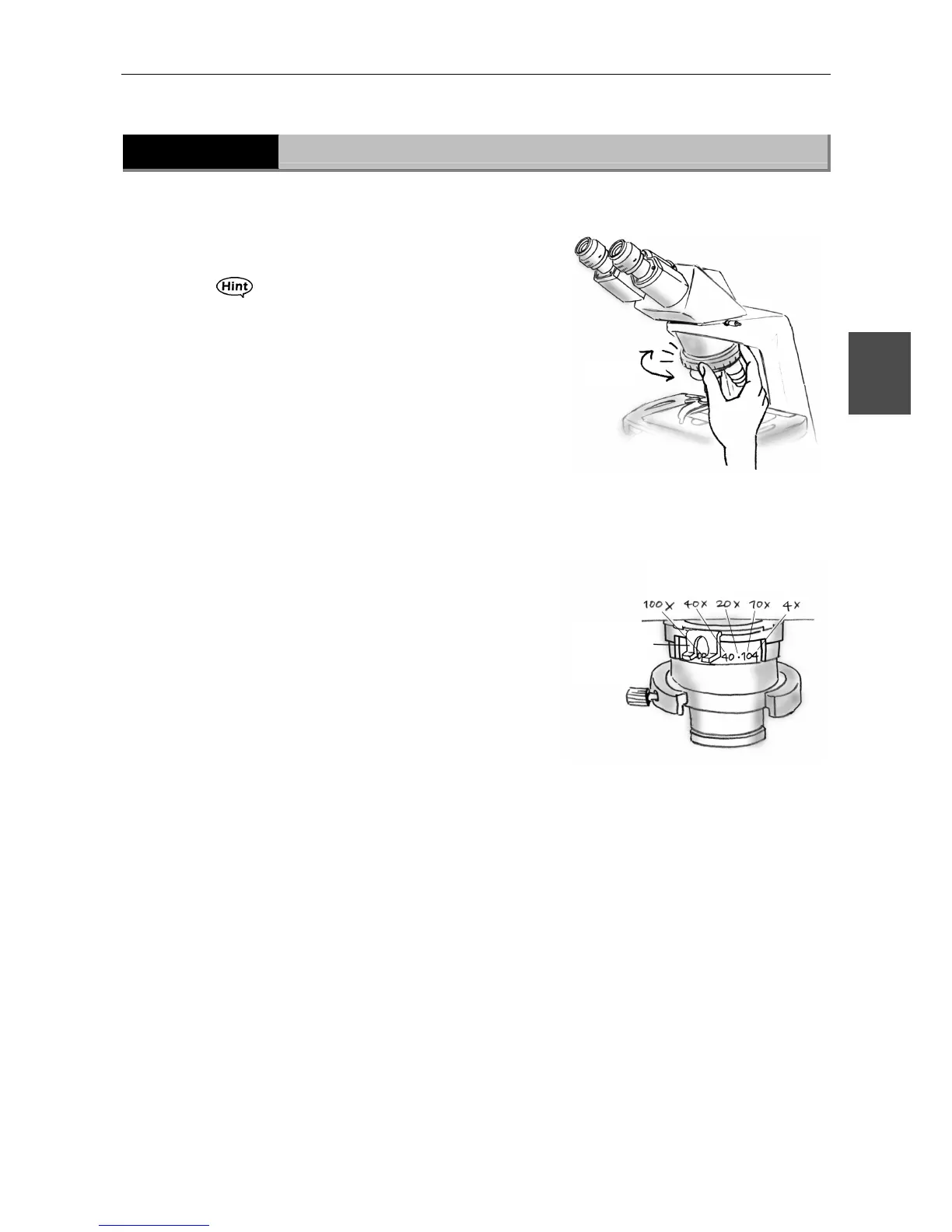
Select the objective.
Rotate the revolving nosepiece to the desired
objective magnification.
The objective will click into place when rotated into
position.
Every time you change the objective
magnifications, adjust the aperture diaphragm lever
according to the selected objective. If the
microscope is equipped with a field diaphragm, also
adjust the size of the field diaphragm.
(Refer to steps 11 and 13.)
11
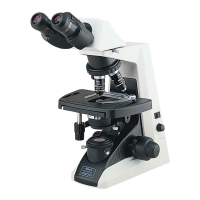
Adjust the condenser aperture
diaphragm.
Turn the condenser aperture diaphragm lever to the
same figure as the magnification of objective in the
optical path.
The figures on the condenser show the approximate
positions of the aperture diaphragm lever
corresponding to each objective magnification.
(When the aperture diaphragm lever is moved to
that position, the size of the aperture diaphragm
will be 70% to 80% of the objective's numerical
aperture.) Each time you change the objective
magnifications, align the aperture diaphragm lever
to the same figure as the magnifying power of the
objective.
Click
Corresponding
objective magnification
Condenser
aperture
diaphragm
lever








 To Next Page