IV Microscopy (Detailed Procedure)
29
IV
17
Trinocular Eyepiece Tube
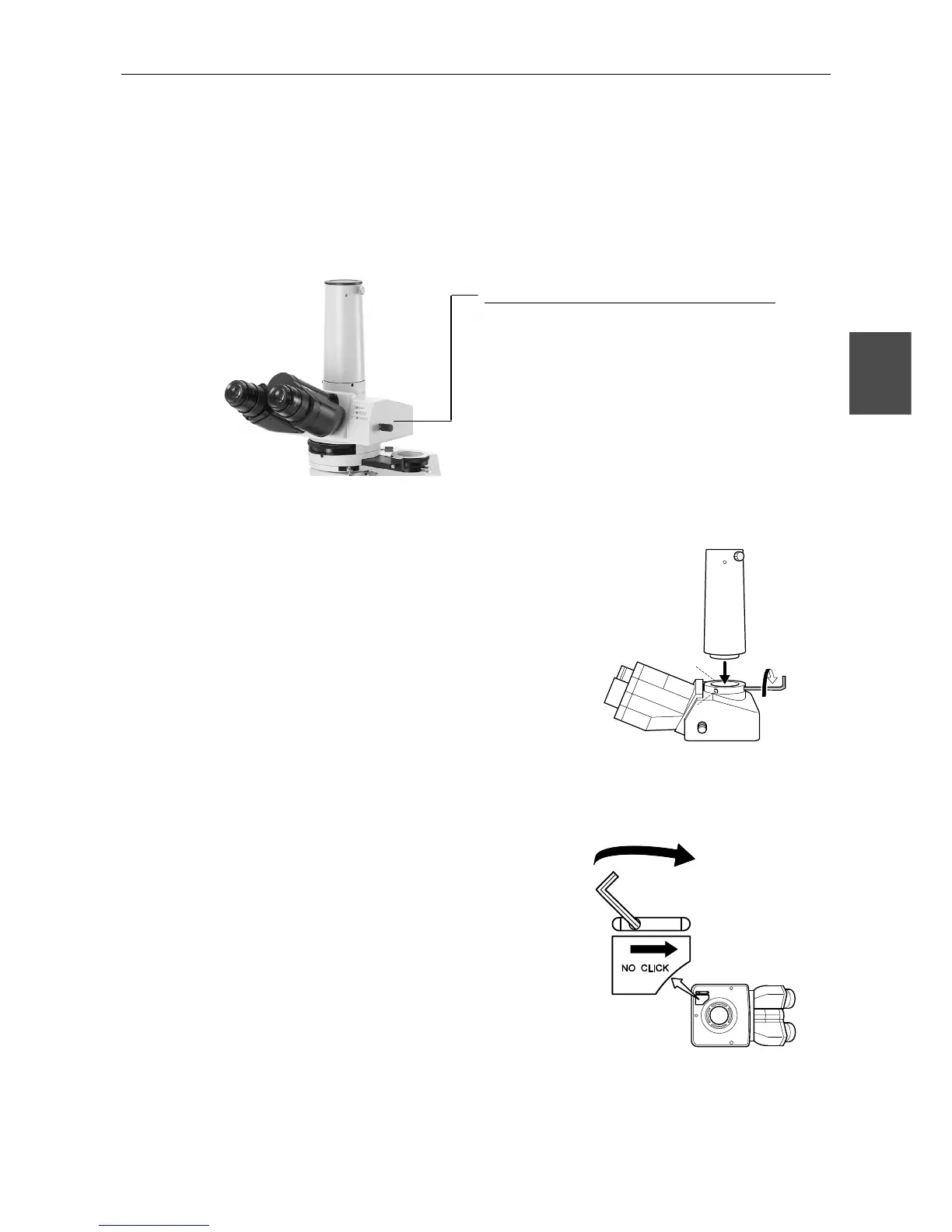
z Optical path selection
The optical path selection lever can be used to select the way to divide the amount of light
between the binocular part and the vertical tube.
z Vertical tube adapter
A photomicrographic vertical tube adapter is
provided as standard equipment that allows a
photomicrographic equipment to be installed. To
install the adapter, insert it into the vertical
tube and clamp three screws with the provided
screwdriver. Replace this adapter with the
optional TV vertical tube adapter when using a
TV camera.
Your microscope may come with an eyepiece
tube without the photomicrographic tube
adapter.
z Optical path selection lever clicking
There is a switch identified by “NO CLICK” on
the bottom surface of the eyepiece tube. Turn
the switch in the direction of the arrow with the
hexagonal screwdriver provided to disengage
the clicking action of the optical path selection
lever. Disengaging the clicking action minimizes
small vibrations produced by operating the
lever.
Your microscope may come with an eyepiece
tube without this function.
Light proportion
Lever Position Binocular part : Vertical tube
Push in. 100 : 0
Pull out one step. 20 : 80
Pull out two steps. 0 : 100
Your microscope may come with an eyepiece tube
with optical path switched between 100% eyepiece
and 100% vertical tube.








 To Next Page