Flash operation using the R1
50
4
Setting the Commander function on the camera.
1
Set the Commander function on the camera and flash mode on
the SB-R200.
• Be sure to read the instruction manual of the camera in use.
Setting the D70-Series digital camera’s Commander mode
With a D70-Series camera, go to “19: Flash Mode” from “Custom Settings” and select
“Commander Mode.”
• For more details, see your D70-Series camera instruction manual.
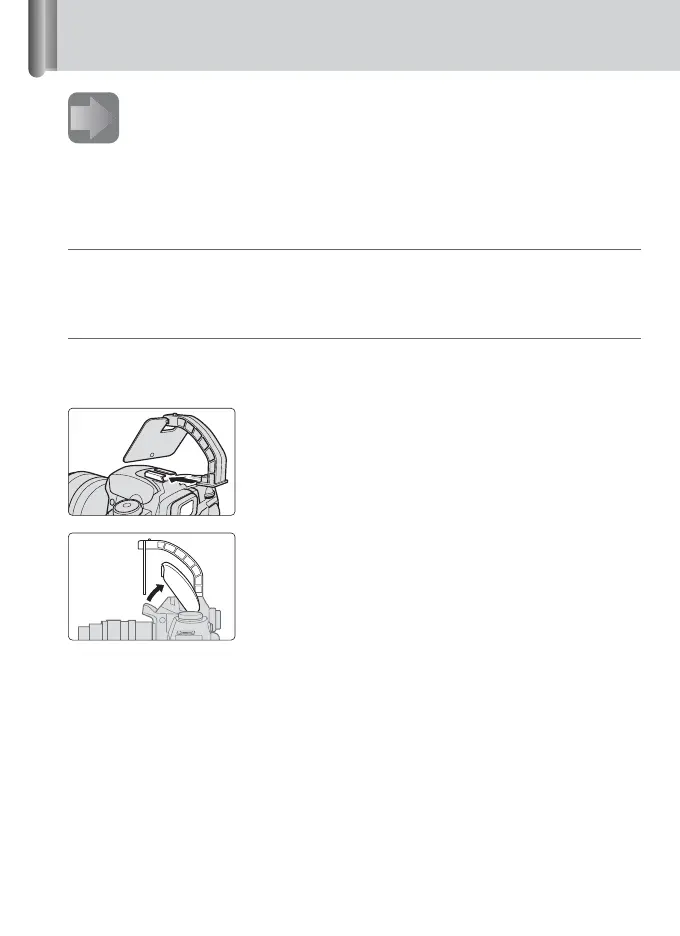
Using the IR Panel for Built-in Flash SG-3IR
Built-in flash units on cameras such as the D70-Series fire at reduced flash output levels
when used as Commander units. This may slightly affect results if pictures are taken from
close distances. To prevent this, use the SG-3IR.
1
Attach the SG-3IR to the camera’s
accessory shoe.
2
Set up the SG-3IR and the built-in flash unit as
shown in the illustration.







 To Next Page