114 The i Button
At default settings, the following items appear in the i menu for
movie mode.
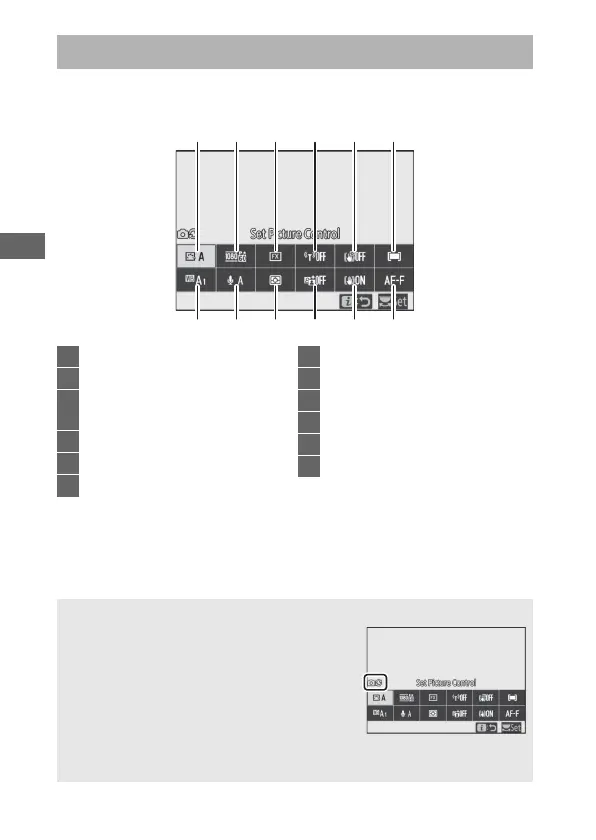
The Movie-Mode i Menu
1357911
42681012
1 Set Picture Control ..................... 115
2 White balance ............................. 115
3 Frame size and rate/
image quality............................. 116
4 Microphone sensitivity.............. 118
5 Choose image area .................... 119
6 Metering ....................................... 120
7 Wi-Fi connection ........................ 120
8 Active D-Lighting ....................... 120
9 Electronic VR................................ 120
10 Vibration reduction.................... 121
11 AF-area mode.............................. 121
12 Focus mode ................................. 121
A “Same as Photo Settings”
If Same as photo settings is selected for
Set Picture Control, White balance,
Active D-Lighting, or Vibration reduction
in the movie shooting menu, a h icon
will appear at the top left corner of the i
menu, indicating that the options selected
for these settings in photo mode also apply
in movie mode and vice versa.



 To Next Page