116 The i Button
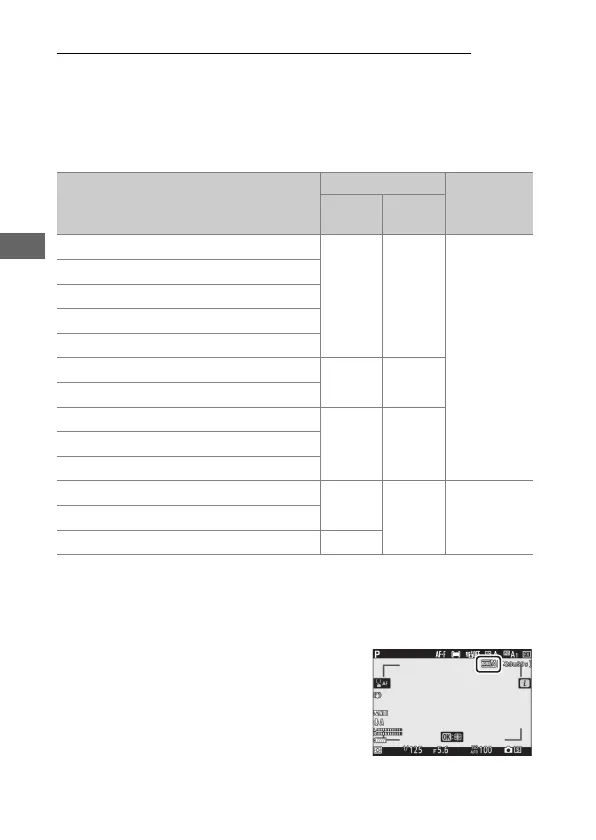
Frame Size, Frame Rate, and Movie Quality
Select the movie frame size (in pixels) and frame rate. You can
also choose from two Movie quality options: High quality
(indicated by frame size/rate icons with “m”) and Normal.
Together, these options determine the maximum bit rate, as
shown in the following table.
1 Actual frame rates for values listed as 120p, 60p, 30p, and 24p are respectively 119.88 fps,
59.94 fps, 29.97 fps, and 23.976 fps.
2 Movie quality fixed at High quality.
3 Image area fixed at DX; face detection not enabled in auto-area AF AF-area mode.
The option currently selected is shown
by an icon in the display.
Frame size/frame rate
1
Max. bit rate (Mbps)
Max.
recording
time
High
quality
Normal
r
3840× 2160 (4K UHD); 30p
144 —
2
29min. 59s
s
3840× 2160 (4K UHD); 25p
t
3840× 2160 (4K UHD); 24p
w
1920× 1080; 120p
3
x
1920× 1080; 100p
3
y/y
1920× 1080; 60p
56 28
z/z
1920× 1080; 50p
1/1
1920× 1080; 30p
28 14
2/2
1920× 1080; 25p
3/3
1920× 1080; 24p
A
1920× 1080; 30p ×4 (slow-mo)
3
36
—
2
3min.
B
1920× 1080; 25p ×4 (slow-mo)
3
C
1920× 1080; 24p ×5 (slow-mo)
3
29



 To Next Page