6 Getting to Know the Camera
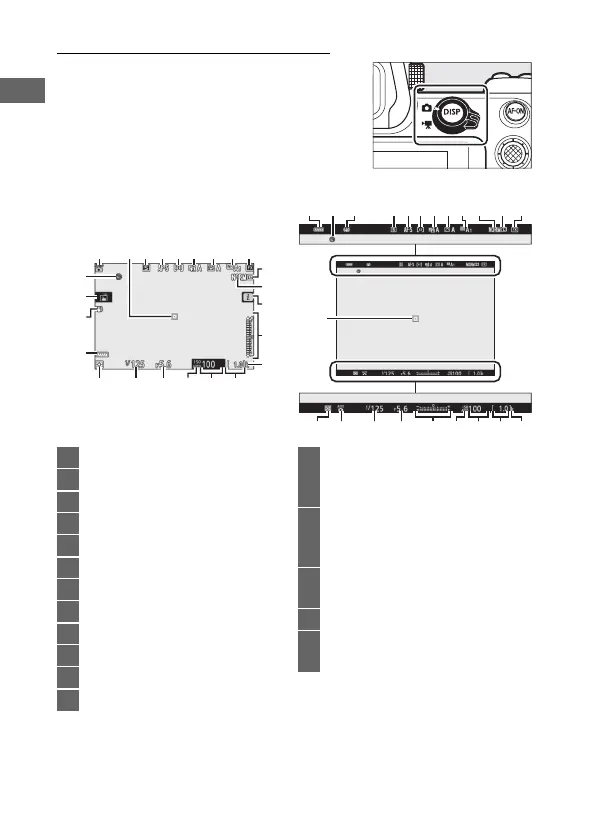
The Monitor and Viewfinder
At default settings, the following
indicators appear in the monitor and
viewfinder in photo mode; for a full list of
indicators, see “The Camera Display and
Control Panel” (0 169).
Monitor Viewfinder
1
11
32 4 5 6 7 8
15
9
12
14
13
10
23
22
21
1618
17
1920
24
24 3 4 5 6
16
7
811 921 22 10
151318 1720 141 19
2
1 Shooting mode ..............................69
2 Focus point...............................42, 55
3 Release mode ........................82, 111
4 Focus mode...................53, 130, 137
5 AF-area mode...............55, 131, 137
6 Active D-Lighting ..... 110, 129, 136
7 Picture Control .............93, 128, 135
8 White balance .......62, 98, 127, 134
9 Image area ................. 119, 125, 133
10 Image size............................ 106, 126
11 Image quality ..................... 104, 126
12 i icon.......................................13, 21
13 Exposure indicator........................72
Exposure compensation
display ............................................80
14 “k” (appears when memory
remains for over 1000
exposures).....................................34
15 Number of exposures
remaining.............................34, 229
16 ISO sensitivity.................................78
17 ISO sensitivity indicator ...............78
Auto ISO sensitivity indicator .....79



 To Next Page