2 Getting to Know the Camera
The Camera Body (Continued)
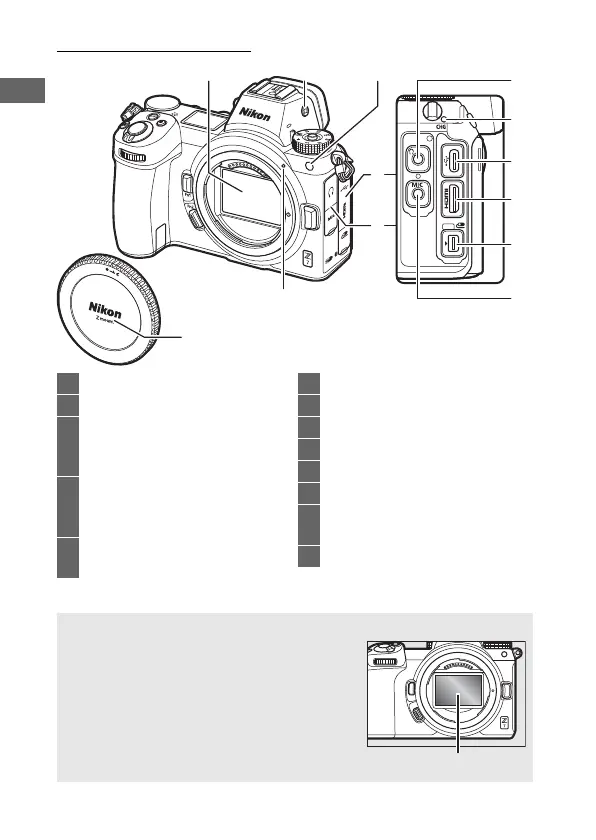
1 Image sensor ............................... 192
2 Monitor mode button ...........9, 150
3 AF-assist illuminator ............43, 140
Red-eye reduction lamp ........... 107
Self-timer lamp ..............................85
4 Cover for accessory terminal
and USB and HDMI
connectors
5 Cover for headphone and
microphone connectors
6 Lens mounting mark ....................36
7 Headphone connector.............. 138
8 CHARGE lamp.................................29
9 USB connector ................... 184, 188
10 HDMI connector ................ 184, 188
11 Accessory terminal..................... 184
12 Connector for external
microphone ............................... 184
13 Body cap.................................36, 184
D Do Not Touch the Image Sensor
Under no circumstances should you exert
pressure on the image sensor, poke it with
cleaning tools, or subject it to powerful air
currents from a blower. These actions could
scratch or otherwise damage the sensor. For
information on cleaning the image sensor,
see “Image Sensor Cleaning” (0 192).



 To Next Page