187Technical Notes
Availability may vary with country or region. See our website or brochures for the latest
information.
Microphones • ME-1 Stereo Microphone: Connect the ME-1 to the camera
microphone jack to record stereo sound and reduce the
chance of picking up equipment noise (such as the
sounds produced by the lens during autofocus).
• ME-W1 Wireless Microphone: Use this wireless Bluetooth
microphone for off-camera recording.
Software Camera Control Pro 2: Control the camera remotely from a
computer and save photographs directly to the
computer hard disk. When Camera Control Pro 2 is used
to capture photographs directly to the computer, a PC
connection indicator (PC) will appear in the control panel.
Note: Use the latest versions of Nikon software; see the Nikon website for
your region for the latest information on supported operating systems. At
default settings, Nikon Message Center 2 will periodically check for updates to
Nikon software and firmware while you are logged in to an account on the
computer and the computer is connected to the Internet. A message is
automatically displayed when an update is found.
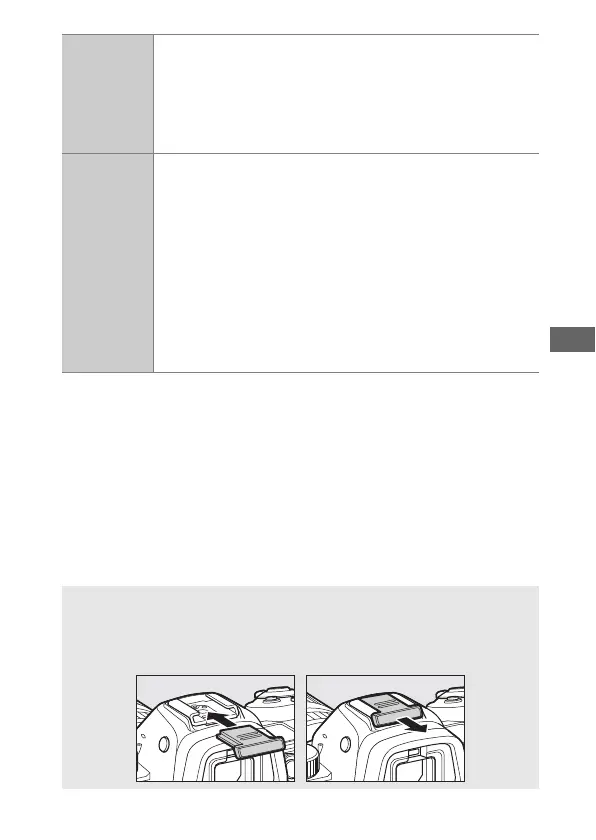
D Attaching and Removing the Accessory Shoe Cover
The BS-1 accessory shoe cover slides into the accessory shoe as shown.
To remove the cover, hold the camera firmly, press the cover down with
a thumb and slide it in the direction shown.



 To Next Page