USER MANUAL ENGLISH
1464809000 - SW4000 23
MAIN BROOM HEIGHT CHECK AND ADJUSTMENT
NOTE
Brooms with harder or softer bristles are available.
This procedure is applicable to all types of brooms.
1. Check the main broom distance from the ground, according
to the following procedure:
Drive the machine on a level ground.
Engage the parking brake.
Lower the main broom and turn it pressing the
DFFHOHUDWRUSHGDOIRUDSSUR[RQHPLQXWH'RQRW
operate the broom continuously in order not to overheat
the drive motor braked.
Stop and lift the main broom, then move the machine
and switch it off.
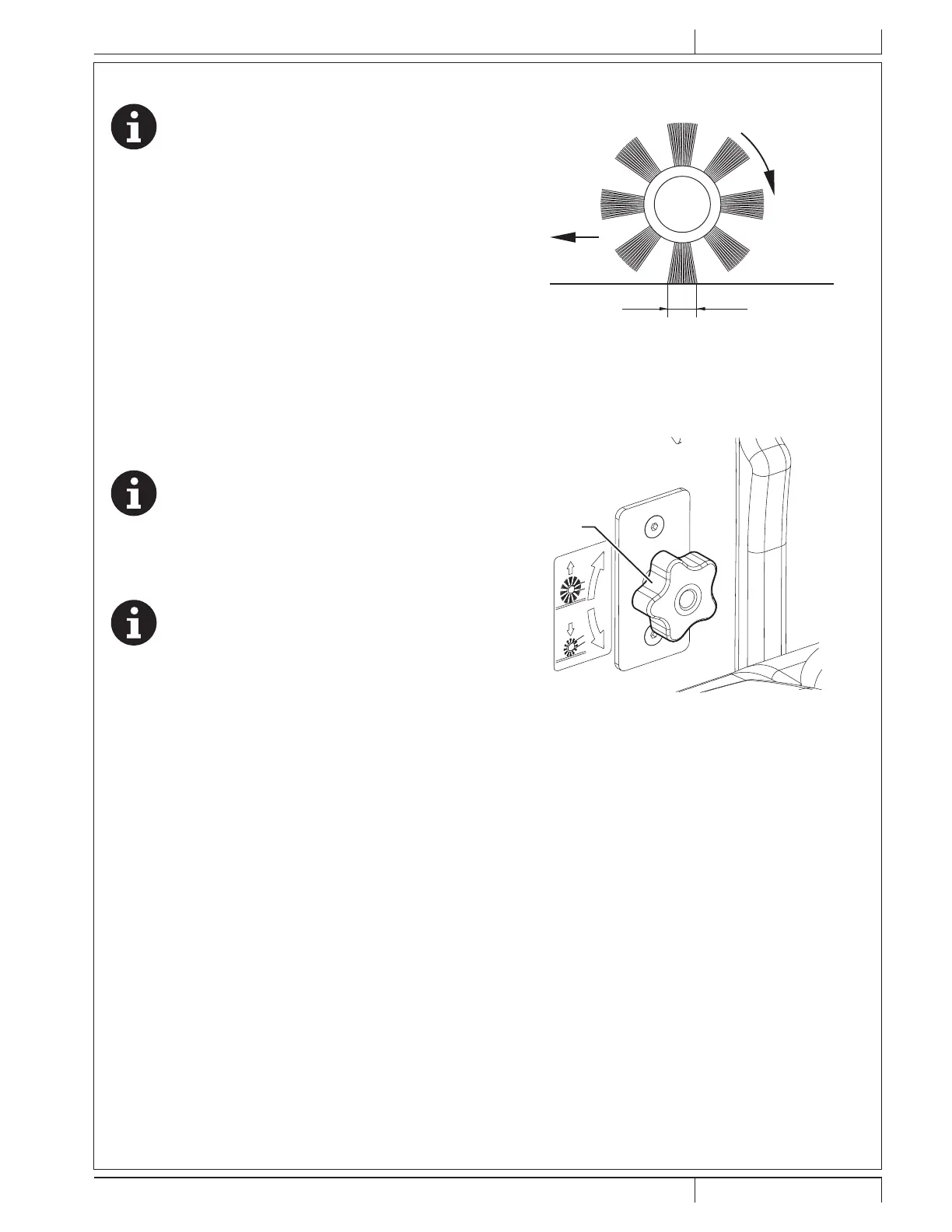
Check that the main broom print (A, Fig. 6), along its
length, is 2 to 4 cm wide.
,IWKHSULQW$LVQRWZLWKLQVSHFL¿FDWLRQVDGMXVWWKHPDLQ
broom height according to the following procedure.
2. Turn the knob (A, Fig. 7) as shown below:
To increase the print length, turn the knob counter-
clockwise
To decrease the print length lift the broom with the lever
(63) and then turn the knob clockwise
NOTE
The knob can be used both to adjust the print and to
adjust the broom according to the bristle wear.
3. Perform step 1 again to check that the main broom is at the
correct distance from the ground.
4. When the broom is too worn to be adjusted, replace it as
VKRZQLQWKHQH[WSDUDJUDSK
NOTE
If it is not possible to adjust the print (A, Fig. 6)
SURSHUO\EHFDXVHWKHSUHVVXUHRQWKHÀRRUDWWKH
ends of the broom is different, refer to the Service
Manual.
A
2 - 4 cm
0,8 - 1,6 in
P100593
Figure 6
B
P100594
Figure 7


 To Next Page
 Loading...