20
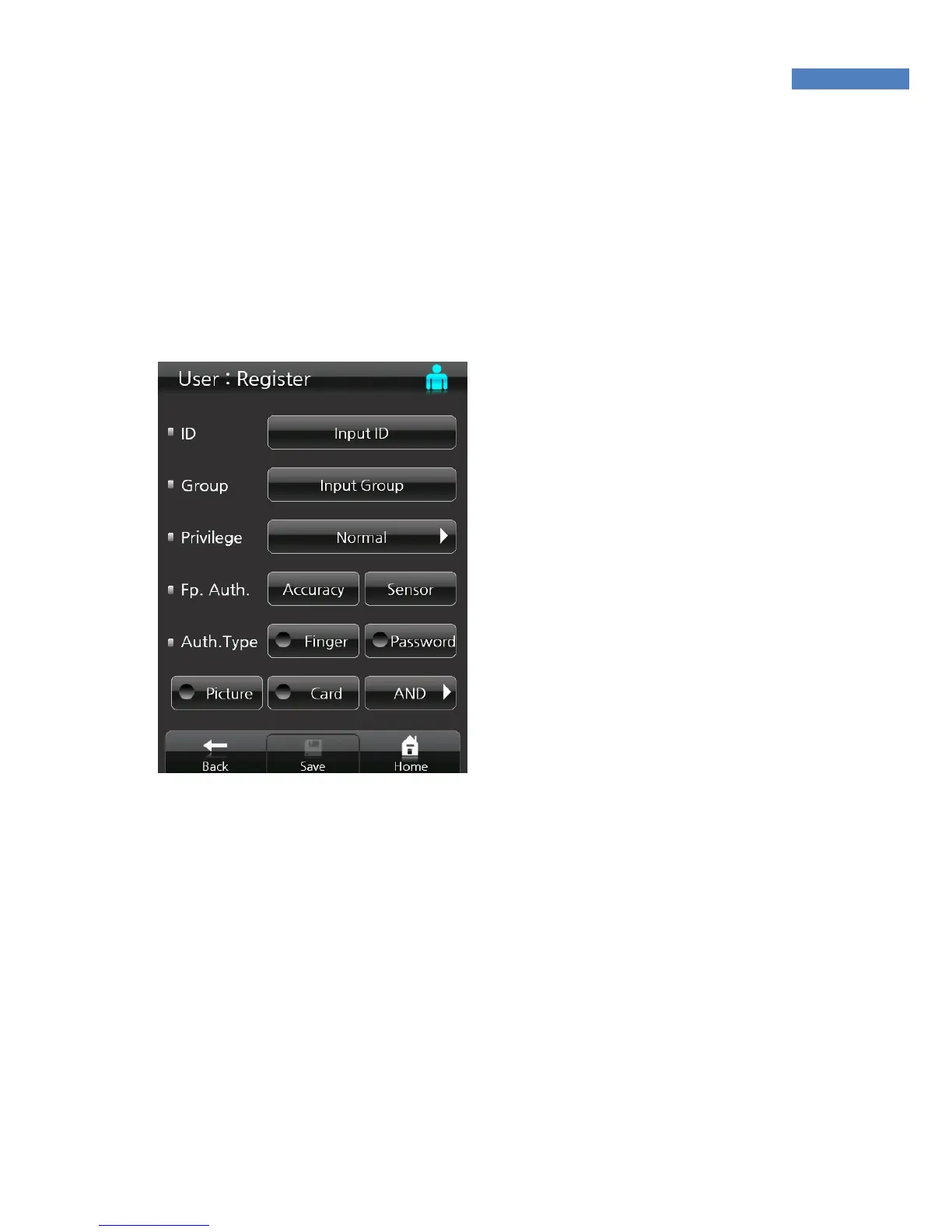
3. In “Authority” touch the “Administrator” button to change the
authority. Select General User or Administrator.
General User: Door Control Authority
Administrator: Door Control + Administrator Menu Authority
4. Fingerprint Authentication –
Set the “Security Level”
when the user’s fingerprint
rejection rate (FRR) or other
users’ fingerprint recognition
error rate (FAR) is high.
In case a user’s fingerprint
is recognized as a different
user’s, set the security level
6 or higher. If the user’s
fingerprint is not recognized
well, reduce the security
level 4 or lower.
If the user’s fingerprint is
too dry, lower the sensor
setting below the default – brightness, contrast, and gain.
If the user’s fingerprint is humid, raise the sensor setting above the
default. Depending on the fingerprint state, change the options.
The new setting is applied upon the registration of the fingerprint and
is valid only for 1:1 authentication.
If the user uses the default “Security Level” and “Sensor” setting
without changing the options, the settings that the user made by
selecting Admin – Authentication – Basic menus will be applied.



 To Next Page