54 / 76 ♦ BKI16ATEX0018X ♦ htk4014a0600p_03
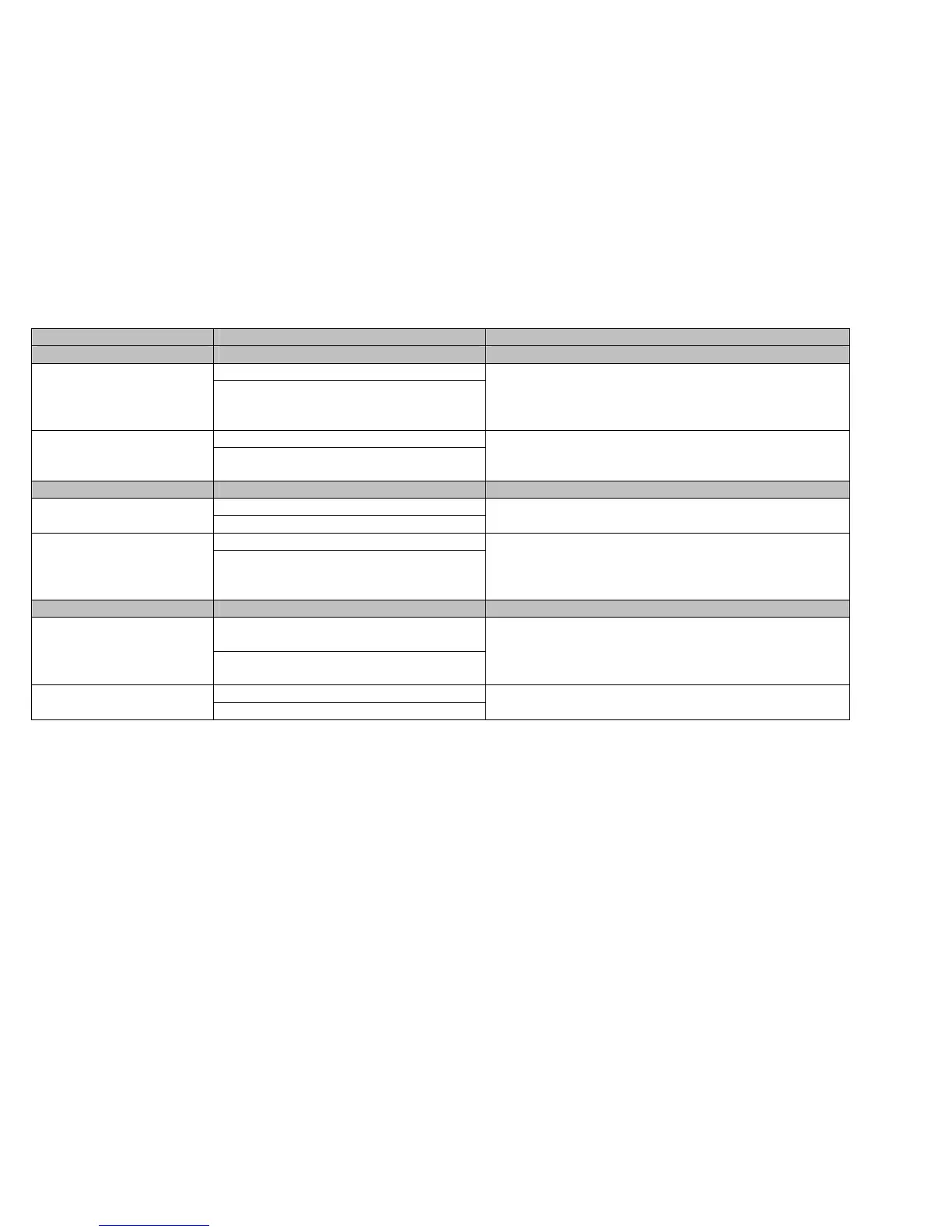
Function (Fct.) Input Range Description
2.1.2.1 LENGTH
Select m, cm, mm, inch, Ft, optional unit 2.1.2.1.1 LENGTH UNIT
mm
Length unit of displayed value
(level / distance).
The optional unit allows the user to define a new unit (name and
factor) see menu 2.1.2.1.3
0, 1, 2, 3, 4, 5, exponential format, auto 2.1.2.1.2 DISPLAY FORMAT
2
Number of decimal places.
Defines the displayed length values format (option of the HART®
communicator H275).
2.1.2.1.3.0 DEFINE NEW UNIT
4 ASCII characters 2.1.2.1.3.1 UNIT NAME
“UNIT”
Optional unit name. User has to enter the unit name before using it
in the menu “LENGTH UNIT”.
Enter 0.0 to 100000 2.1.2.1.3.2 UNIT FACTOR
1.0
Optional unit factor. User has to enter the Unit Factor before using
it in the menu “LENGTH UNIT”.
With a factor 1.0, the unit is equivalent to one millimeter.
With a factor 1000.0, the unit is equivalent to one meter.
2.1.2.2.0 VOLUME
Select m
3
, l, US Gal, Ft
3
, bbl, M
3
/h, Ft
3
/h, kg,
Metric Tons, US Tons
2.1.2.2.1 VOLUME UNIT
m³
Unit for conversion values
("volume table").
The selected unit is only used to display the conversion value from
the strapping table.
0, 1, 2, 3, 4, 5, exponential format, auto 2.1.2.2.2 DISPLAY FORMAT
2
Number of decimal places. Defines the displayed volume value
format. (Option of the HART® communicator H275).


 To Next Page