NORAM 65ET GRADER
2-33
General Information
2
Electronic Display
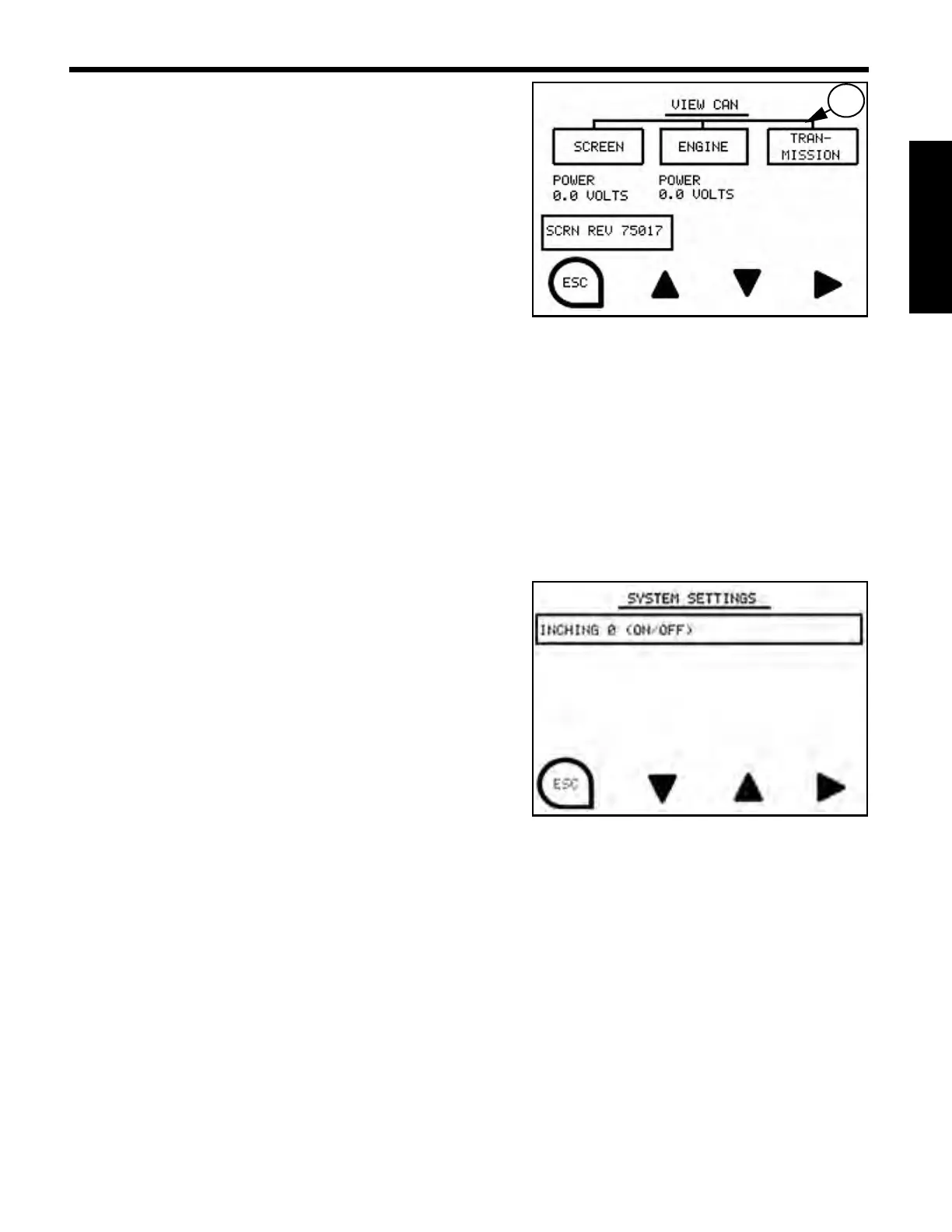
View CAN Screen
View CAN Screen displays the following:
• CAN conditions
• Power in Volts
• Current Software Revision
If a problem is present in the CAN system, TCU, ECM or
display and an entity is not connected to the CAN system,
the line
(1) above the entity will not be present.
NOTE: View CAN Screen is a read only screen. The Up, Down, and Enter Control keys do not
function in View CAN Screen.
System Settings Screens
Systems Settings Screens allow system settings to be adjusted. To adjust a setting, use up, down, and
right enter arrows to select, activate and deactivate setting of choice.
The following system settings are available:
Inching
When the inching control is in the “OFF (0)” position, the
transmission is disconnected through a clutch when the
brake pedal is depressed. When the inching control is
activated “ON (1)”, the transmission continues to drive the
motor grader when the brake pedal is depressed. To
activate, press the Control Keys associated with the up or
down arrows, followed by the right arrow to select, to turn
inching on/off. Press the Control Key associated with the
“ESC” icon to return to the Menu Screen.
NOTE: When machine is turned off, inching control is reset to “OFF (0)”.


 To Next Page