5 Installing the machine and adjusting the level
69
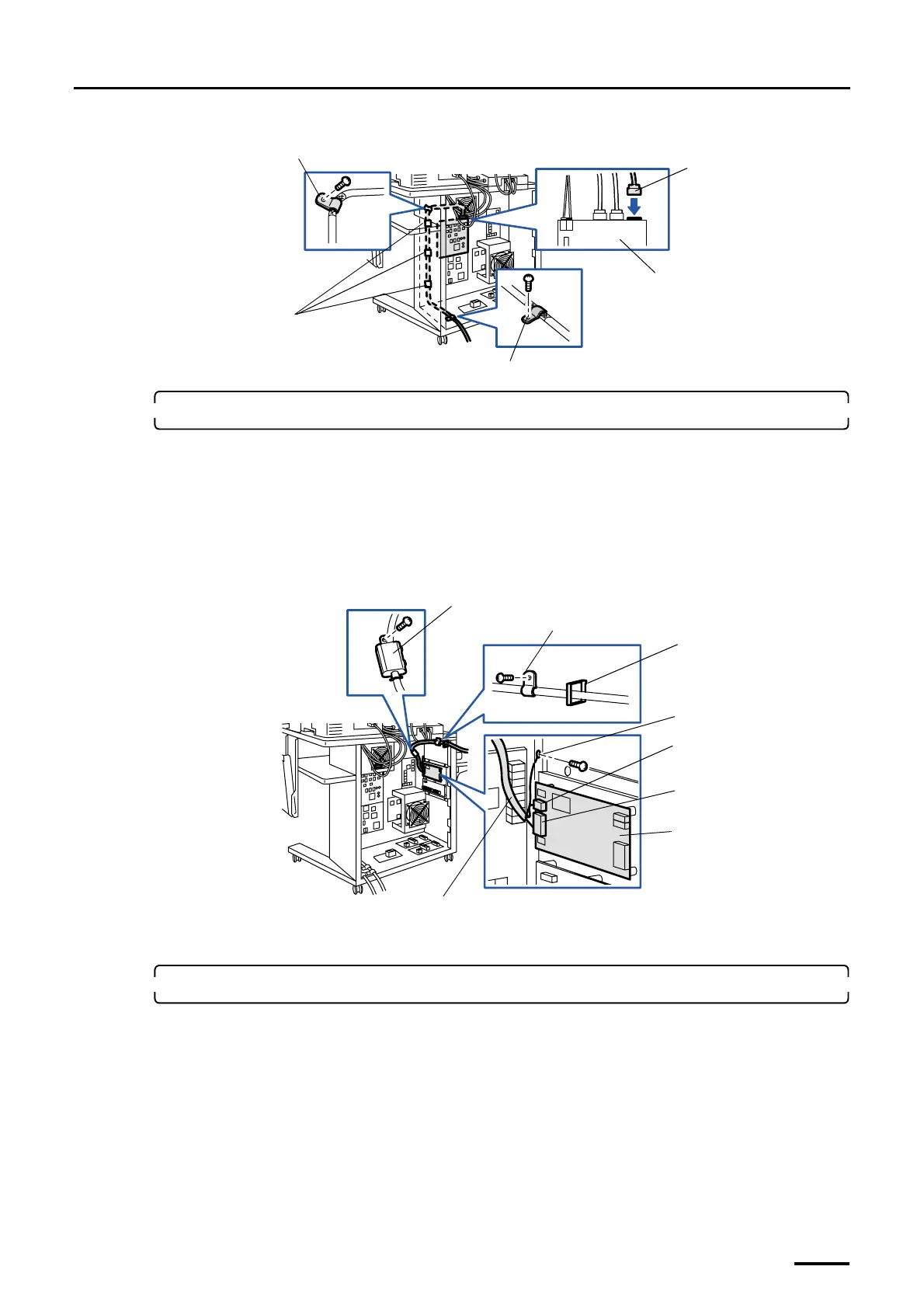
3. Connect the cables from the optional Pricing Unit to the input section.
This is for the machine with the optional Pricing Unit.
(1) Connect the cable from the Pricing Unit to the PU control PCB.
(2) Connect the ground wire from the Pricing Unit to the desk section. (one screw)
(3) Fix the cables that are connected to the Pricing Unit with the clamp (one screw) and clamps (wire
saddle).
(4) Attach the ferrite core. (one screw)
4. Reattach the rear cover to the input section.
Attach it aligning each cable to the cutouts on the rear cover.
LVDS cable (J455)
FG clamp
Image processing PCB
FG clamp
Clamps
G070277
Ground wire
PU control PCB
Ferrite core
Clamp
J/P305
J/P304
Clamp
(wire saddle)
Cable connected to the Pricing Unit
G070289
Distributed by: minilablaser.com


 To Next Page