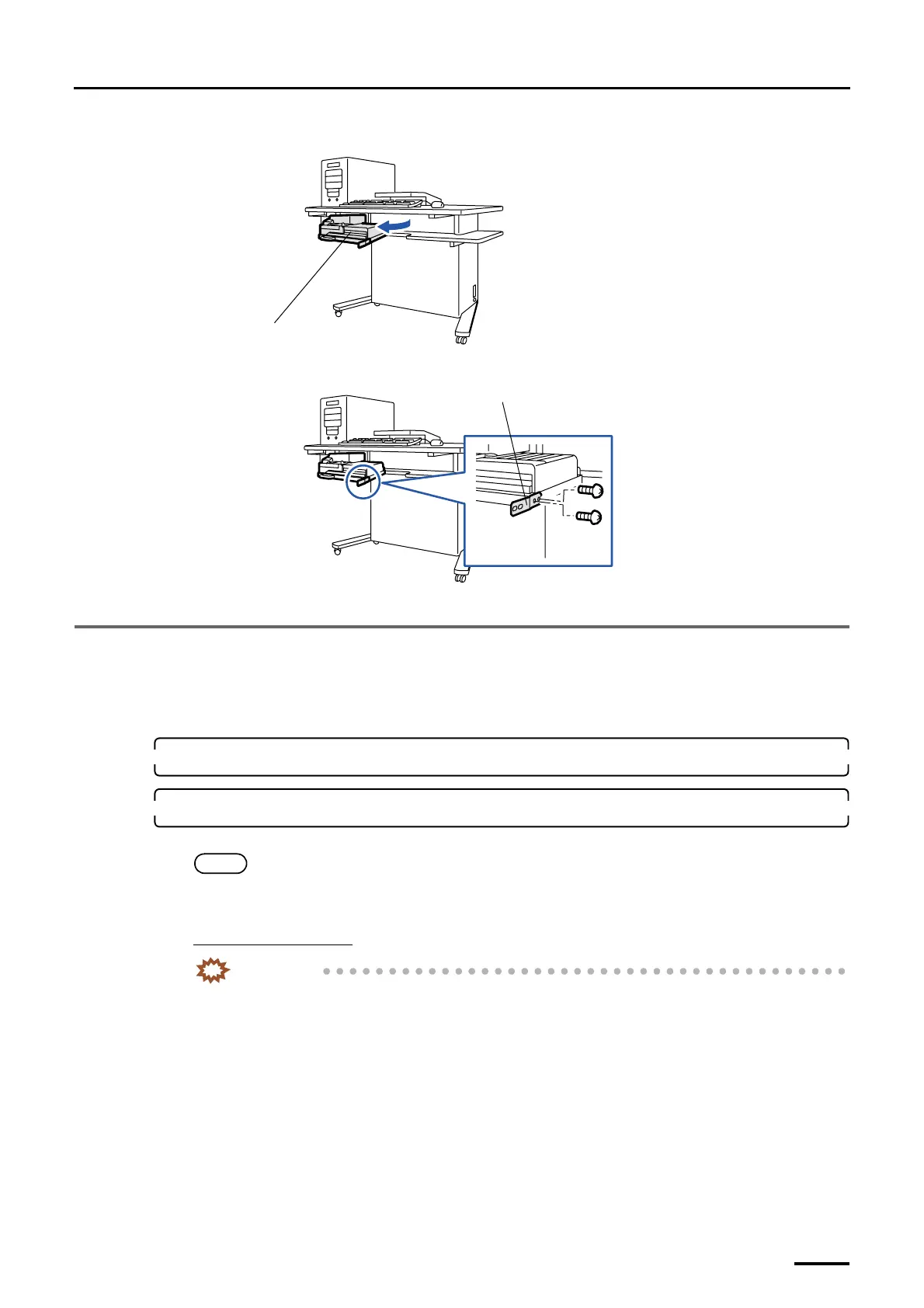
3 Removing the packing angle brackets
19
(2) Pull out the colorimeter unit.
(3) Remove the packing angle bracket. (two screws)
This completes removing the packing angle brackets in the desk section.
3.4 Scanner section
This is for the machine with the scanner.
Do not use the packing angle brackets and packing screws you have removed from the machine. Only use them when you are
instructed to do so.
1. Remove all the cardboards, adhesive tapes, ropes and packing materials from the machine.
2. Remove the packing angle bracket from the film carrier.
This operation is necessary only when installing optional 135/240 AFC-II, 135/240 MMC-II or 135/240 AMC-II.
NOTE
• Film carriers other than the 135/240 AFC-II, 135/240 MMC-II and 135/240 AMC-II have no packing angle
bracket.
For the 135/240 AFC-II
IMPORTANT
• When removing the packing angle brackets, place the 135/240 AFC-II on a flat table or the like.
If you remove the packing angle brackets with the 135/240 AFC-II inclined, the 135/240 lane may
quickly switch and the cables inside the film carrier may be damaged.
Colorimeter unit
G072515
Packing angle bracket
G068922
Distributed by: minilablaser.com



 To Next Page