5 Installing the machine and adjusting the level
53
5 Installing the machine and adjusting the level
5.1 Adjusting the level of paper processor section
1. Prepare to move the paper processor section and the printer section.
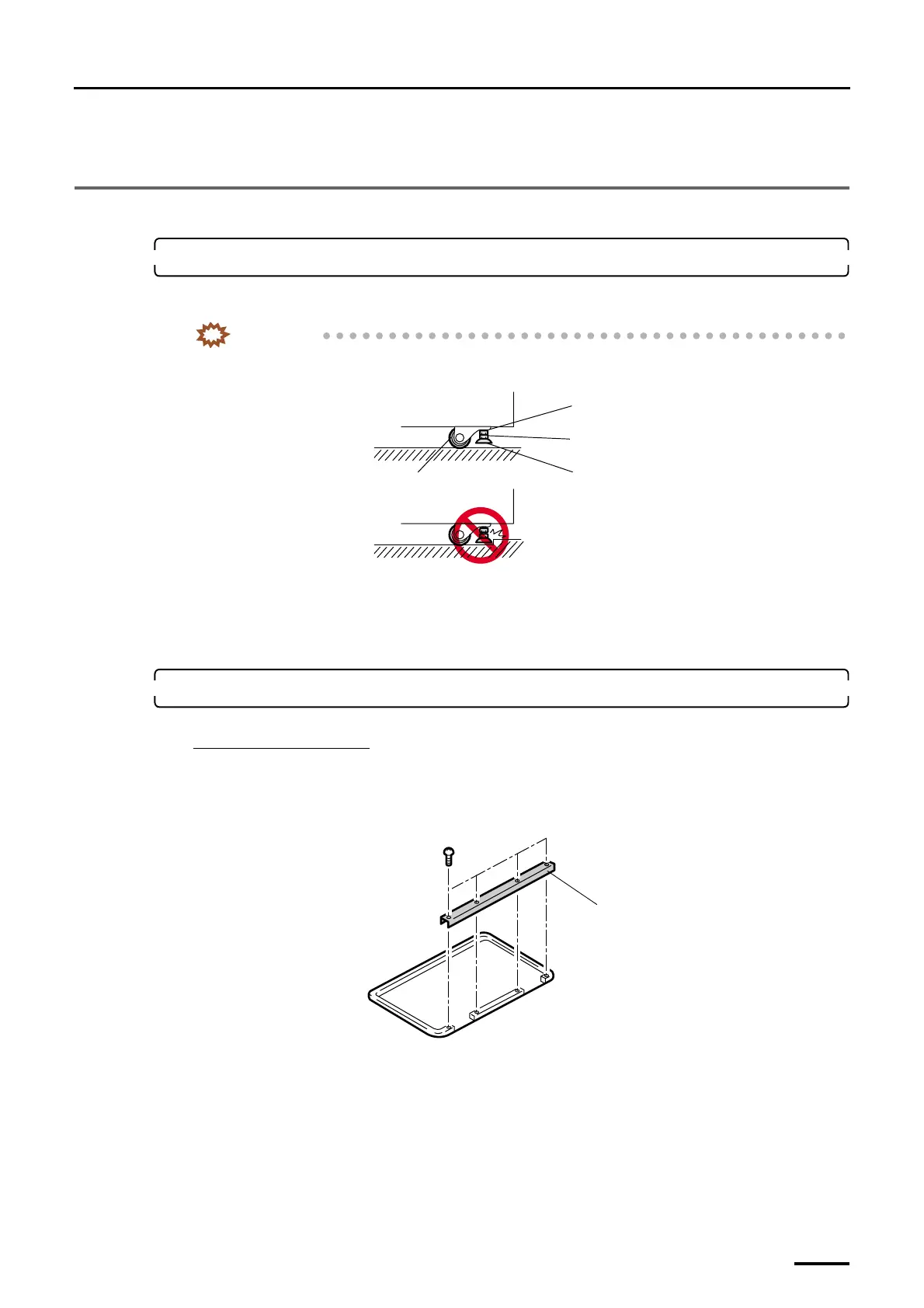
Raise the jack bolts (four for paper processor section, four for printer section) completely so that the machine can be
moved.
IMPORTANT
• Be sure to raise the jack bolts to the uppermost position before moving. If the jack bolts hit any steps
or protrusions during relocation, they may be bent.
• Move the machine on a flat floor to prevent the castors from being overloaded.
• When moving the machine over a long distance, lift it.
• Hold the bottom frame of the machine when lifting.
• Do not force to the covers.
2. Move the paper processor section to the location intended for installation.
When a floor tray is used:
When an optional floor tray is used, follow the procedure below.
(1) Place the floor tray in the position where the paper processor is to be installed.
(2) Remove the removable channel. (four screws)
(3) Put the paper processor on the floor tray.
Attach the removable channel after the printer was put on the floor tray.
Castor
Jack bolt
Adjusting nut
Lock nut
G068858
Removable channel
G071466
Distributed by: minilablaser.com



 To Next Page