MX40 Pro LED Display Controller User Manual
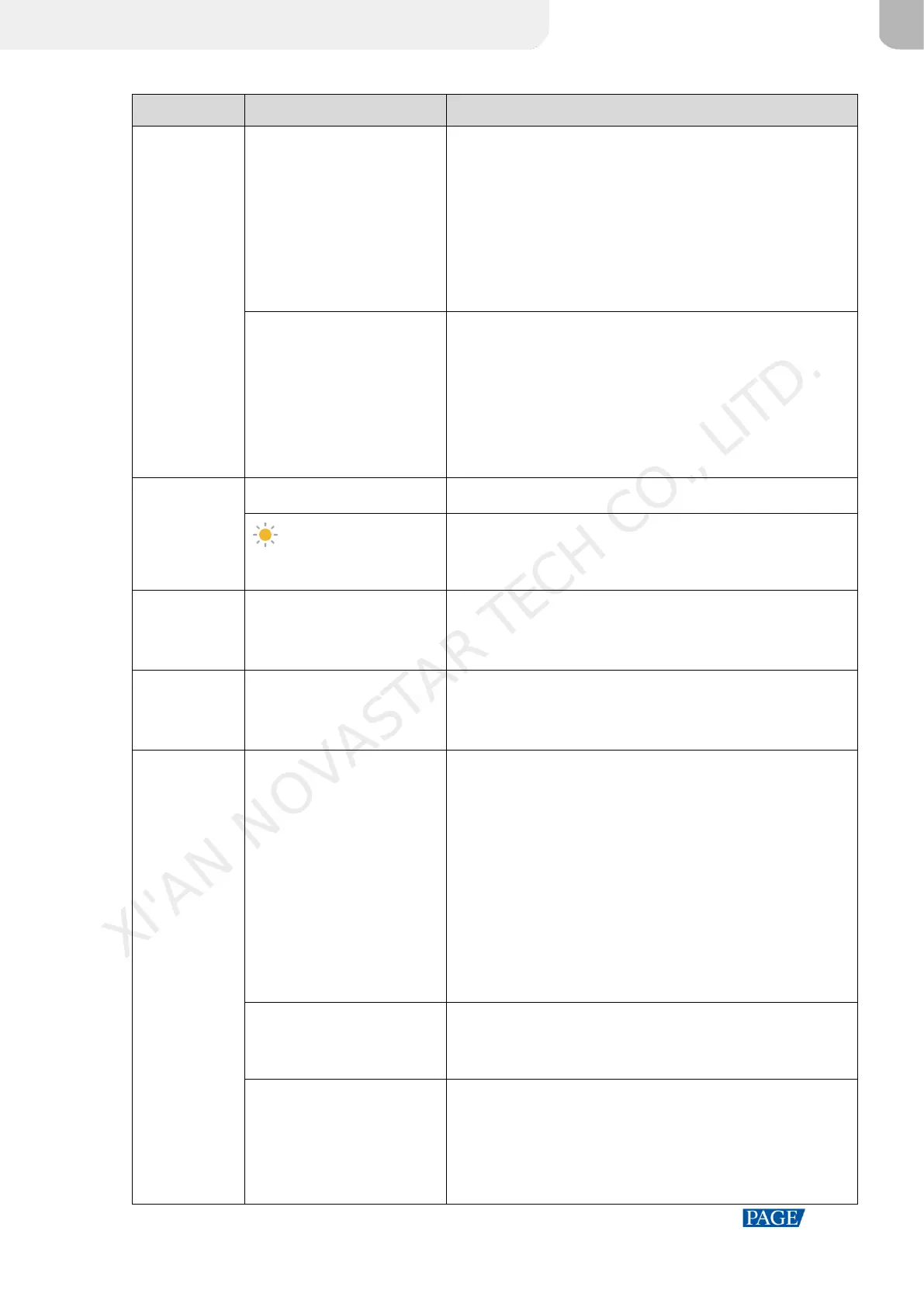
HDMI1, HDMI2, HDMI3, DP,
SDI, Internal
The device input source type and status
Green: The signal is accessed normally and used.
Blue: The signal is accessed normally, but not used.
Red: The signal is not accessed, or the accessed signal is
abnormal.
Gray: The signal is abnormal and not used.
For related operations in the working mode of Send-Only
Controller, please refer to 5.1.1 Set Input Source.
The resolution and frame rate of the currently available input
source
If multiple input sources are available, the resolution and frame
rate of each input source will be displayed one by one. If the
input is used by the layer, the layer number will be displayed
below.
For related operations, please refer to 6.2.2 Set Resolution and
Frame Rate (HDMI1, HDMI2, HDMI3 and DP only).
The screen resolution and frame rate
The screen brightness
For related operations, please refer to 6.4.1 Adjust Screen
Brightness.
The statuses of the Ethernet ports
Blue: Connected
Gray: Disconnected
The statuses of the OPT ports
Blue: Connected
Gray: Disconnected
The sync signal currently used and the signal status
Sync: Active Input: Sync with the frame rate of the current
input source
Sync: Genlock: Sync with the frame rate of the Genlock
signal
Sync: Internal: Sync with the frame rate of the internal clock
of the device
Color code:
Blue: The signal is normal.
Red: The signal is abnormal.
For related operations, please refer to 6.4.6 Set Sync Source.
The format of the dynamic range
For-related operations, please refer to 6.2.4 Set HDR (HDMI1,
HDMI2 and HDMI3 only).
The 3D function status
The icon displayed: The 3D function is turned on.
The icon not displayed: The 3D function is turned off.
For related operations, please refer to 6.4.3 Enable 3D
Function.
XI'AN NOVASTAR TECH CO., LITD.



 To Next Page