MX40 Pro LED Display Controller User Manual
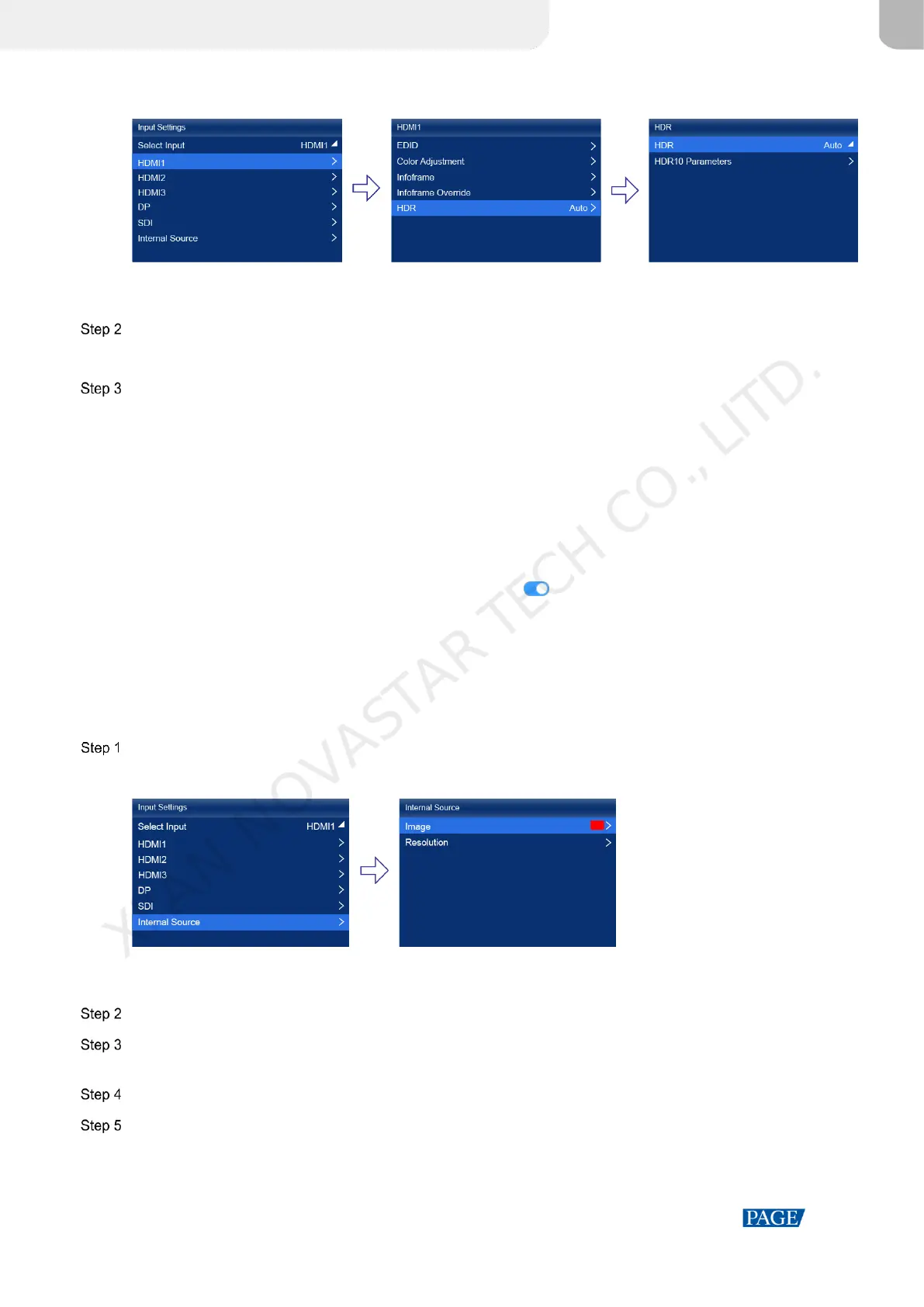
Figure 6-5 HDR
When the device working mode is All-In-One Controller, the Select Input menu is not displayed.
Select HDR and select the HDR format from the listed options.
Select Auto and the device will read the attribute value that comes with the input source.
Select HDR10 Parameters to complete the related settings. If the HDR format is SDR here, no parameters need to
be set.
HDR-related parameters include:
PQ mode: The mapping method of video source brightness.
− ST2084 (PQ): This mode 1:1 maps the brightness of the video source. The part that exceeds the maximum
screen brightness will still be adjusted to the maximum screen brightness.
− ST2086 (Linear mapping): This mode linearly maps the brightness of the video source. It globally adjusts the
video source brightness according to the maximum screen brightness to ensure that the ratio of the
brightness of the entire source content remains unchanged.
MaxCLL Override: When the MaxCLL Override switch is , the parameter takes effect.
MaxCLL: Override the maximum video source brightness and adjust the brightness to a specified value.
To restore the parameters to the defaults, select Reset.
6.3 Set Internal Input Sources
Select the internal source stored in the device and set the related parameters for screen testing and troubleshooting.
On the main menu screen, choose Input Settings > Internal Source > Image.
Figure 6-6 Internal source
When the device working mode is All-In-One Controller, the Select Input menu is not displayed.
Select a static picture or a motion picture.
When the relevant parameters of the image are displayed, set the parameters according to your actual needs;
otherwise, please skip this step.
Press the BACK button to go back to the upper-level menu and select Resolution.
Set Mode to Custom or Standard, and then set the resolution, frame rate and bit depth.
XI'AN NOVASTAR TECH CO., LITD.



 To Next Page