MX40 Pro LED Display Controller User Manual
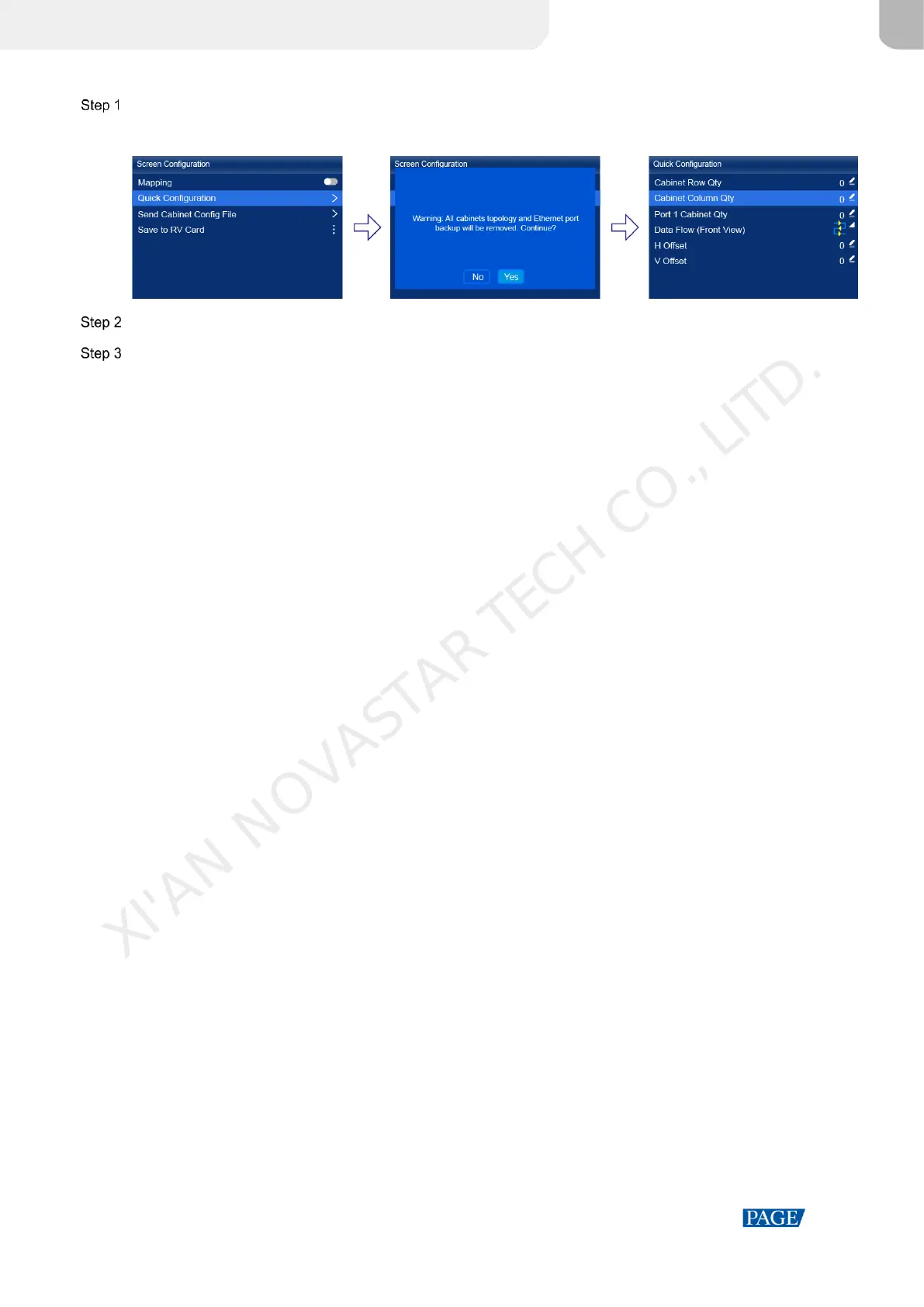
On the main menu screen, choose Screen Configuration > Quick Configuration.
Figure 5-3 Quick configuration
Select Yes in the displayed dialog box.
Set screen configuration parameters as required.
Cabinet Row Qty: Set the quantity of cabinet rows.
Cabinet Column Qty: Set the quantity of cabinet columns.
Port 1 Cabinet Qty: Set the quantity of the cabinets loaded by Ethernet port 1.
Data Flow (Front View): Select the data flow for the cabinets loaded by Ethernet port 1.
H Offset: Set the horizontal offset of the displayed image.
V Offset: Set the vertical offset of the displayed image.
5.2 Free Screen Configuration via VMP
The VMP software can be used to configure either the regular screens or complex screens, and supports free wiring
of the cabinets, plus the ability of calculating the used loading capacity according to the cabinets that are actually
loaded. For the details of performing the free screen configuration, please refer to VMP Vision Management Platform
User Manual.
XI'AN NOVASTAR TECH CO., LITD.



 To Next Page