MX40 Pro LED Display Controller User Manual
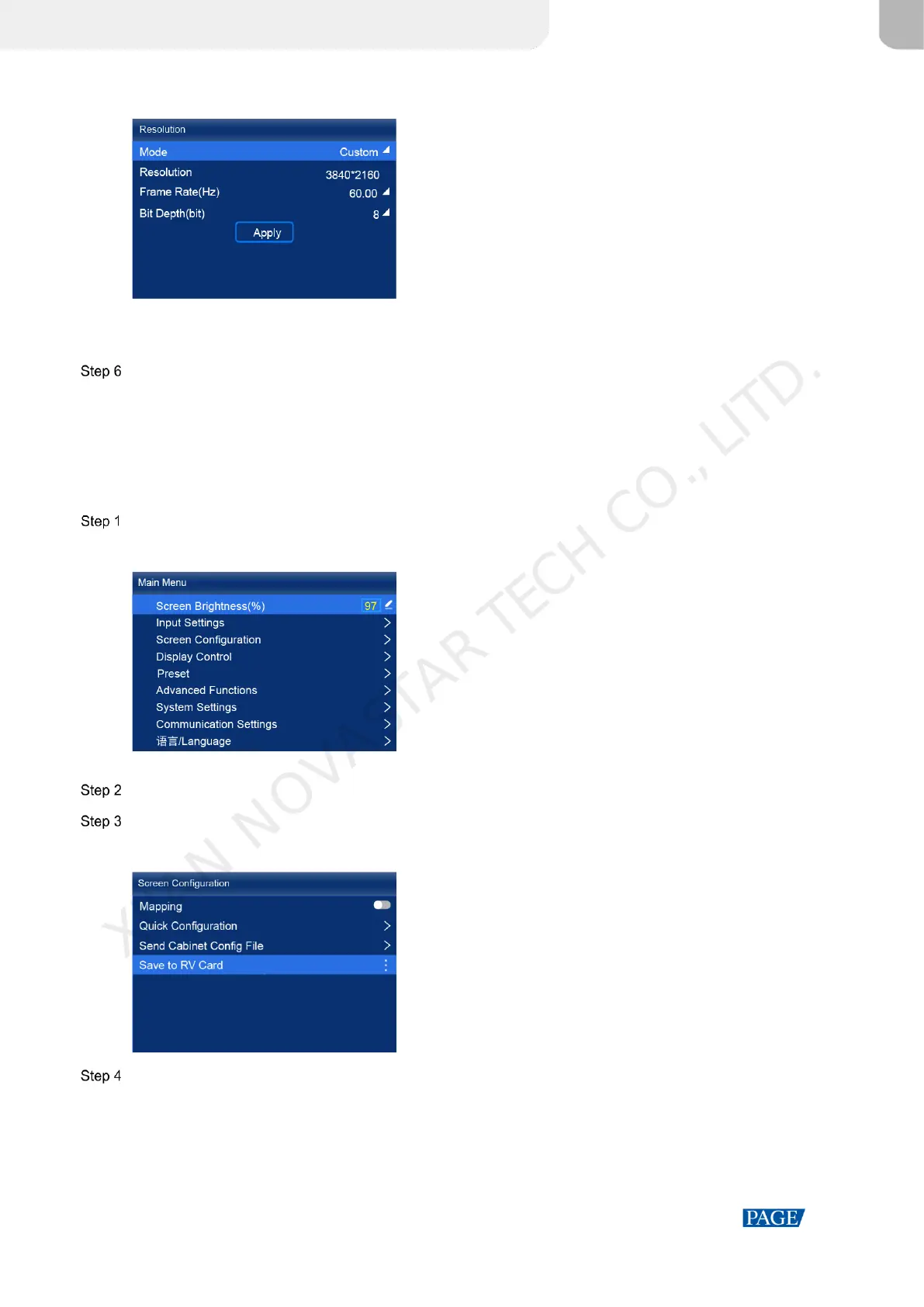
Figure 6-7 Resolution parameters
Custom: Set the resolution manually.
Standard: Select the desired resolution from the drop-down options.
After the settings are done, click Apply.
6.4 Set Output Parameters
6.4.1 Adjust Screen Brightness
Adjust and save the screen brightness.
On the main menu screen, select Screen Brightness and then the brightness value becomes editable.
Figure 6-8 Screen brightness (the All-In-One Controller mode as example)
Rotate the knob to adjust the brightness to the target value, and then press the knob to confirm.
Choose Screen Configuration > Save to RV Card.
Figure 6-9 Save to RV card
Select Yes in the displayed dialog box.
After the brightness value is successfully saved, a message appears on the menu screen.
6.4.2 Adjust Gamma and Color Temperature
Adjust and save the Gamma and color temperature.
XI'AN NOVASTAR TECH CO., LITD.



 To Next Page