MX40 Pro LED Display Controller User Manual
4 UI Introduction
4.1 Home Screen
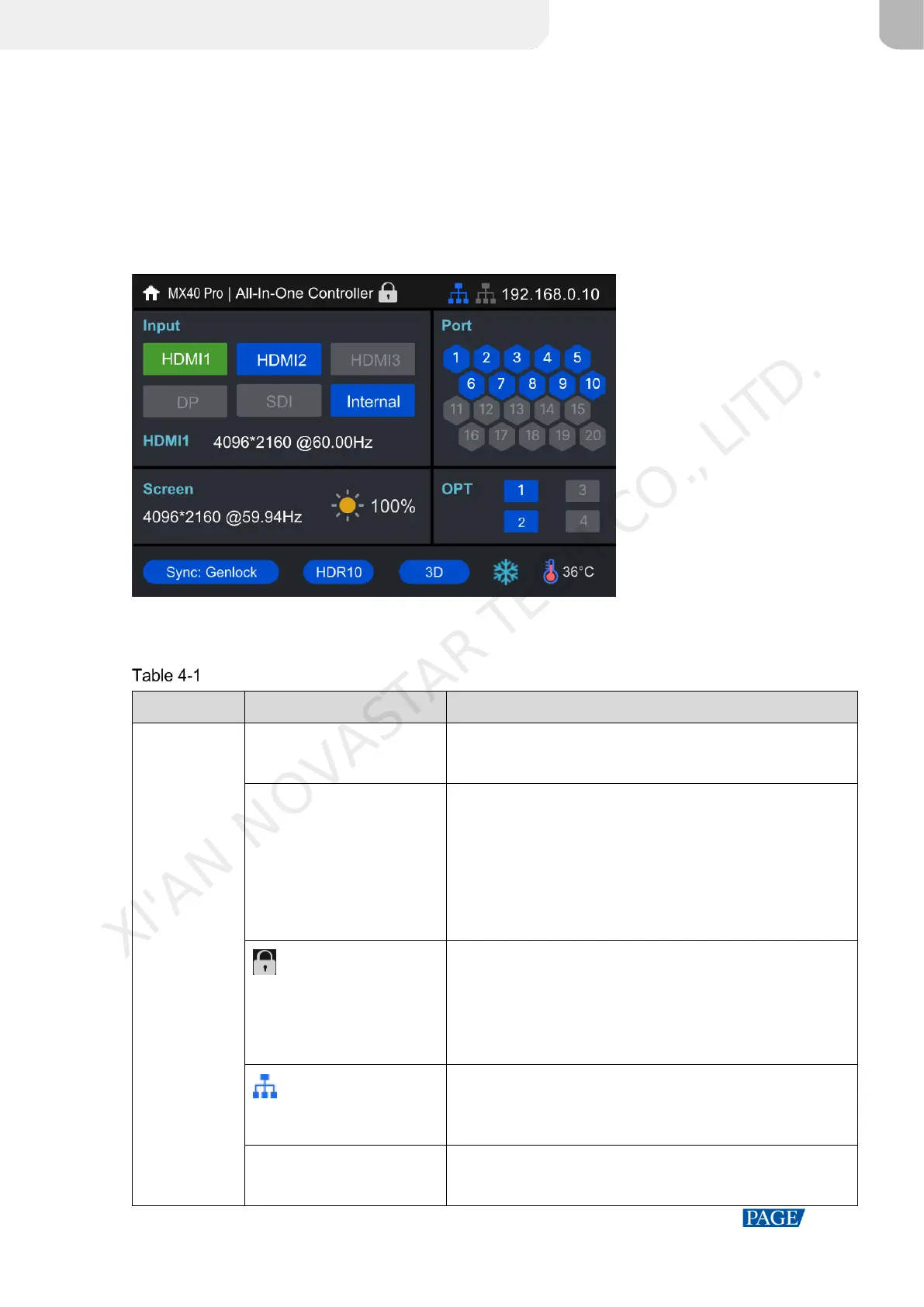
After the device is powered on, the home screen showing device related information is displayed as follows.
Figure 4-1 Home screen
The home screen is shown in Figure 4-1 and the home screen descriptions are shown in Table 4-1.
Home screen descriptions
The device name
The name can be changed in VMP software.
The device working mode
All-In-One Controller: The video processing and sending
functions are available.
Independent Controller: Only the video sending function is
available.
For related operations, please refer to 7.1 Switch Working
Mode.
The device button lock status
The icon displayed: The buttons are locked.
The icon not displayed: The buttons are unlocked.
Hold down the knob and BACK button simultaneously for 5s or
longer to lock or unlock the buttons.
The connection status of the Ethernet ports
Blue: Connected
Gray: Disconnected
The device IP address
For related operations, please refer to 7.3 Set an IP Address.
XI'AN NOVASTAR TECH CO., LITD.



 To Next Page