EasyManua.ls Logo

NTI TFTN - Page 104

NTI TFTN
116 pages
Print Icon
To Next Page IconTo Next Page
To Previous Page IconTo Previous Page
Loading...
Installation and Operation Manual TFTN 085-199
104
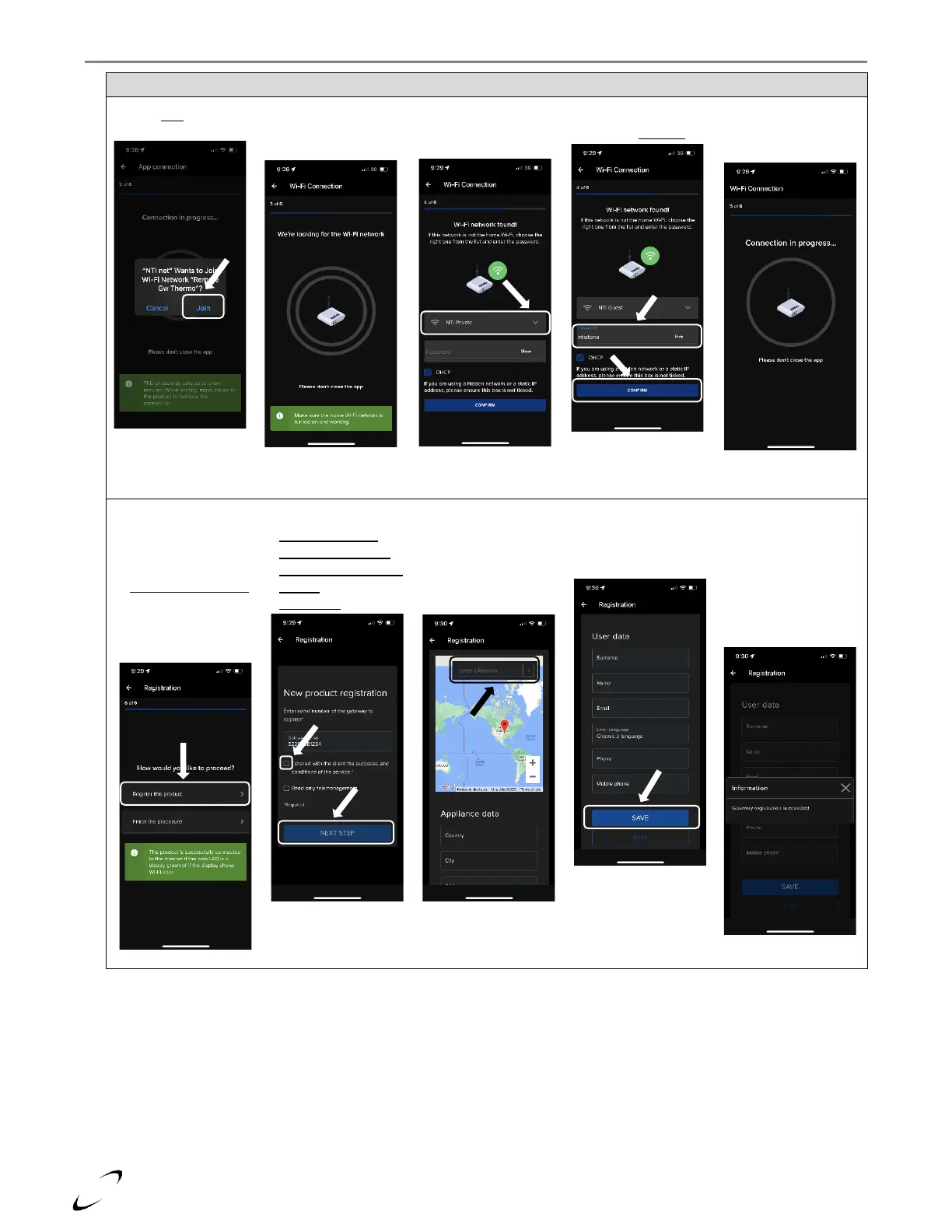
Figure 17-4 NTI net App Making WiFi Connection and Registering Product
Press Join to connect
to the boiler
Wait while the app
searches for available
WiFi networks
Select the WiFi
Network from the
dropdown menu
Enter the password
and press Confirm
Wait while the
connection to the
WiFi Network is made
Boiler is successfully
connected to Wifi, to
register it to your “NTI
net” account select
Register the product;
otherwise close the
App and finish the
setup at the boiler;
see Figure 17-3
Check the box next to
I shared with the
client the purposes
and conditions of the
service, then press
NEXT STEP to proceed
A
Start typing the
address in the box
above the map
select the correct
address from the
autogenerated list.
Scroll down the page
and enter the User
data (optional), then
select SAVE
Boiler is now registered
to your “NTI net”
account and can be
remotely monitored
and adjusted. Proceed
to finish the setup at
the boiler; see Figure
17-3 steps 7 & 8
A
B
B

Other manuals for NTI TFTN

Related product manuals