28
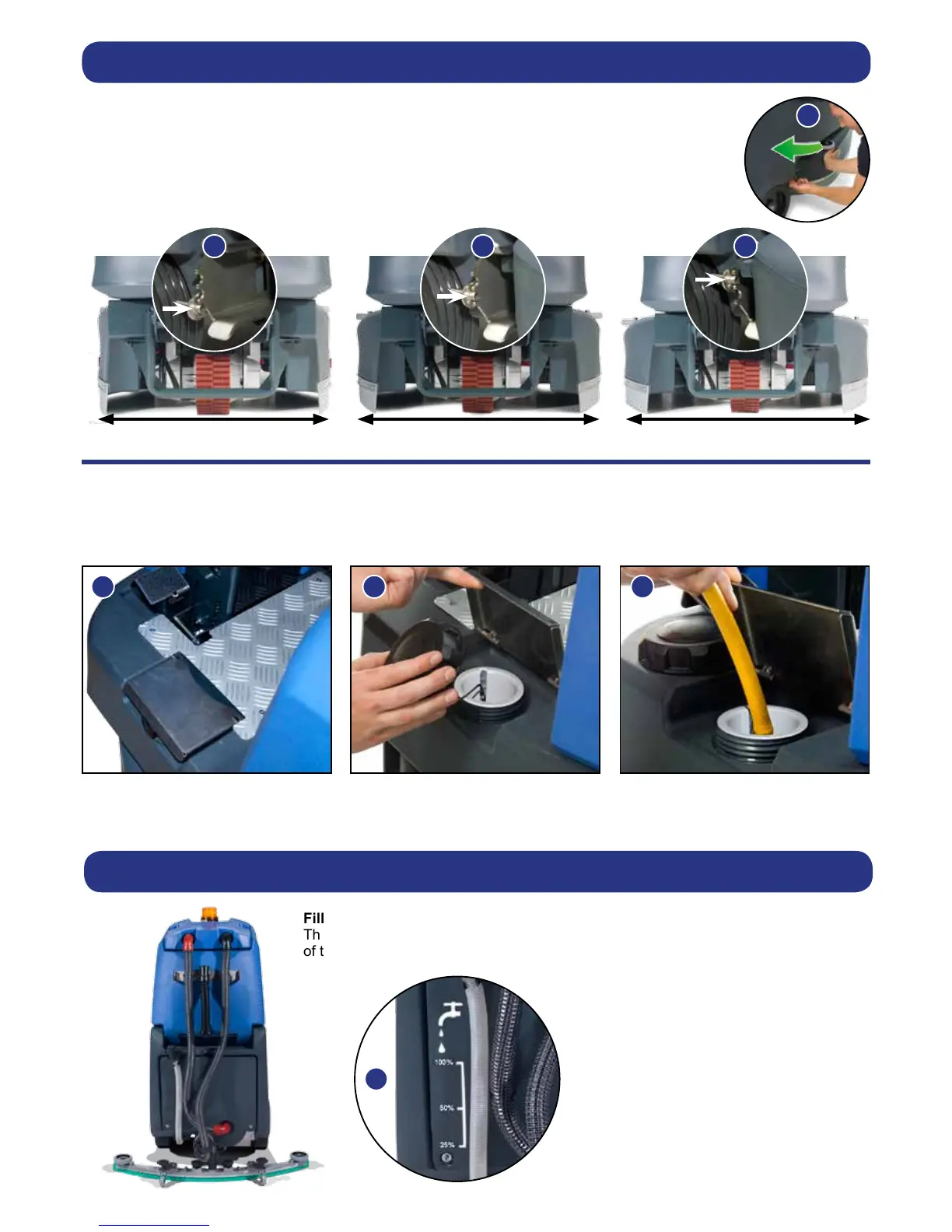
First push the side pod in (see Fig.17), then pull the side pod adjustment lever and set it to one of
the three width-settings (see Fig.18-20) Repeat the operation on both sides.
650mm 750mm 850mm
The TTV 678 is equipped with a large capacity 120 litre clean-water tank allowing,
for large areas to be covered in a single ll.
To ll the clean-water tank, lift the cover ap (Fig.21) to expose the ller cap.
Unscrew the ller cap (Fig.22) and ll the tank using a hose (Fig.23) or preferred method.
Fill-level indicator
The water level in the clean-water tank can be measured using the scale on the rear
of the machine (Fig.24).
Machine Set-Up
Setting the Width Adjustment
Filling the Clean-water Tank
Note: Great care must be taken to ensure that contaminants (leaves, hair, dirt, etc.) are not allowed to enter the
clean-water tank during the lling process. If using a bucket or similar, ensure it is always clean and free from debris.





 To Next Page