19
User Tracking
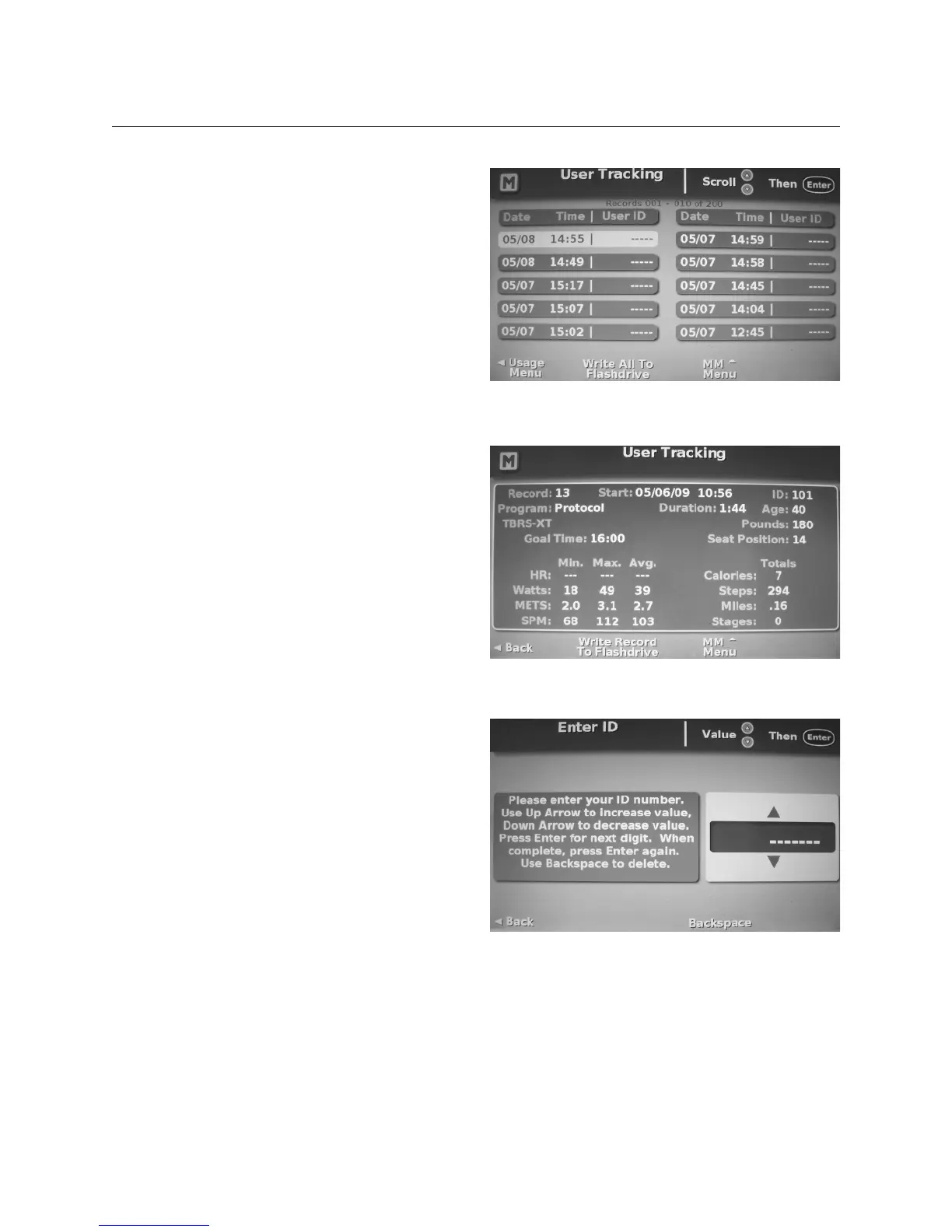
The user tracking screen allows users
to view or export workout data for the
last 200 individual workouts. Note,
this feature always tracks the last 200
workouts and is FIFO (fi rst in fi rst out)
data. If you wish to track a PIN with
a workout, you must turn on User
Tracking in Manager Mode.
To view or export individual workout
records, scroll through the workout
records and select the desired record.
The workout records provide a
complete summary of the workout.
Enabling User Tracking
To make tracking of user data more
specifi c and show outcomes, it is
advisable to turn on User Tracking in
Manager Mode. This enables users to
enter a personal identifi cation number
(PIN) of up to six digits before every
workout. Their workout data is then
tracked by this PIN. Users who do not
wish to use a PIN when User Tracking
is enabled may simply press the Enter
button twice to bypass this input
screen before a workout.
User Tracking


 To Next Page