Nytech DC-7200 Introduction
12 - English
Inserting an SD Card
By using the SD memory card (not included in the package) you can
increase the Nytech DC-7200 storage capacity for saving your photos,
videos and voice recordings.
When the memory card is inserted, all the photos and videos you take will
be saved onto it. If there is no memory card inserted, your photos and
videos will be saved to the internal memory of the camera.
!
Power off the camera using the switch [2] before you insert or
remove a memory card.
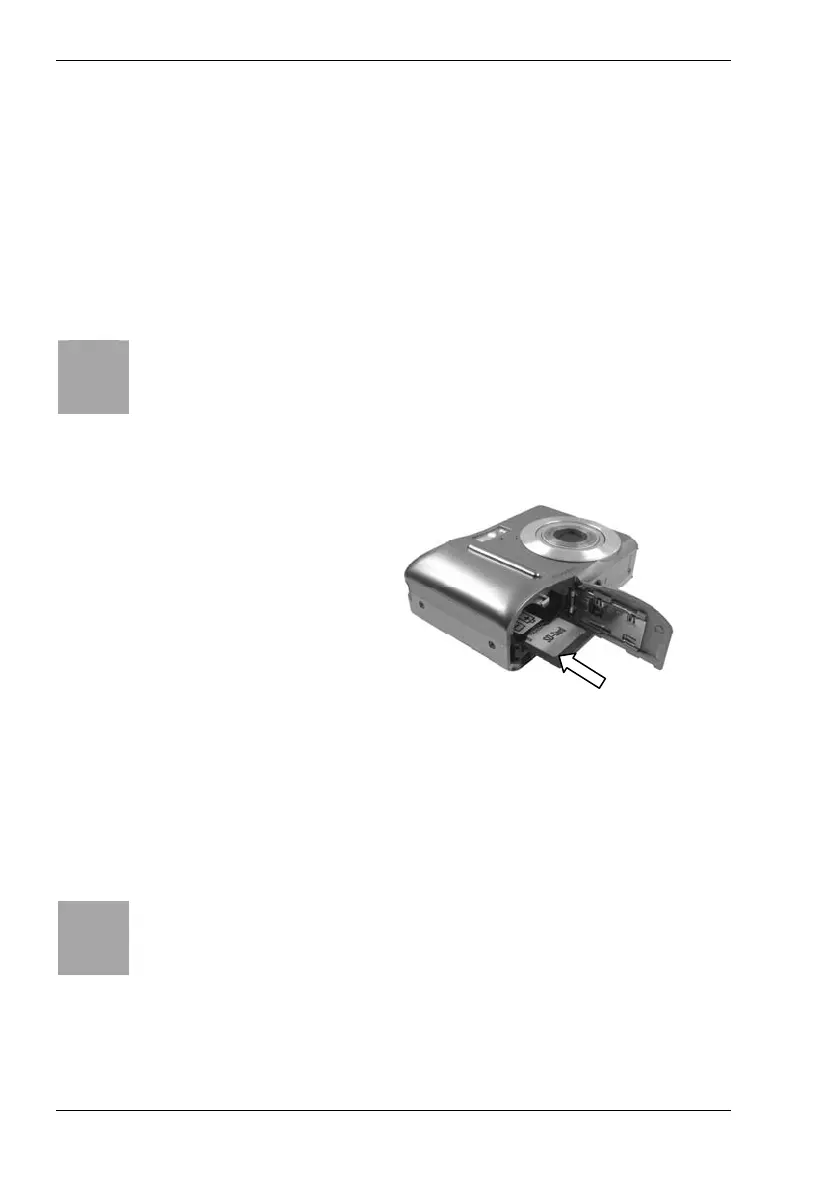
- Open the Nytech DC-7200 battery compartment by pushing the cover
gently outwards. The cover will spring up by a spring mechanism.
- Insert the memory card with
the contacts towards the
back side of the camera into
the card compartment and
push it into the housing. The
memory card clicks into
place.
- Close the battery compartment cover by pressing down the flap on the
housing of the camera and then by pushing it inwards till it locks. The
cover clicks into place.
- To remove the memory card, open the battery compartment cover
gently press on the inserted card. This will protrude a little so that you
can get a hold of it and remove it.
!
If the memory card or the internal memory is exhausted, the
message Memory full will appear on the display [12].



 To Next Page