36 User manual
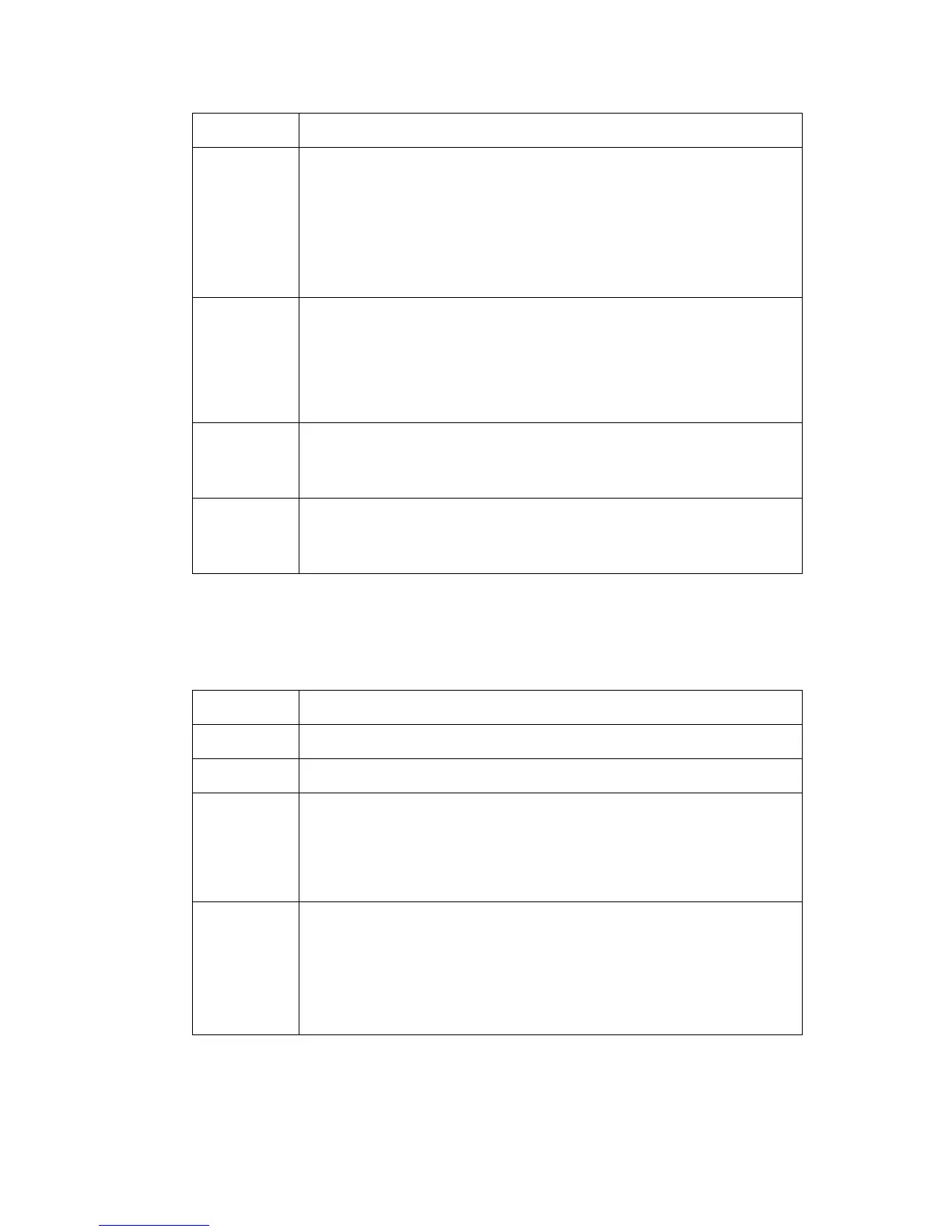
The menu bar
[4] The menu bar items
[4] The menu bar items
The top toolbar
[5] The buttons of the top toolbar
[5] The buttons of the top toolbar
Menu Function
'File'
■ Log on to a user mode
■ Log off from the previous user mode
■ Open a file that contains saved settings
■ Save the current settings to a file
■ Connect to a different controller ( for remote users only).
■ Close the application.
'Edit'
■ Define the host name
■ Define the default system you want to connect to at the
start-up
■ Use 'Automatic logon', to start the Océ Settings Editor
application automatically in the defined user mode.
'View'
■ Toggle between the display languages
■ Toggle between the display of the KO settings and the SA
settings.
'Help'
■ Access the contents of the on-line help
■ Get more information about the copyright and the version
of the application.
Button Function
'Open' Open a file that contains saved settings.
'Save as...' Save all the KO settings or the SA settings in a file.
'Apply' Apply the changes you made to the settings.
Note: The button is enabled after you change a setting. The
button is disabled after you apply the settings, or after an undo
action.
'Undo' Restore the settings to the state before the settings were
changed. The 'Undo' button does not restore the factory
default.
Note: The button is enabled after you change a setting. The
button is disabled after you apply a changed setting.




 To Next Page