If output current is hi
her than OCP Level, "OCP TRIPPED" message will be displayed.
It disables output voltage & current from sources.
If you wish to output voltage & current, please remove the load and used the method below
the causes of trip occuring Trip are :
First, The different OCP Level can cause trip. Therefore raise level value to get resolution.
Second, when you used load that causes counter-electromotive force from coil & motor.
Can be protected as below diagram
Third, When sources used by load also can cause tripping. This happens when
source one is used from load
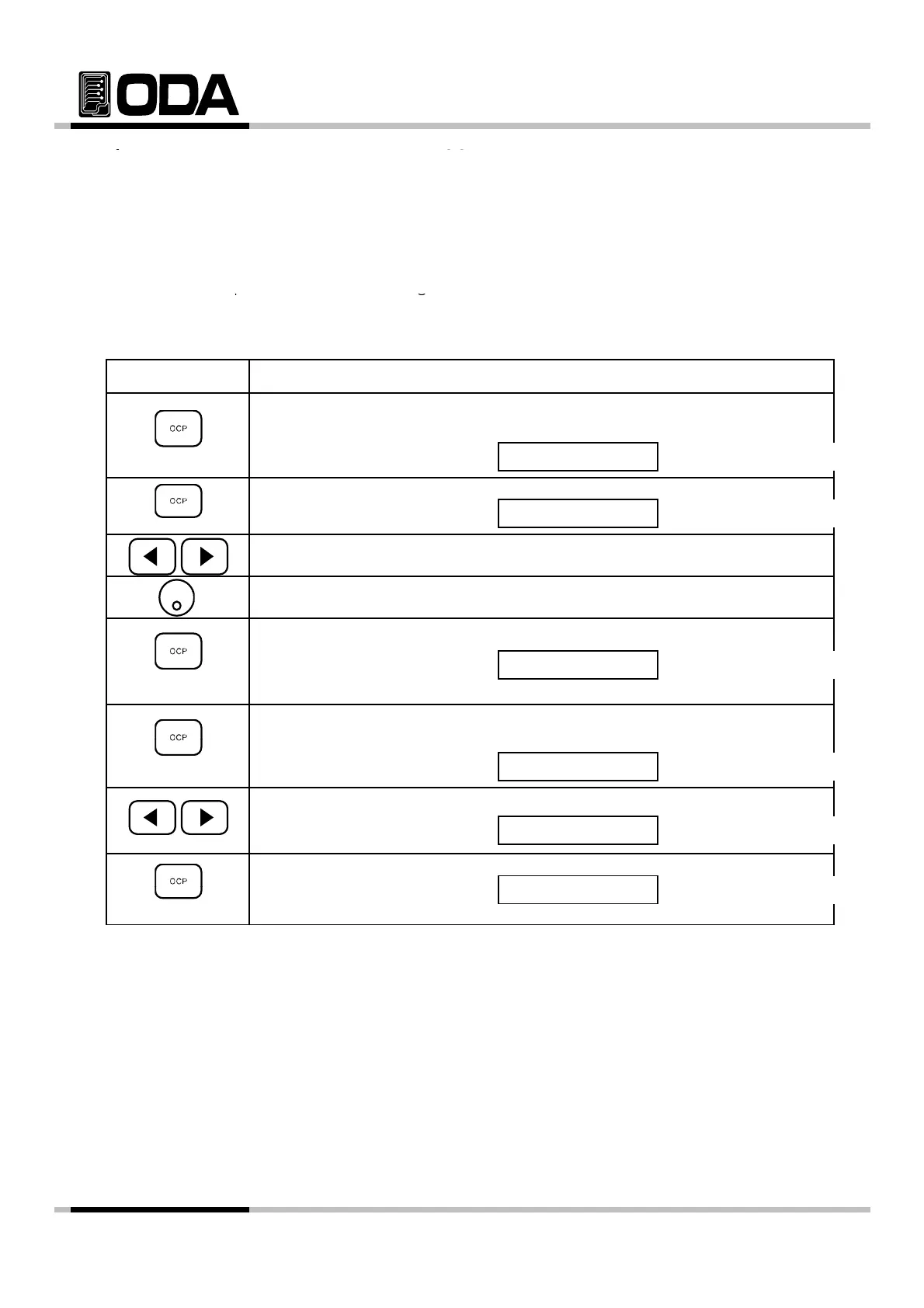
▌When OCP Trip occurs, "OCP TRIPPED" will be displayed on VFD.
▌To clear OCP Trip, raise OCP Level in the first step.
To set up Level, press OCP Key.
OCP TRIPPED
VFD Display Description
▌Press OCP button once more while "OCP ON" is displayed.
VFD Display Description
▌Use cursor key to change value.
OCP ON
CP-LEVEL 10.0
Use encorder switch to raise level.
▌When the setting is done, press OCP Key.
VFD Display Description
Message above will be displayed, and return to condition before trip.
▌Second step to clear OCP Trip.
To disable OCP press OCP Key
CHANGED
o
sa
e
,
ress
ey.
VFD Display Description
▌Press left or ri
ht cursor while "OCP ON" is displayed.
VFD Display Description
▌To save chan
es, press OCP ke
while "OCP OFF" is displayed.
OCP OFF
OCP ON
s
ay
escr
on
Message above will be displayed, return to condition before trip.
≫ Related Remote Interface Command
[SOURce:]CURRent:PROTection{<current>}
[SOURce:]CURRent:PROTection:STATe {0|1|OFF|ON}
[SOURce:]CURRent:PROTection:TRIPped?
[SOURce:]CURRent:PROTection:CLEar
[SOURce:]CURRent:PROTection:CLEar
Refer: Method to raise level value when there is a trip
CURR:PROT:TRIP? Return value "1" Check whether it is OCP Trip condition
CURR:PROT 10 OCP Level Setting
CURR:PROT:CLE OCP Trip Clear
Method to disable OCP when there is a Trip
CURR:PROT:TRIP? Return value "1" Check whether it is OCP Trip condition
:
:
CURR:PROT:CLE OCP Trip Clear
- 30 -



 To Next Page