3-8. STORE / CALIBRATE
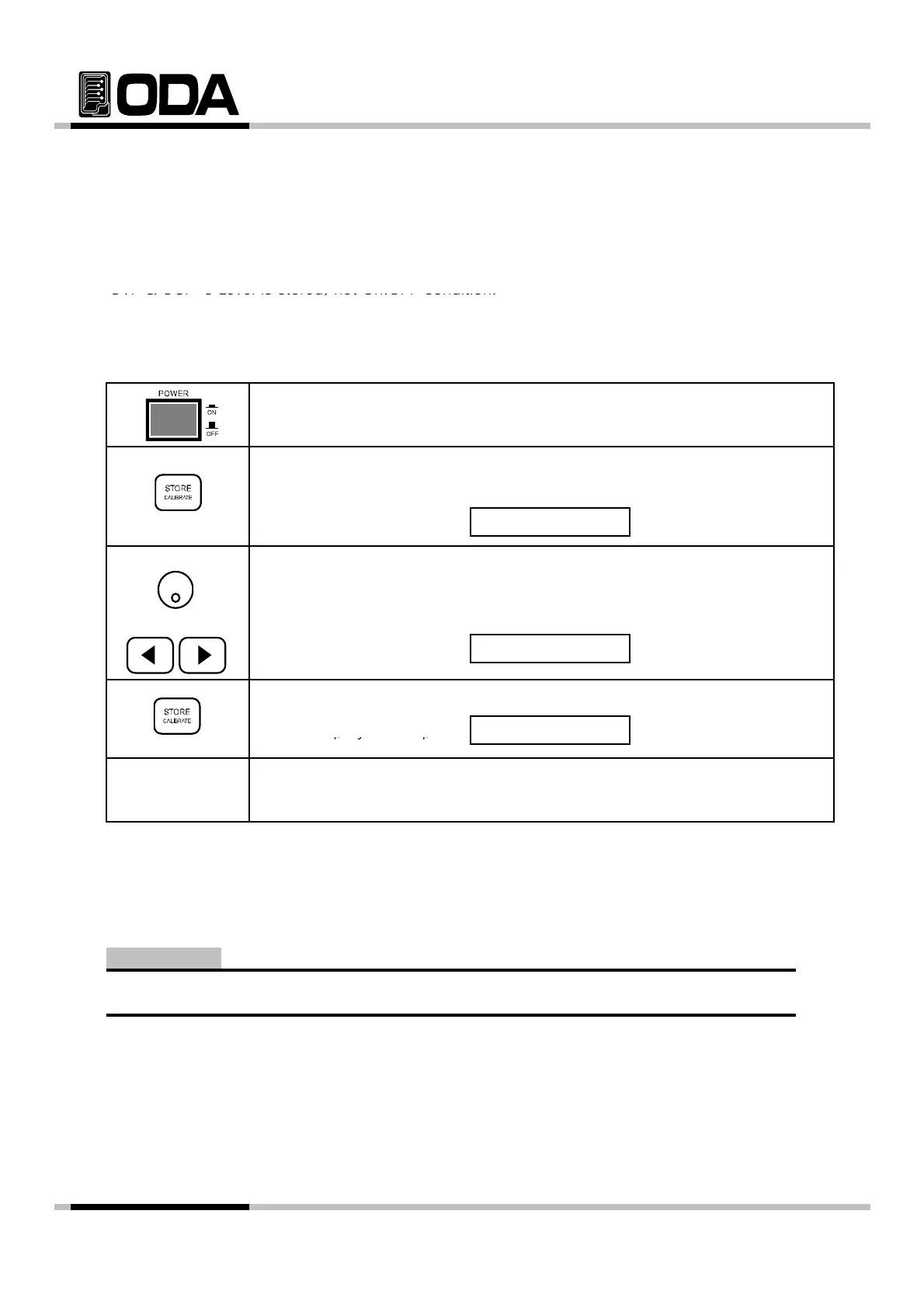
You can store the operating states that are total five voltage, current in non-volatile memory.
In case of this function, the mode must be in "**OUTPUT MODE**". If the mode of
ower su
is output on mode, store key is used the left move key of cursor. Proceed as follows.
OVP & OCP 's Level is stored, not On.OFF condition.
▌Power Switch ON
After turning On, please check "**OUTPUT OFF**" is displayed.
▌To save user's memory, press STORE Key.
VFD Display Description
▌Use cursor key to change slots.
STORE NO, 01
For instance, press right key to select 02 slot or use encorder switch
또는
VFD Display Description
▌To save slot, press STORE Key once.
VFD Display Description
STORE NO, 02
STORE DONE
▌
fter STORE DONE displa
ed, return to previous condition.
≫ Related Remote Interface Command
*SAV {1|2|3|4|5|6|7|8|10}
Refer: *SAV 4 User's memory
User's memory can be reset. Please read reference "5-4" USER-MEM CLEAR.
Note
- 37 -



 To Next Page