3-5. Programming Over Current Protection(OCP)
Disables current when output current is higher than user set up.
Read below to set up OCP Level.
the OCP Level below can be diffierent from others
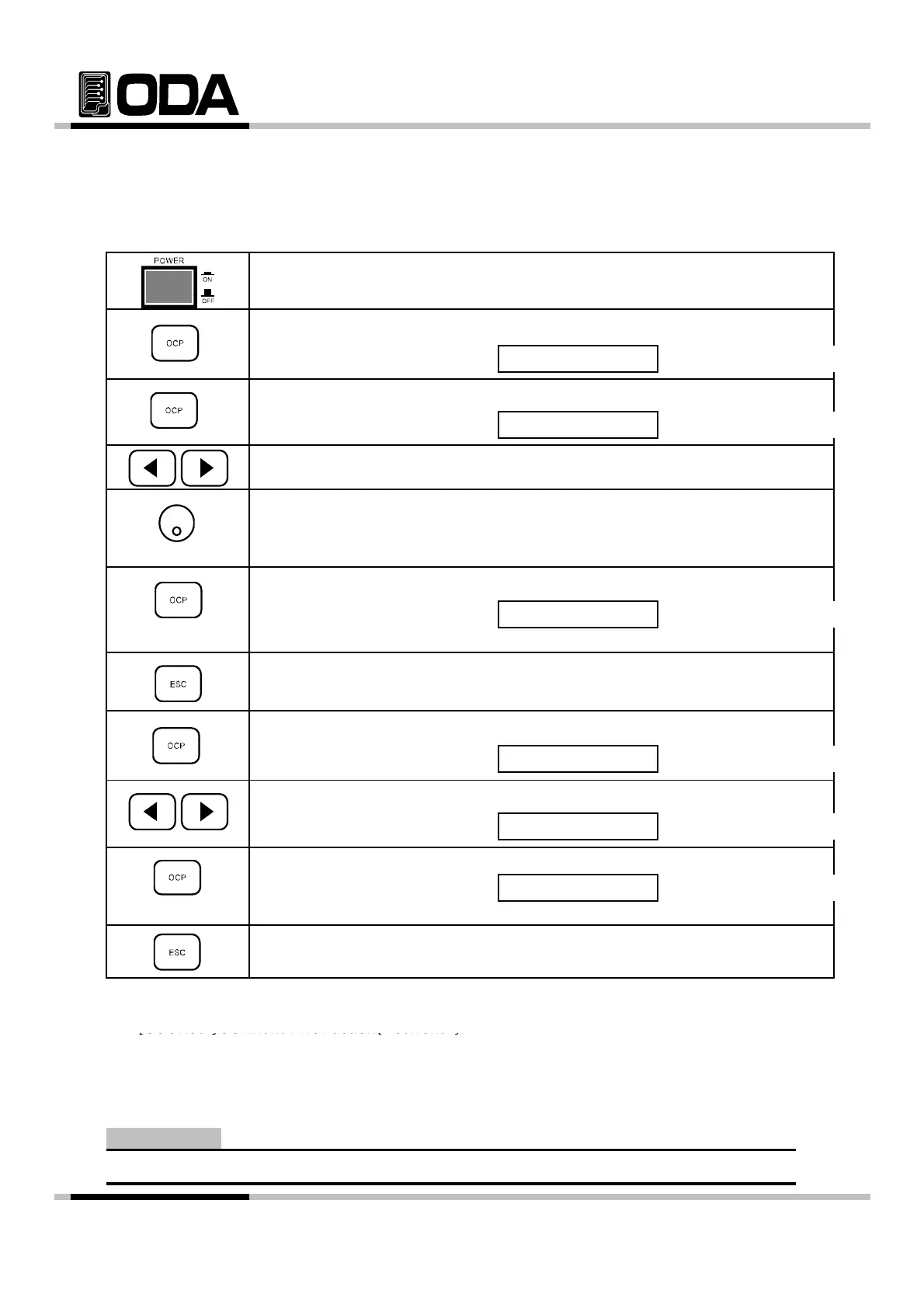
▌Power switch ON
After turnin
on
check "**OUTPUT OFF**" is dis
la
ed on the screen.
▌To set up OCP Level & Panel press OCP Key.
VFD Display Description
▌Press OCP button once more while "OCP ON" is displayed.
VFD Display Description
OCP ON
CP-LEVEL 11.0
▌Use cursor key to change value.
▌Use encorder switch to change level.
▌When the setting is done press OCP Key
,
.
VFD Display Description
Message above will be displayed and return to previous condition.
▌To cancel, press ESC Key.
There is no message for cancelling, return to previous condition.
CHANGED
,
.
VFD Display Description
▌Press left or right cursor while "OCP ON" is displayed.
VFD Display Description
▌To save chan
es, press OCP Ke
while "OCP OFF" is displayed.
OCP ON
OCP OFF
s
ay
escr
on
Message above will be displayed, return to previous condition.
▌To cancel, press ESC Key.
There is no message for cancelling, return to previous condition.
≫ Related Remote Interface Command
[SOURce:]CURRent:PROTection{<current>}
[SOURce ]CURRent PROTection{ current }
[SOURce:]CURRent:PROTection:STATe {0|1|OFF|ON}
Refer: CURR:PROT 6 OCP Level Setting
CURR:PROT:STAT ON OR, OCP Sensing condition
CURR:PROT:STAT OFF OCP Disable
First OCP set-up Reference : 1-6
Note
- 29 -



 To Next Page