EN
40
ODYS PRIME
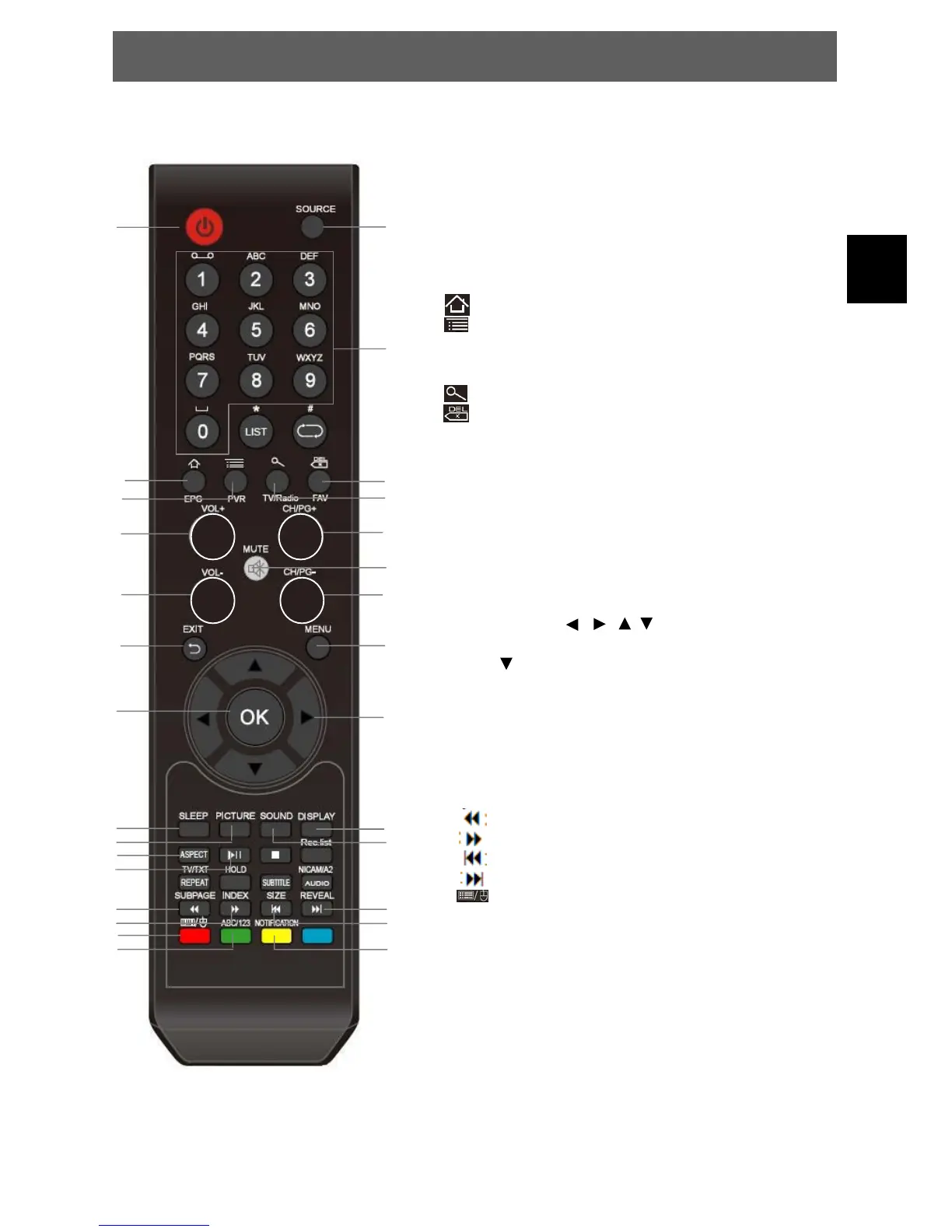
1. POWER: to switch the set device to on or standby.
2. SOURCE: Select input source.
3. NUMBER KEYS: Enter numbers and characters
where writing is available.
4. HOME: Press to return to the home screen.
5. MENU: Press to view the option menu
Note: When you press the Menu key from within an application,
you will see the options for that application. To view the Android
system options, tap the Menu key from the home screen.
6. Google Search / Internet address bar
7. BACKSPACE:
To delete just written text.
8. VOL+: Increase the Volume
9. Page up
10. MUTE: To disable or enable the sound output.
11. VOL-: Decrease the Volume
12. Page down
13. EXIT: Press to return to the previous screen.
If the keyboard is on the screen, press to close the
keyboard.
14. MENU: Open the main/TV system settings
15. OK: Used to confirm a selection.
16. ARROW KEYS / /
/ : Move within the menus and
select selectable elements one by one. In Browser mode
press
several times to select search results.
17. SLEEP: Set timer to turn off the TV.
18. PIC: To switch picture mode.
19. SOUND: to switch sound mode.
20. DISPLAY: Showing mode information
21. ASPECT: to switch the aspect ration
22. PLAY/PAUSE: Press to start playing MEDIA, or to
pause playing.
23. : Fast rewind
24. : Fast forward
25. : go to the last file
26. : go to the next file
27. : Toggle between keyboard and mouse function
Note: Because of IR limitations the mouse function by using
the provided remote control is slow. We recommend using a
separate mouse or keyboard (not provided).
28. ABC/123: Change the input mode for the number keys.
Enable the function to enter character directly by pressing
one key several times.
29. NOTIFICATION: Open/ close the notification bar.
12.5 Remote Control – Android Functions
1
2
3
4
5
6
7
8
9
10
11
12
13
14
15
16
17
18
19
20
21
23
24
27
28
26
25
29
22



 To Next Page