ENG
31
Service settings manual
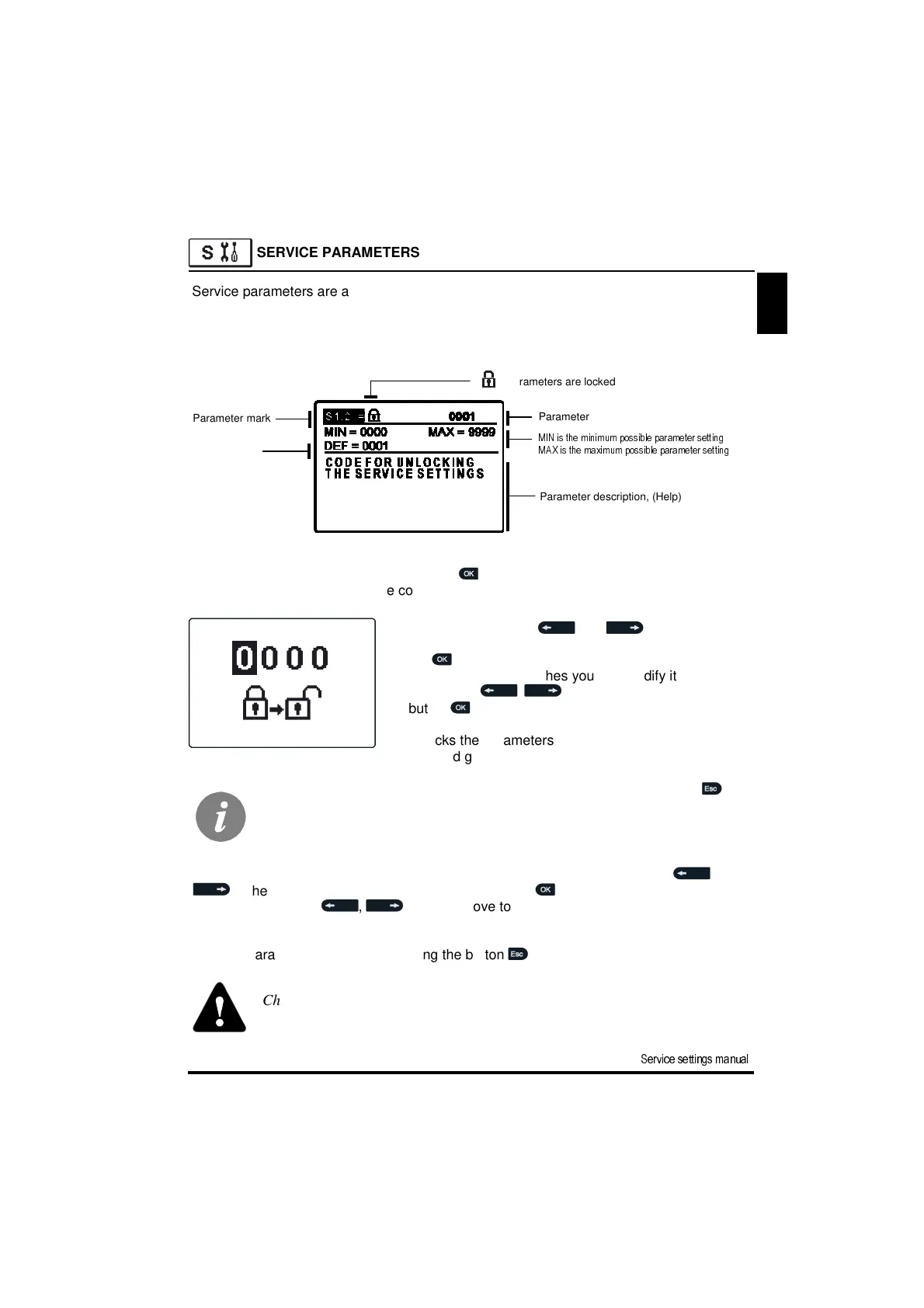
Parameter mark
Parameter value
MIN is the minimum possible parameter setting
MAX is the maximum possible parameter setting
Default value
- Parameters are locked
Parameter description, (Help)
SERVICE PARAMETERS
Service parameters are arranged in groups S1, S2 and S3. With service parameters it is
possible to activate or select many additional functions and adaptations of controller per-
formance. When you select the required parameter group in the menu, a new screen
opens:
By pressing buttons and you mark the
number which you want to modify and press the but-
ton .
When the number flashes you can modify it by press-
ing buttons , and confirm it by pressing
button .
When the correct code is inserted, the controller
unlocks the parameters for editing and returns to the
selected group of parameters.
Return back from unlocking by pressing button .
Now you can modify the value of the unlocked parameter by pressing buttons ,
. The setting is confirmed by pressing the button .
By pressing buttons , you can move to another parameter and repeat the
procedure.
You exit parameter settings by pressing the button .
You modify settings by pressing the button . Because parameters are locked
a new screen opens to insert the code for unlocking:
Factory set code is “0001”.
Change of service and functional parameters must be carried out only by a
propperly qualified expert.


 To Next Page