www.oes-scoreboards.com | 1.877.652.5833
4056 Blakie Rd., London ON Canada N6L 1P7
Issued: 2021-10-21
CONFIGURATION
To enter system setup:
• Ensure in normal game mode and all timers are stopped.
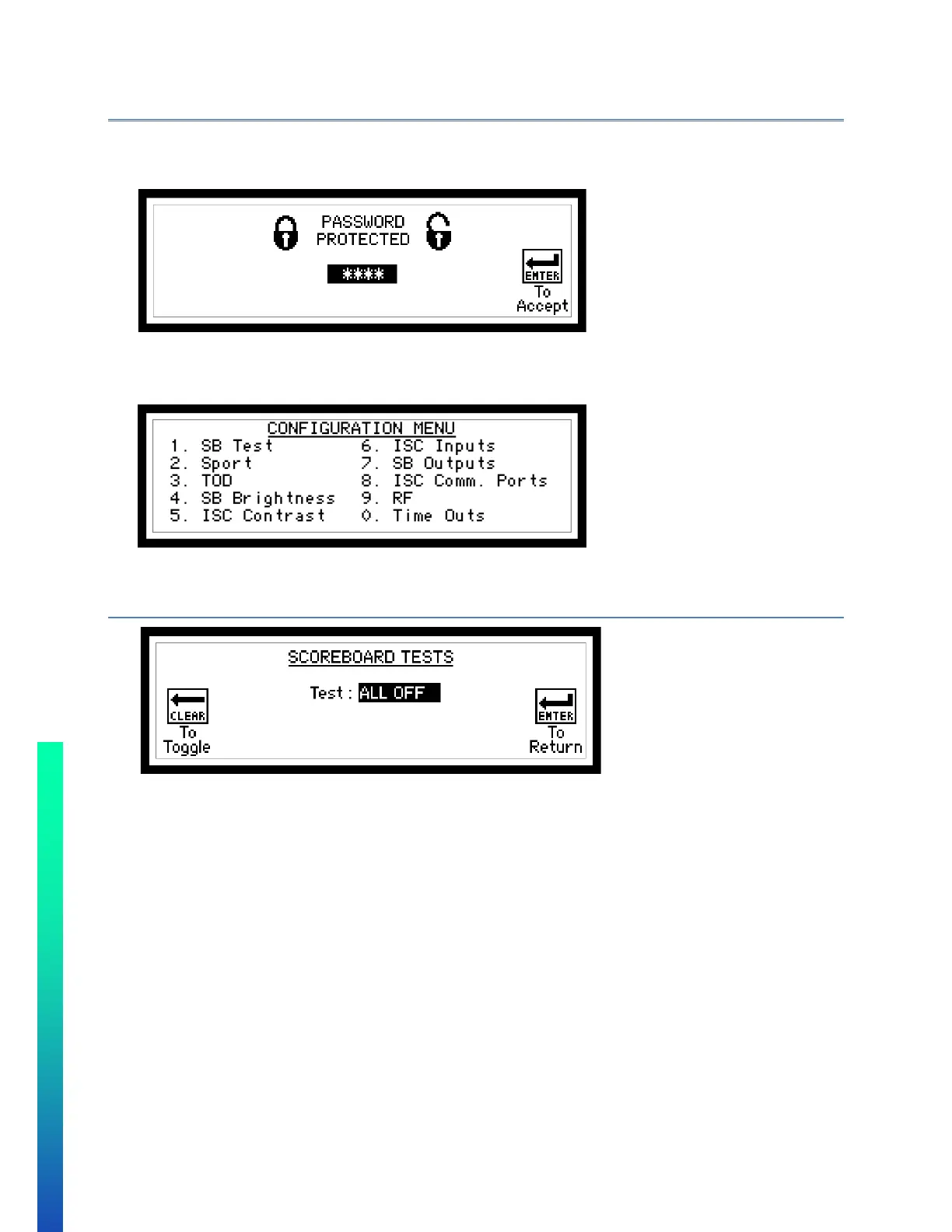
• Press and hold SETUP until the following screen appears:
• Enter password (5833) on numeric keypad and press ENTER.
• If an incorrect password is entered, the unit will return to game mode.
USER CONFIGURATION MENU
Use numeric keypad to make selection.
CONFIGURATION OPTION #1 – SB TEST (SCOREBOARD TEST)
Follow on-screen instructions.
Available Tests:
• ALL OFF – blanks all displays
• ALL ON – turns on all displays
• ROTATE – rotates through numbers
• LOCATION – control board driver number
• OUTPUTS – rotates through outputs


 To Next Page