www.oes-scoreboards.com | 1.877.652.5833
4056 Blakie Rd., London ON Canada N6L 1P7
Issued: 2021-10-21
o Press ENTER
• To modify current shift time, press “Shift” twice and modify time.
• Shift timer will operate when game time is running.
• To disable Shift Time, set Shift Set to 0:00.
SHOT CLOCK (PLAY TIMER)
Shot clock (play timer) RUN, STOP and RESET functions are usually controlled by remote connected to REMOTE
2 port on back of the ISC9000 controller. (Remote 2 port is configured in CONFIGURATION OPTION #6 – ISC
Inputs (Remote Inputs). If these inputs are disabled however, the shot clock/play timer reset is controlled by the
SHOT CLOCK RESET button on the ISC9000 keypad.
• Maximum value (All settings and current time) is: 99 seconds.
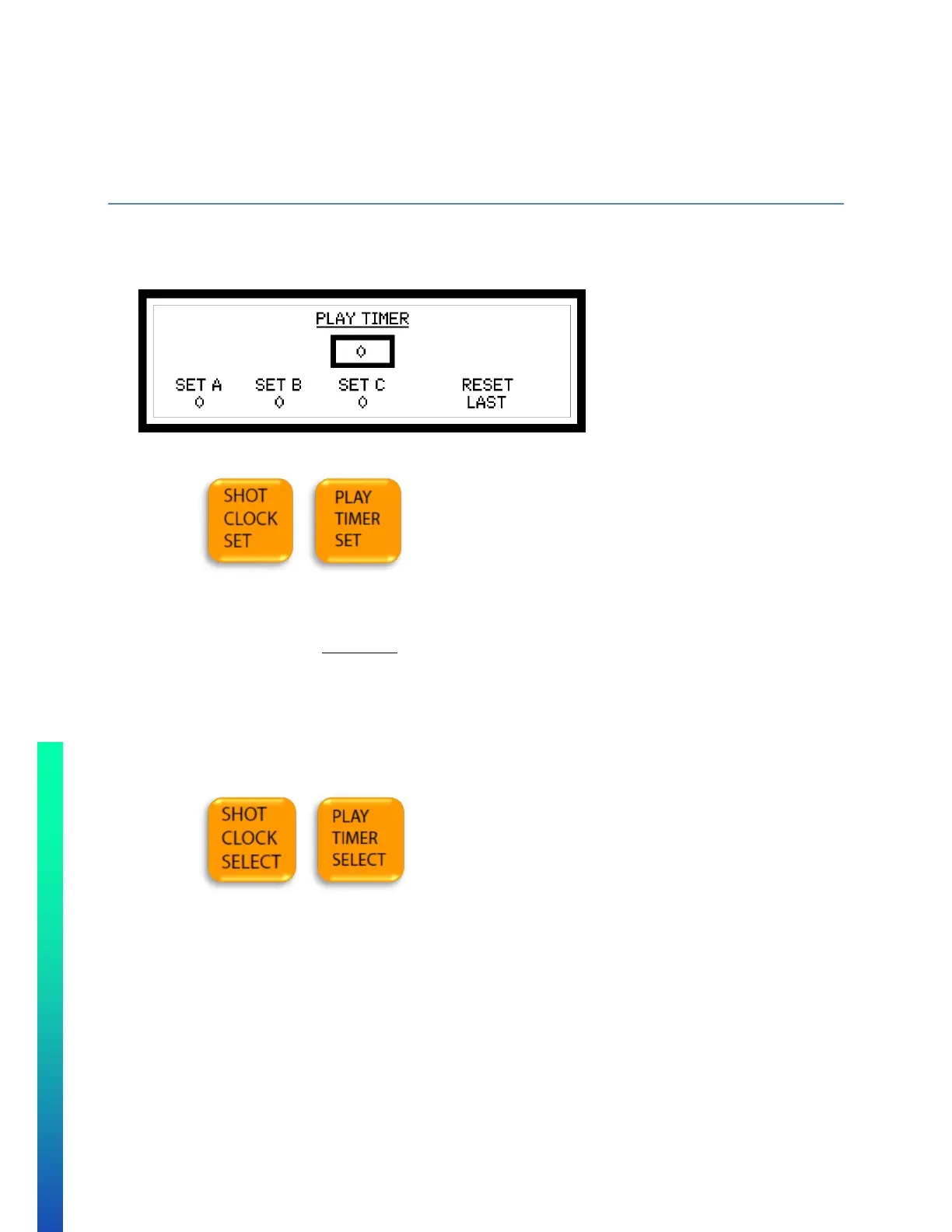
• Press SHOT CLOCK SET (PLAY TIMER SET) repeatedly to select the field you wish to modify.
o SET A is the primary reset value.
o SET B is the secondary reset value.
o SET C is an extra reset time value.
o The time in the PLAY TIMER box is the current time on the shot clock. It can be set to a temporary
time if necessary, and then reset to one of the A, B, or C presets upon SHOT CLOCK RESET
• Enter value on numeric keypad.
• Press ENTER.
• To select the reset type.
o Press the SHOT CLOCK SELECT (PLAY TIMER SELECT) repeatedly until the reset type desired is
selected.
o Different reset types are:
A – sets shot clock to A setting
B – sets shot clock to B setting
C – sets shot clock to C setting
TOGGLE – if clock running, resets shot clock to A setting. If clock stopped, repeated reset
presses will toggle the shot clock between the A, B and C setting.
LAST – if clock is stopped, will reset shot clock to last value before a reset
BLANK – will blank out shot clock digits.
• To operate the Shot Clock Timer
o Shot clock is normally operated from an independent remote connected to the REMOTE2 port. To
set up remote 2 operate the shot clock see the CONFIGURATION OPTION #6 – ISC Inputs (Remote
Inputs).


 To Next Page