www.oes-scoreboards.com | 1.877.652.5833
4056 Blakie Rd., London ON Canada N6L 1P7
Issued: 2021-10-21
BASEBALL
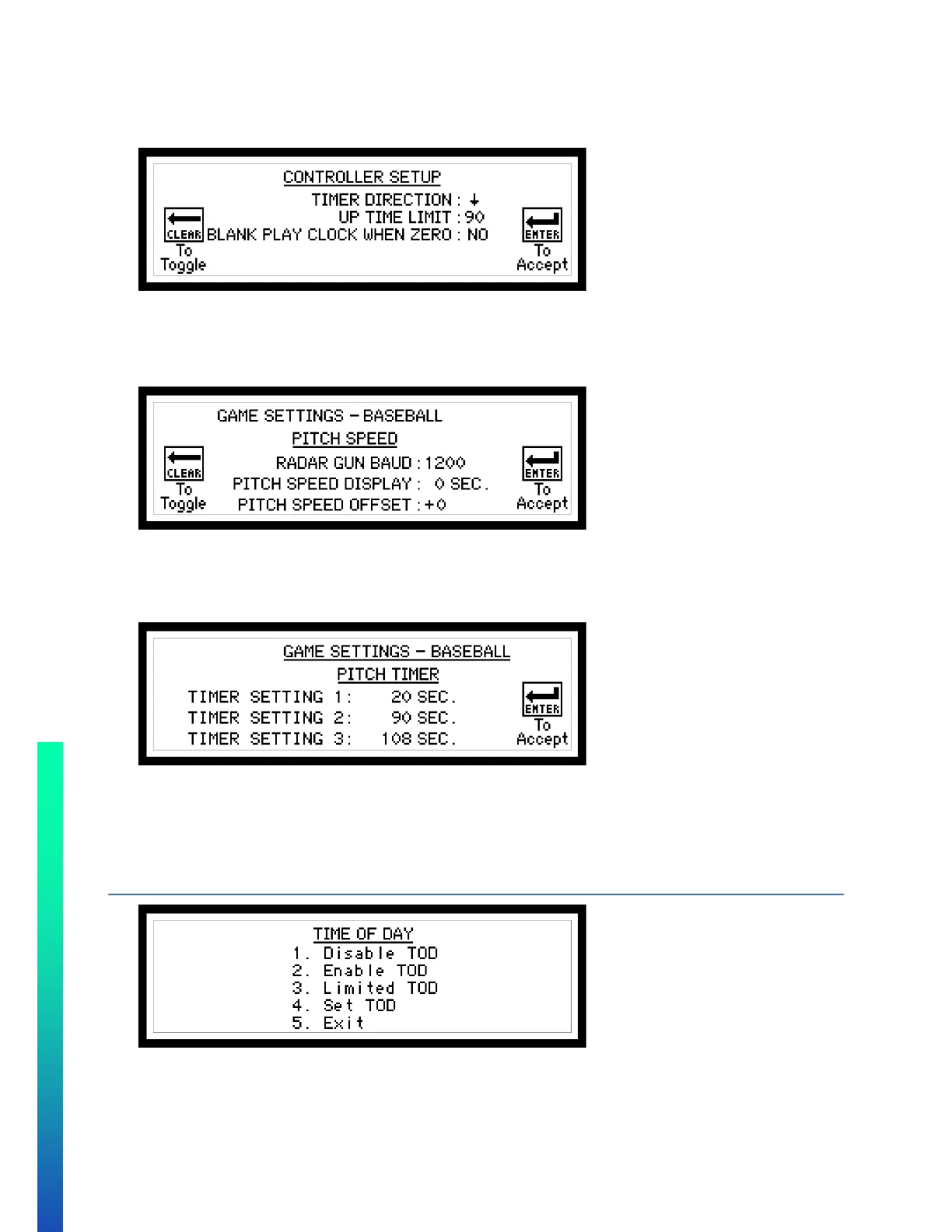
TIMER
• TIMER DIRECTION – Select GAME TIME to count up ↑ or down ↓
• UP TIMER LIMIT – Minutes that the clock will stop at.
• BLANK PLAY CLOCK WHEN ZERO: Play clocks blank when game time is zero.
PITCH SPEED
• RADAR GUN BAUD – This needs to match the baud rate of the radar gun output.
• PITCH SPEED DISPLAY – Seconds that the pitch speed will be displayed on the scoreboard. (1- 60sec.)
• PITCH SPEED OFFSET – This will adjust the speed of the speed received from the radar gun.
PITCH TIMER
• TIMER SETTING 1 – Seconds that the first pitch timer will be set to.
• TIMER SETTING 2 – Seconds that the second pitch timer will be set to.
• TIMER SETTING 3 – Seconds that the third pitch timer will be set to.
These values can be set from 1 to 199 seconds
CONFIGURATION OPTION #3 – SB TOD (TIME OF DAY)
• Use numeric keypad to make selection.
• To Disable/Enable the Time of Day select “1. Disable TOD” or “2. Enable TOD”. Once selected the
controller will return to GAME SCREEN.


 To Next Page