www.oes-scoreboards.com | 1.877.652.5833
4056 Blakie Rd., London ON Canada N6L 1P7
Issued: 2021-10-21
CONFIGURATION OPTION #9 – RF (RADIO FREQUENCE CHANNELS)
SETTING RADIO CHANNEL IN CONTROLLER
Factory setting can be found on serial number label.
*** ENSURE ALL OTHER CONTROLLERS ARE POWERED OFF BEFORE PROCEEDING. ***
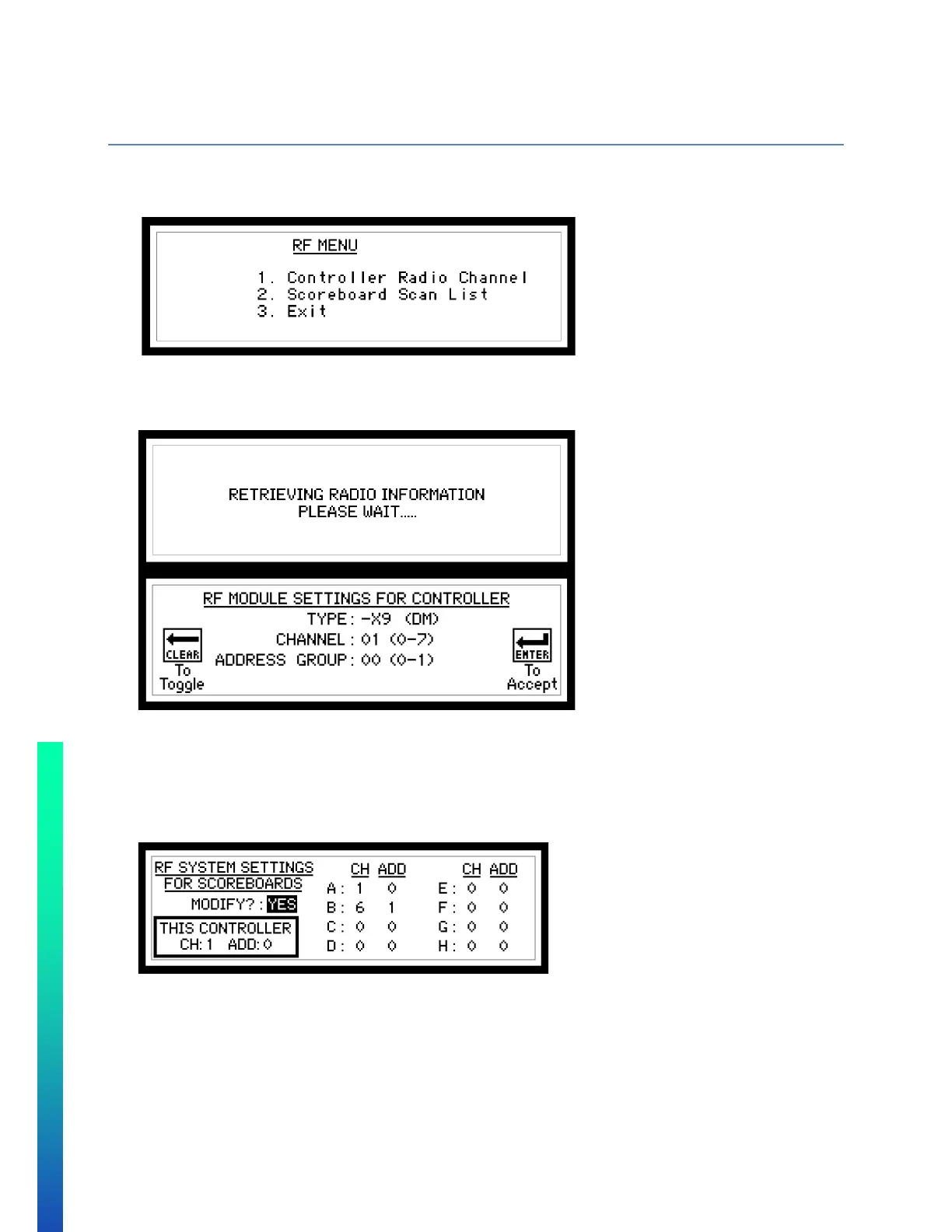
Select option 1 to adjust controller radio channel
Select option 2 to do a scoreboard scan list, in order to have multiple scoreboards controlled by one controller.
Select option 3 to go back to the game menu.
Option 1
• If no radio attached, unit will return to game mode.
• TYPE – This value is read from the radio, either –X9 (DM) or –X2 (DM) will appear.
• CHANNEL – Set desired radio channel for the control unit (Press CLEAR to toggle through channels)
• ADDRESS GROUP – Set desired radio address group for the control unit (-X9 only) CLEAR to Toggle.
SETTING RADIO CHANNELS FOR SCOREBOARDS
*** ENSURE ALL OTHER CONTROLLERS ARE POWERED OFF BEFORE PROCEEDING. ***
• THIS CONTROLLER shows the current channel and address of the unit from the previous page, and cannot
be changed on this page
• Use CLEAR button to toggle YES and NO. ENTER button will accept input.
• Select if YES the RF SYSTEM SETTINGS need to be modified. If NO then the control unit will return to the
GAME SCREEN.
*** ENSURE THERE ARE NO OTHER CONTROLLERS POWERED ON BEFORE PROCEEDING. ***
• Each display components will have a factory assigned system group A, B, C, D, E, F, G or H
• Shot clocks and system A will not change channel or address group.



 To Next Page