46
NetNet
NetNet
Net
Weight shown on the display can be referred to as a zero value (gross value) or tare
value (net value). When enabled the display value also has GROSS/NET Indicator
turned ON, this feature will allow you to obtain a zero value by a long press on .
A short press is a tare.
Net Weight Net Weight
Net Weight Net Weight
Net Weight - the weight of a material or sample after deducting the weight of its
packaging or container with which it had previously been weighed.
Gross Weight Gross Weight
Gross Weight Gross Weight
Gross Weight - the weight of object or sample (Net Weight) including container or
packaging.
NOTENOTE
NOTENOTE
NOTE: When in a weighing mode, switches between Gross weight and
Net weight.
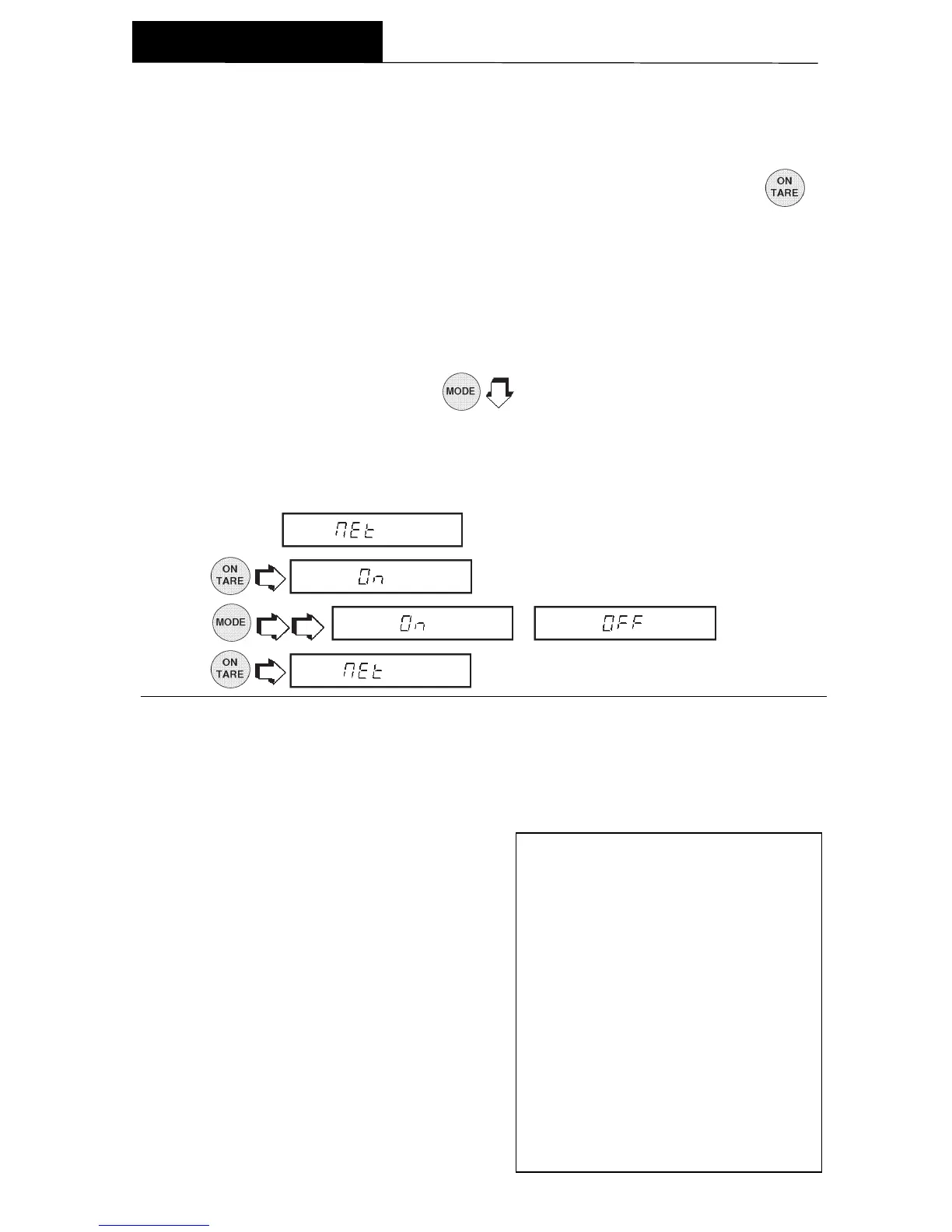
The Net function can be set either ON or OFF.
1. Access the
menu under the Setup Options menu.
2. .
3.
or .
4.
.
SCIENTIFIC NOTATIONSCIENTIFIC NOTATION
SCIENTIFIC NOTATIONSCIENTIFIC NOTATION
SCIENTIFIC NOTATION
NumberNumber
NumberNumber
Number
BetweenBetween
BetweenBetween
Between
Conv.Conv.
Conv.Conv.
Conv.
0.1 and0.1 and
0.1 and0.1 and
0.1 and
PowerPower
PowerPower
Power
Man-Man-
Man-Man-
Man-
FactorFactor
FactorFactor
Factor
1.9999991.999999
1.9999991.999999
1.999999
of 10of 10
of 10of 10
of 10
tissatissa
tissatissa
tissa
Exp.Exp.
Exp.Exp.
Exp.
123.4 = .1234 x 1000 = .1234 x 10
3
12.34 = .1234 x 100 = .1234 x 10
2
1.234 = .1234 x 10 = .1234 x 10
1
.1234 = .1234 x 1 = .1234 x 10
0
.01234 = .1234 x .1 = .1234 x 10
-1
.001234 = .1234 x .01 = .1234 x 10
-2
.000123 = .123 x .001 = .123 x 10
-3
Custom Unit or Volume SelectionCustom Unit or Volume Selection
Custom Unit or Volume SelectionCustom Unit or Volume Selection
Custom Unit or Volume Selection
Custom Unit is enabled when Unit 3 under Unit Selection is selected. When you need
to display weight measurements in a weighing unit other than those provided standard
with the balance, this feature can be used to create your own custom weighing unit.
It permits you to enter a conversion factor
which the balance will use to convert grams
to the desired unit of measure.
Conversion Weight Weight
Factor x in = in
grams custom unit
Conversion factors are expressed in sci-
entific notation and entered into the bal-
ance in three parts:
• a number between 0.1 and 1.999999
called the mantissa
• a power of 10 called the exponent
• a least significant digit (LSD)
MENUS






 To Next Page